10. OPTIONS OPERATION
10.1
PRINTER (DPU-414)
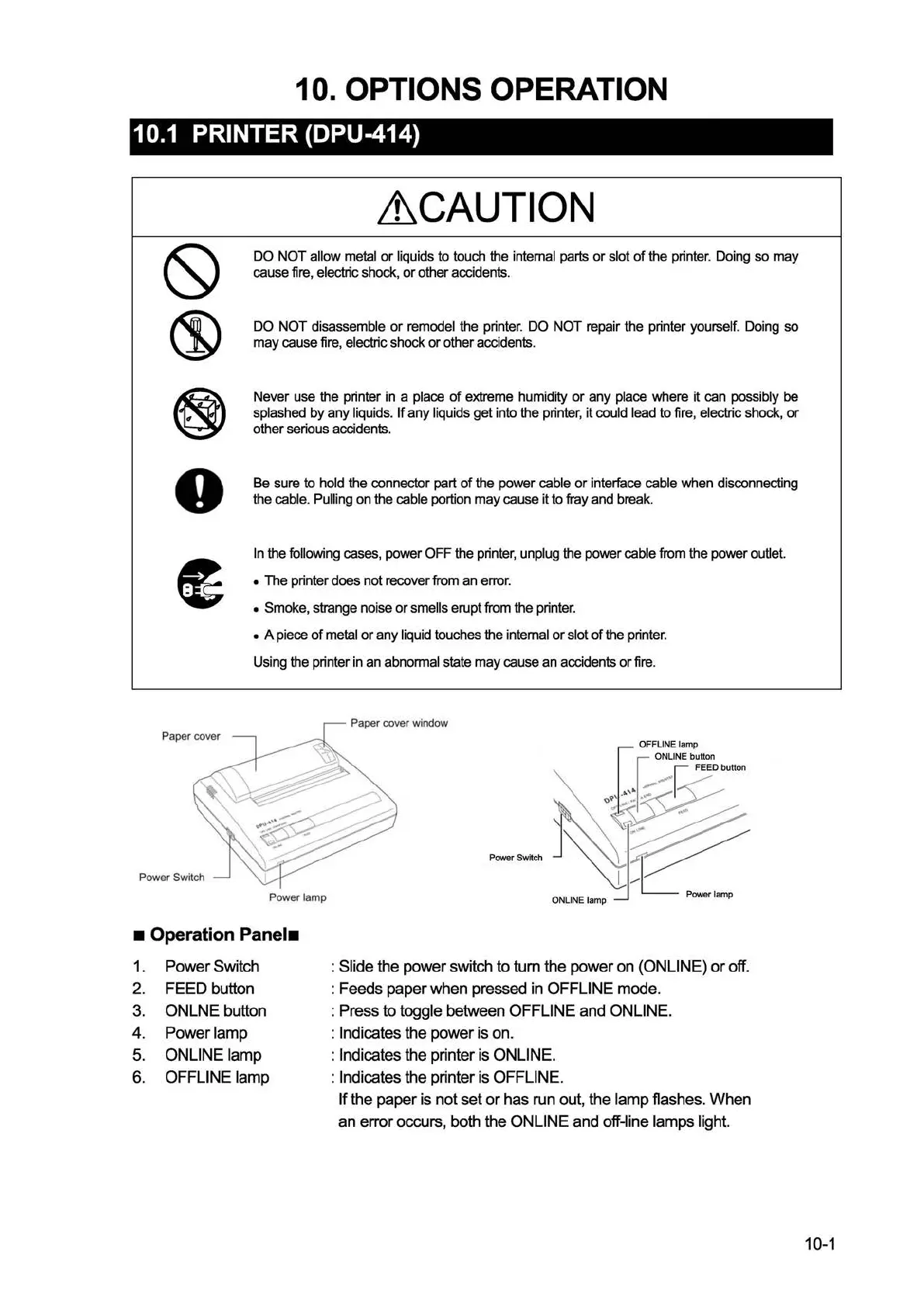
Power Switch
Lt.
CAUTION
DO
NOT
allow metal
or
liquids to touch the internal parts
or
slot
of
the printer. Doing so may
cause fire,
electric shock,
or
other accidents.
DO
NOT
disassemble
or
remodel the printer. DO
NOT
repair the printer yourself. Doing so
may
cause fire, electric shock
or
other accidents.
Never use the printer in a
place
of
extreme humidity
or
any
place where it can possibly be
splashed by any liquids.
If
any
liquids get into the printer, it could lead to fire, electric shock,
or
other serious accidents.
Be sure to
hold the connector part
of
the power cable
or
interface cable when disconnecting
the
cable. Pulling on the cable portion
may
cause it to fray and break.
In
the following cases, power OFF the printer, unplug the power cable from the power outlet.
•
The printer does not recover from an error.
• Smoke, strange noise
or
smells erupt from the printer.
• A piece
of
metal
or
any liquid touches the internal
or
slot
of
the printer.
Using the printer in an
abnormal state
may
cause an accidents
or
fire.
Paper cover window
Power lamp
• Operation
Panel•
1.
Power Switch
2.
FEED button
3.
ONLNE button
4. Power lamp
5.
ONLINE lamp
6.
OFFLINE lamp
: Slide the power switch to tum the power on (ONLINE)
or
off.
: Feeds paper when pressed
in
OFFLINE mode.
: Press to
toggle between OFFLINE and ONLINE.
: Indicates the power is on.
: Indicates the printer
is
ONLINE.
: Indicates the printer
is
OFFLINE.
If
the paper
is
not set
or
has run out, the lamp flashes. When
an error occurs, both the ONLINE and off-line lamps light.
10-1


 To Next Page
 Loading...