– 30 –
2. WHEN USING IP-420
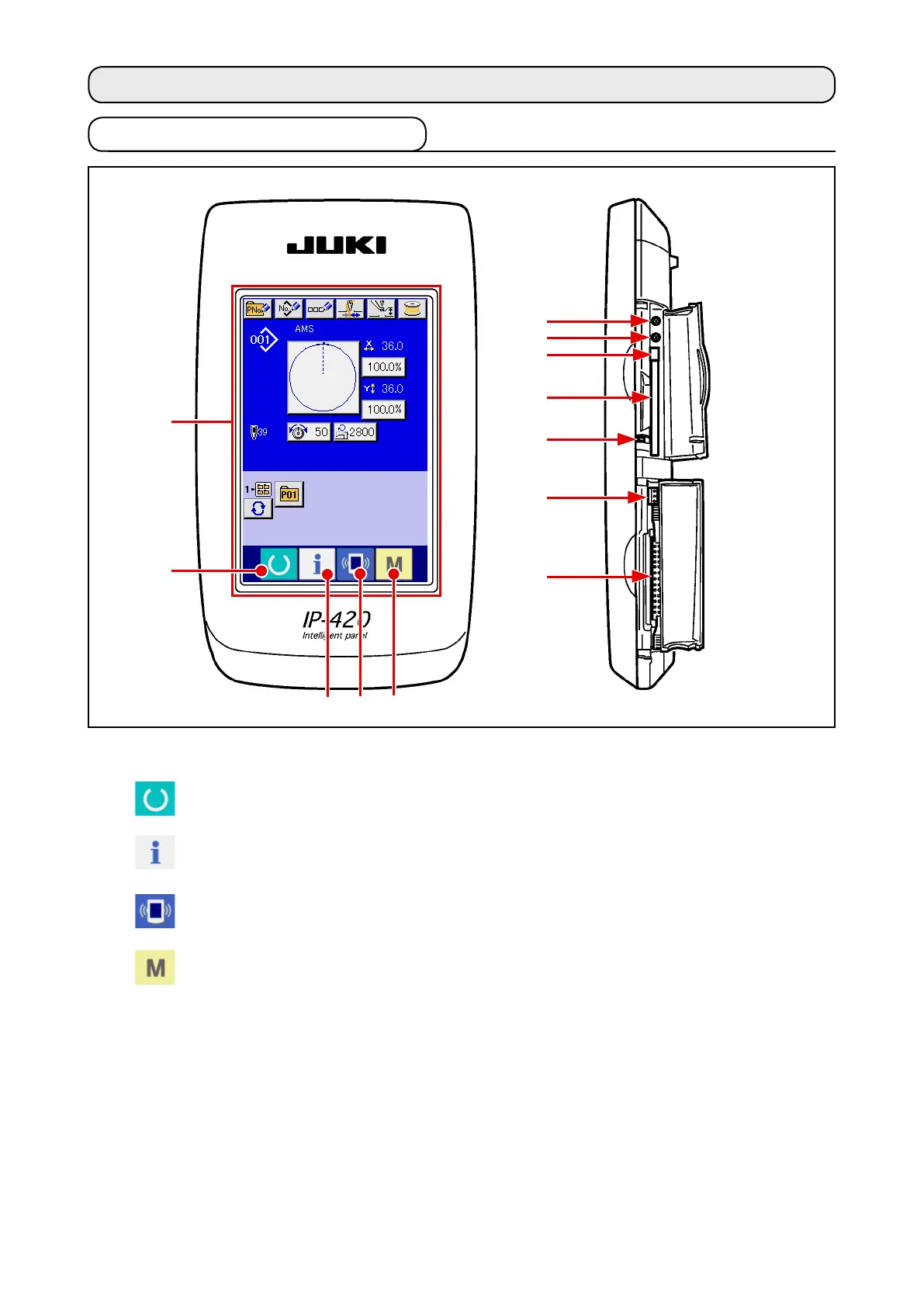
2-1. Name of each section of IP-420
(Front)
(Right side)
1
3
2
4 5
1
Touch panel
・
LCD display section
2
READY key
→
Changeover of the data input screen and
the sewing screen can be performed.
3
INFORMATION key
→
Changeover of the data input screen and
the information screen can be performed.
4
COMMUNICATION key
→
Changeover of the data input screen and
the communication screen can be performed.
5
MODE key
→
Changeover of the data input screen and
the mode changeover screen which
performs various detail settings can be performed.
6
Contrast control
7
Brightness control
8
CompactFlash (TM) eject button
9
CompactFlash (TM) slot
!0
Cover detection switch
!1
Connector for external switch
!2
Connector for control-box connection
!1
7
!2
8
9
6
!0












 To Next Page