– 69 –
(2) Creating procedure of the combination data
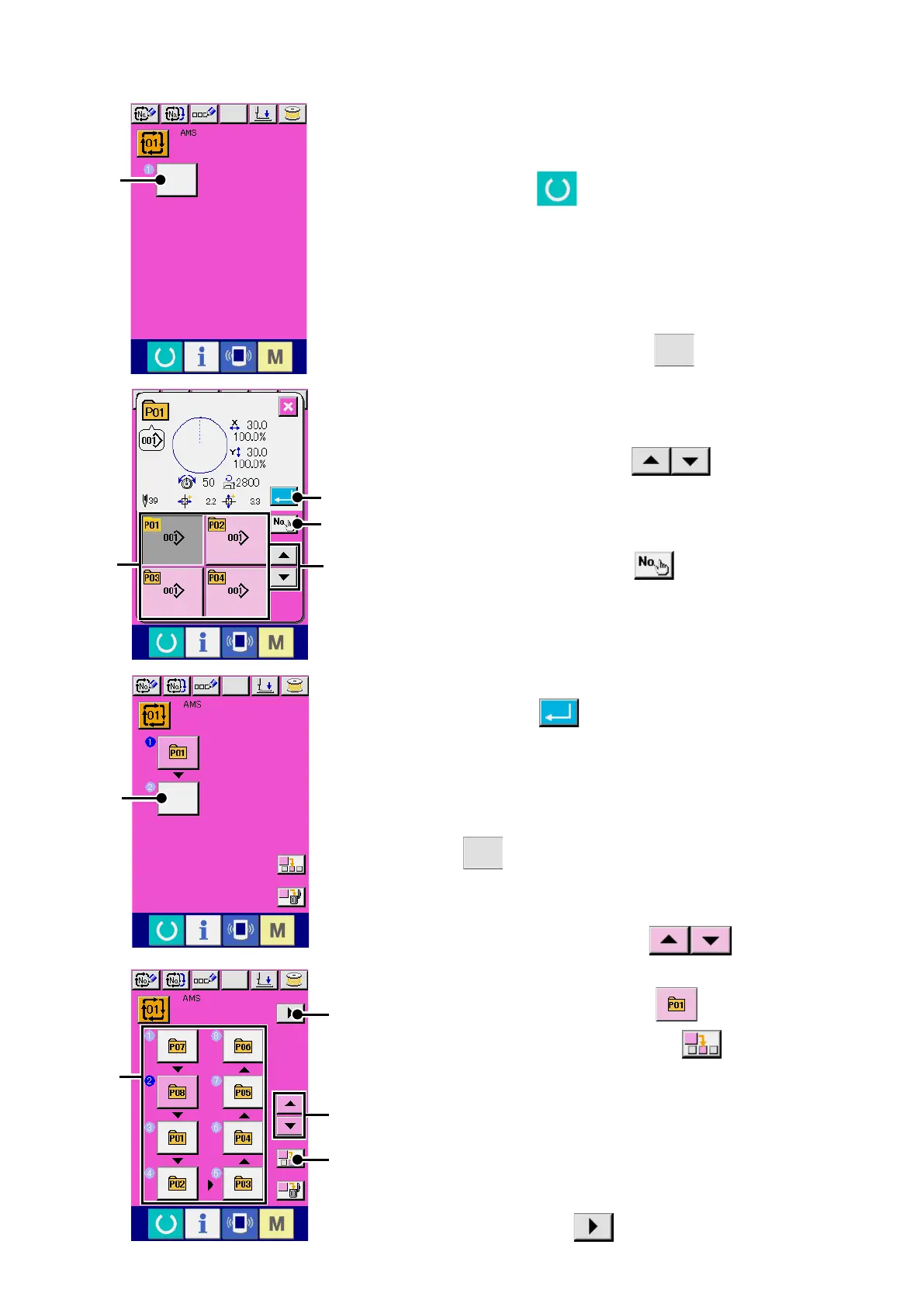
1
Display the data input screen.
Only in case of the data input screen (pink) it is possible to in-
put the combination data. In case of the sewing screen (green),
press READY switch
to display the data input screen
(pink).
Pattern No. has not been registered in the initial sta
te, and the
rst pattern selection button is displayed in the blank state.
2
Display the pattern No. selection screen.
When PATTERN SELECTION button
A
is pressed, the
pattern No. selection screen is displayed.
3
Select the pattern No.
When UP/DOWN SCROLL button
B
is pressed,
pattern No. buttons
C
which have been registered are
changed over in order.
It is also possible to display the pattern No. input screen by
means of NUMBER INPUT button
D
and input a pat-
tern No. directly. The contents of pattern data are displayed in
the buttons. Here, press the pattern No. buttons you desire to
select.
4
Determine the pattern No.
When ENTER button
E
is pressed, the pattern No. se-
lection screen is closed and the selection is nished.
A
C
B
F
E
D
I
G
5
Repeat steps
2
through
4
as many as the number of pat-
tern Nos. you desire to register.
When the rst register is determined, the second pattern selec-
tion button
F
is displayed.
Repeat steps
2
through
4
as many as the number of pattern
Nos. you desire to register.
W
hen UP or DOWN SCROLL button
G
is pressed,
the PATTERN NO. button can be selected. The selected PAT-
TERN NO. button is displayed in pink
.
When the PATTERN NO. INSERT button
H
is pressed,
a step is inserted before the pattern No. being selected (dis-
played in pink). When PATTERN NO. button
I
being dis-
played is pressed to select a different pattern No., the pattern
No. is changed over.
If the programmed combination data extends over two or
more screens, the next screen can be displayed by means of
SCREEN SCROLL button
J
.
H
J












 To Next Page