– 53 –
1
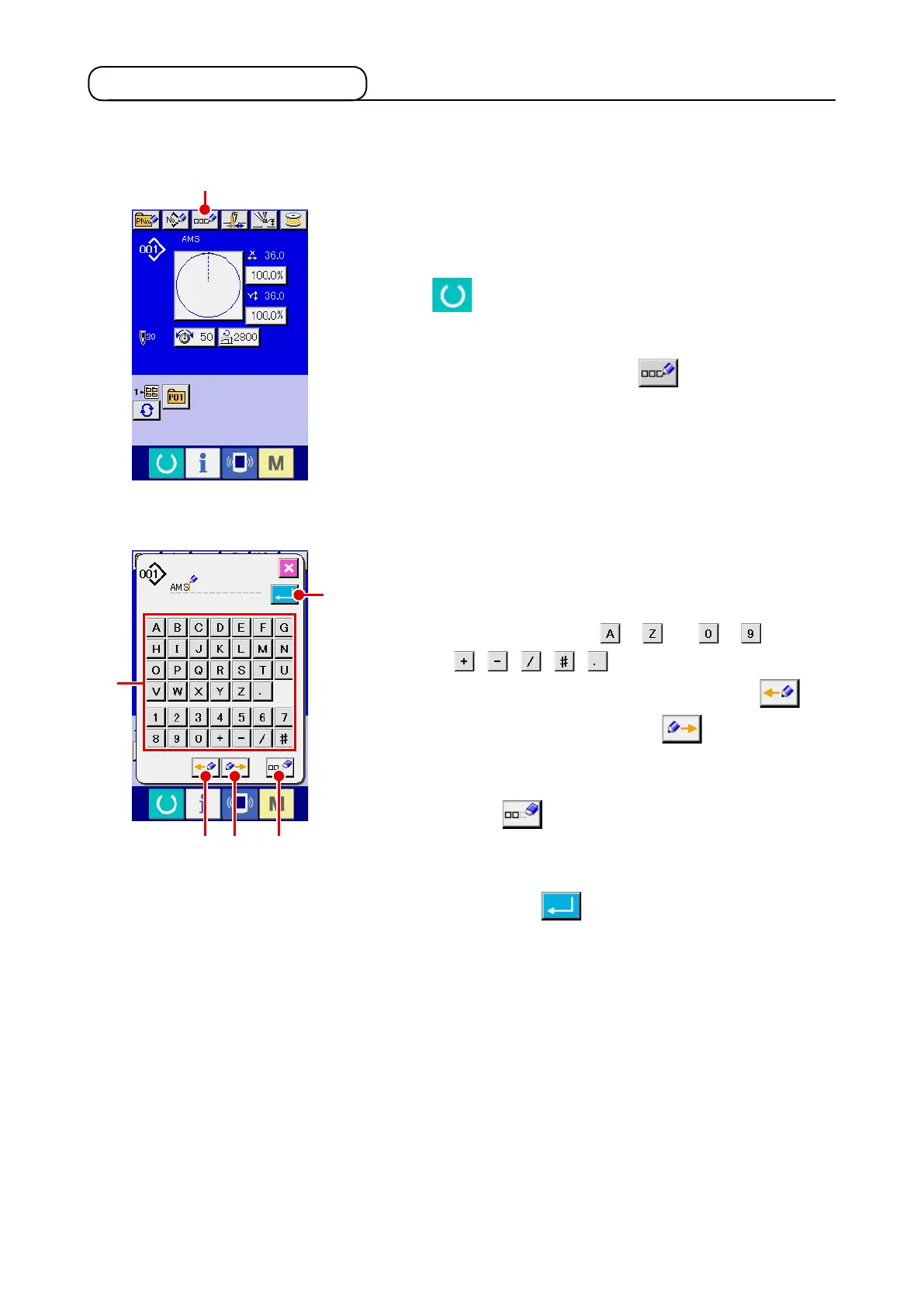
Display the data input screen.
Only in case of the data input screen (blue) at the time of pat-
tern button selection, it is possible to input the name of pattern
button. In case of the sewing screen (green), press READY
switch to display the data input screen (blue).
2
Call the character input screen.
When CHARACTER INPUT button
A
is pressed, the
character input screen is displayed.
2-14. Naming users’ pattern
3
Input the character.
Press CHARACTER button
B
you desire to input and the
input of character can be performed.
As many as 255 characters (
to and to ) and
symbols( , , , , ) can be input. The cursor
can be moved with CURSOR LEFT TRAVEL button
C
and CURSOR RIGHT TRAVEL button
D
. When you
desire to delete the inputted character, adjust the cursor to
the position of the character you desire to delete and press
DELETE button
E
.
4
Finish the input of character.
When ENTER button
F
is pressed, the input of
character is nished. After the nish, the inputted character is
displayed on the upper part of the data input screen (blue).
As many as 255 characters can be input for each user’s pattern.
A
B
C
F
D
E












 To Next Page