– 70 –
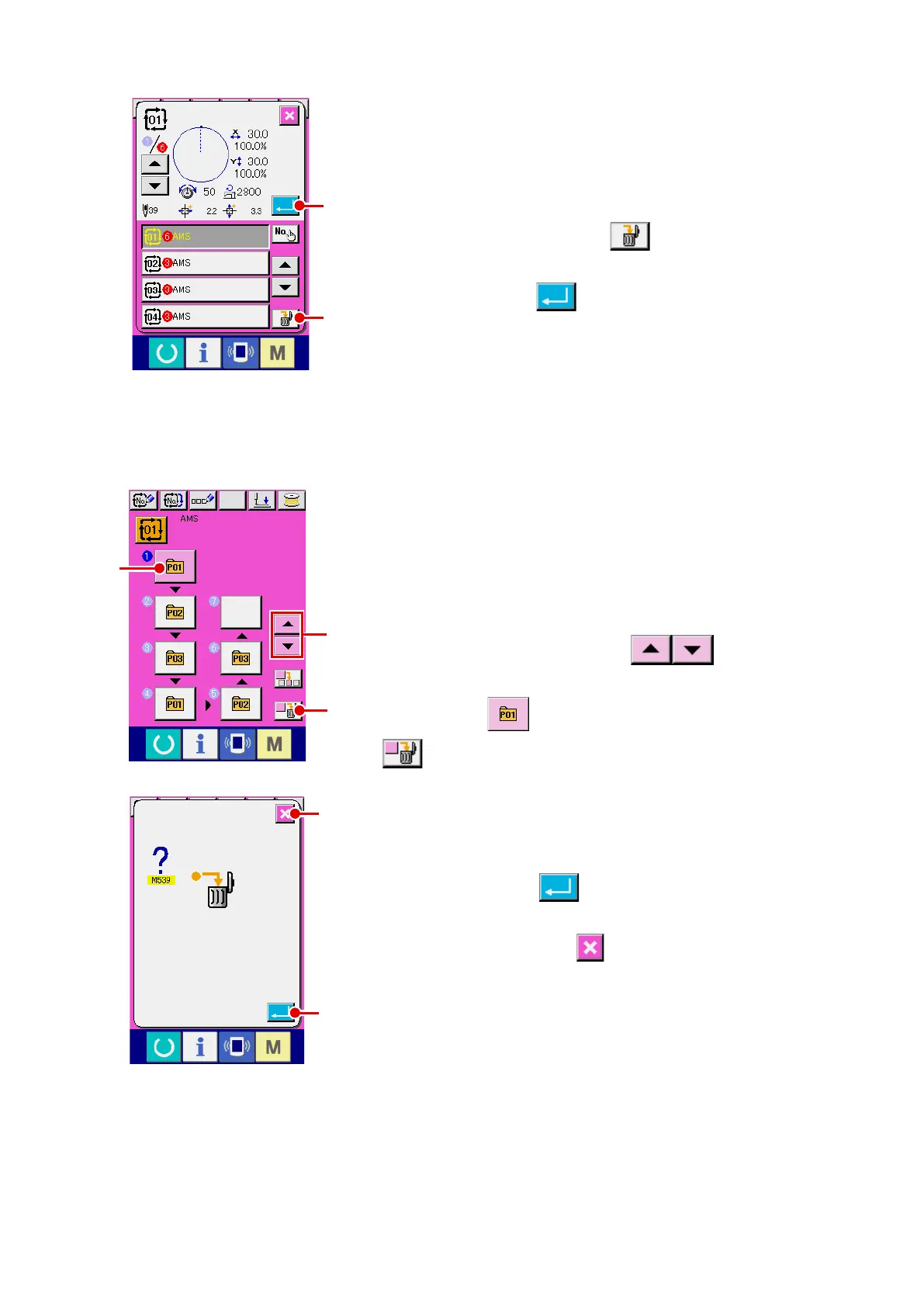
(3) Deleting procedure of the combination data
1
Select the combination data No.
Perform steps
1
to
3
of “
@
-2-22. (1) Selection of combina-
tion data” p.68
to display the combination data to be deleted.
2
Performing deleting the combination data.
When DATA DELETION button
A
is pressed, the com-
bination data deletion conrmation pop-up is displayed. Here,
press ENTER button
B
, and the selected combination
data is deleted.
(4) Deleting procedure of the step of the combination data
1
Select the combination data No.
Perform steps
1
to
2
of “
@
-2-22. (1) Selection of combina-
tion data” p.68
to make the state that the combination data
including the step you desire to delete has been selected.
2
Display the pattern No. selection screen.
Press UP/DOWN SCROLL button
A
to bring the
PATTERN SELECT button for the step to be deleted under the
selected state
B
. Then, when STEP DELETE button
C
is pressed, the data step delete popup window is dis-
played.
3
Performing deleting the step of the selected combination
data.
When ENTER button
D
is pressed, the selected combi-
nation data step is deleted.
When the CANCEL button
E
is pressed, no data is de-
leted and the screen is restored to the data input screen.
D
E
A
B
B
C
A












 To Next Page