1
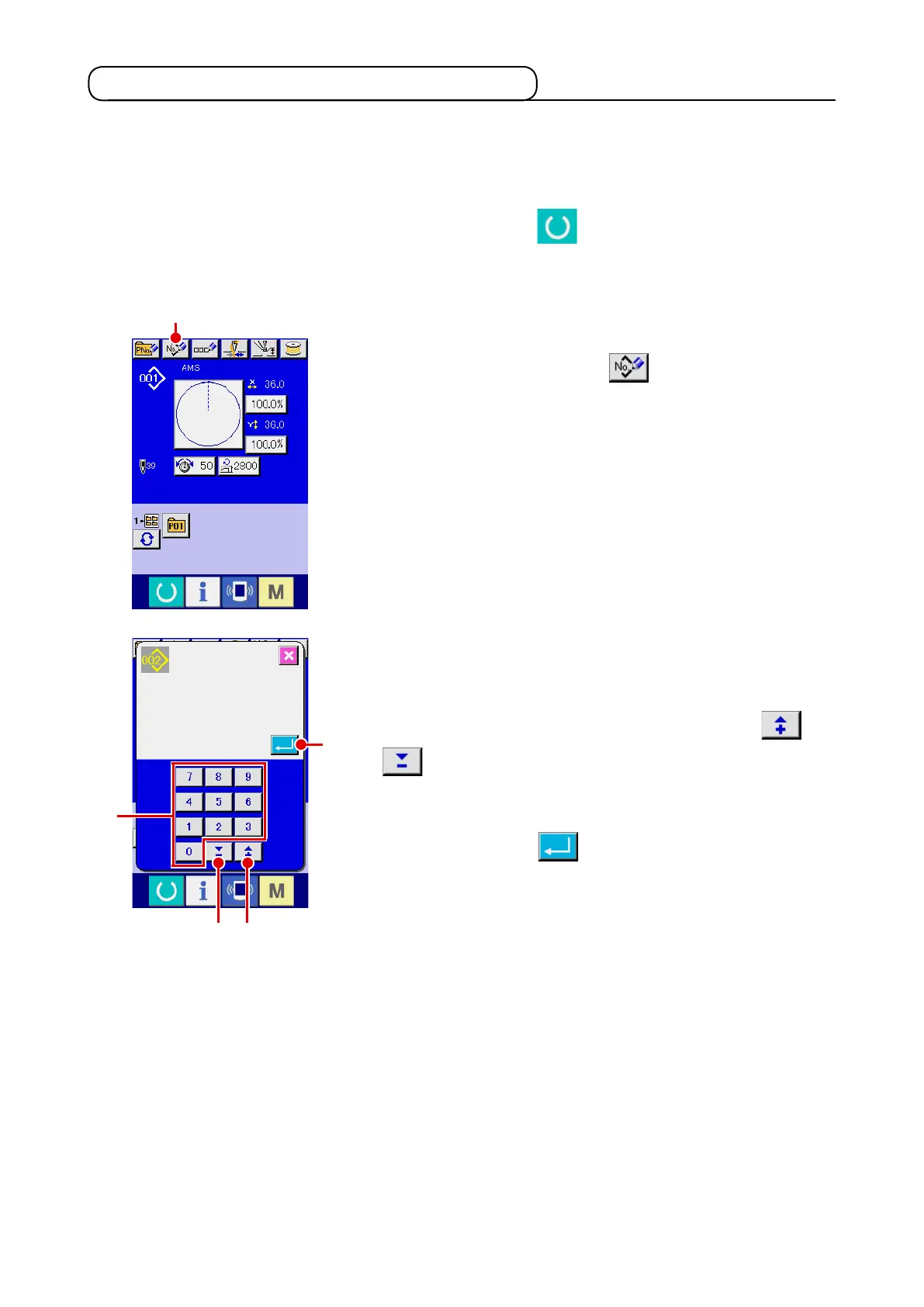
Display the data input screen.
Only in case of the data input screen (blue), new register of the
pattern can be performed. In case of the sewing screen (green),
press READY switch and display the data input screen
(blue).
2
Call the new register of users’ pattern screen.
Press NEW REGISTER button
A
and the new register
of users’ pattern screen is displayed.
2-13. Performing new register of users’ pattern
3
Input the users’ pattern No.
Input the users’ pattern No. you desire to newly register with
the ten keys
B
. It is possible to retrieve the users’ pattern No.
which has not been registered with the + or – button
(
C
and
D
).
4
Determine the users’ pattern No.
Press ENTER button
E
to determine the users’ pattern
NO. to be newly registered and the data input screen at the
time of users’ pattern selection is displayed.
When the existing users' pattern No. is inputted and ENTER
button is pressed, the overwriting conrmation screen is dis-
played.
B
E
C
D
A












 To Next Page