Keysight N9938-90003 User’s Guide 133
SA (Spectrum Analyzer) Mode (Option 233–Mixed Analyzers)
SA Mode Settings
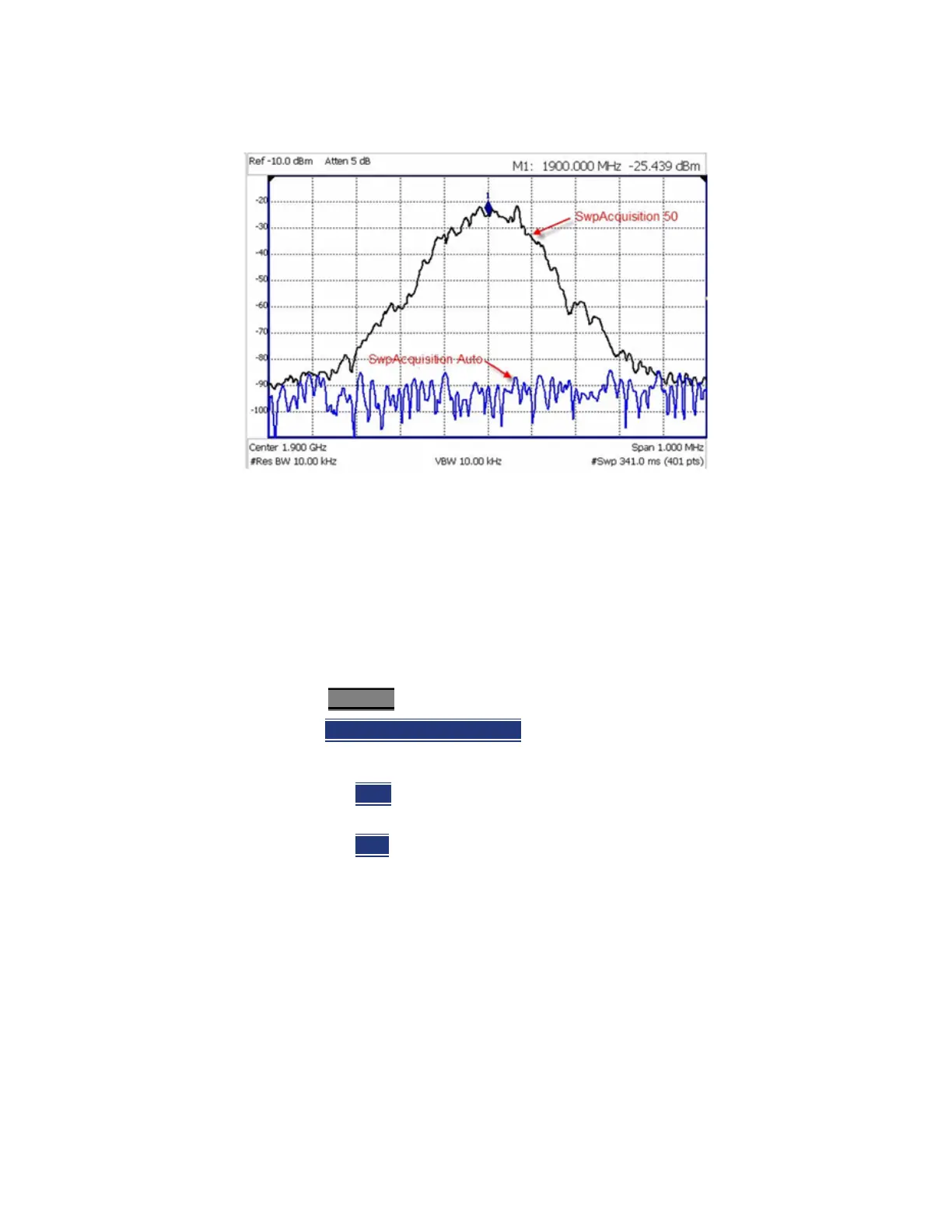
Figure 7-7 GSM Signal in Framed Data Format
In the graphic above, a GSM signal in a framed data format; timeslot zero ON;
all others OFF;
PRF = 218Hz, Duty Cycle = 12.5%. The pulsed signal becomes visible on every
sweep update with SwpAcquisition = 50.
How to set Sweep Acquisition
SwpAcquisition is NOT an absolute measure of time, but a relative number
between 1 (fastest) and 5000 (slowest) sweep time. The actual time that was
required to complete a sweep is annotated on the screen.
—Press Sweep 3
.
—Then SwpAcquisition Auto Man
.
— Then choose from the following:
——Auto
Sweep is set to the fastest sweep possible with the current
settings.
——Man
Enter a relative acquisition value between 1 and 5000,
where:
— Man Enter a relative acquisition value between 1 and 5000, where:
——1 = Fastest sweep possible
——5,000 = Slowest sweep possible
——# is shown in front of the actual sweep time to indicate a
manual setting.


 To Next Page