SANARIUM B, S
PAGE 48
50701206/02.18
10. Custom settings
10.10. Switching the touchscreen lock on/off
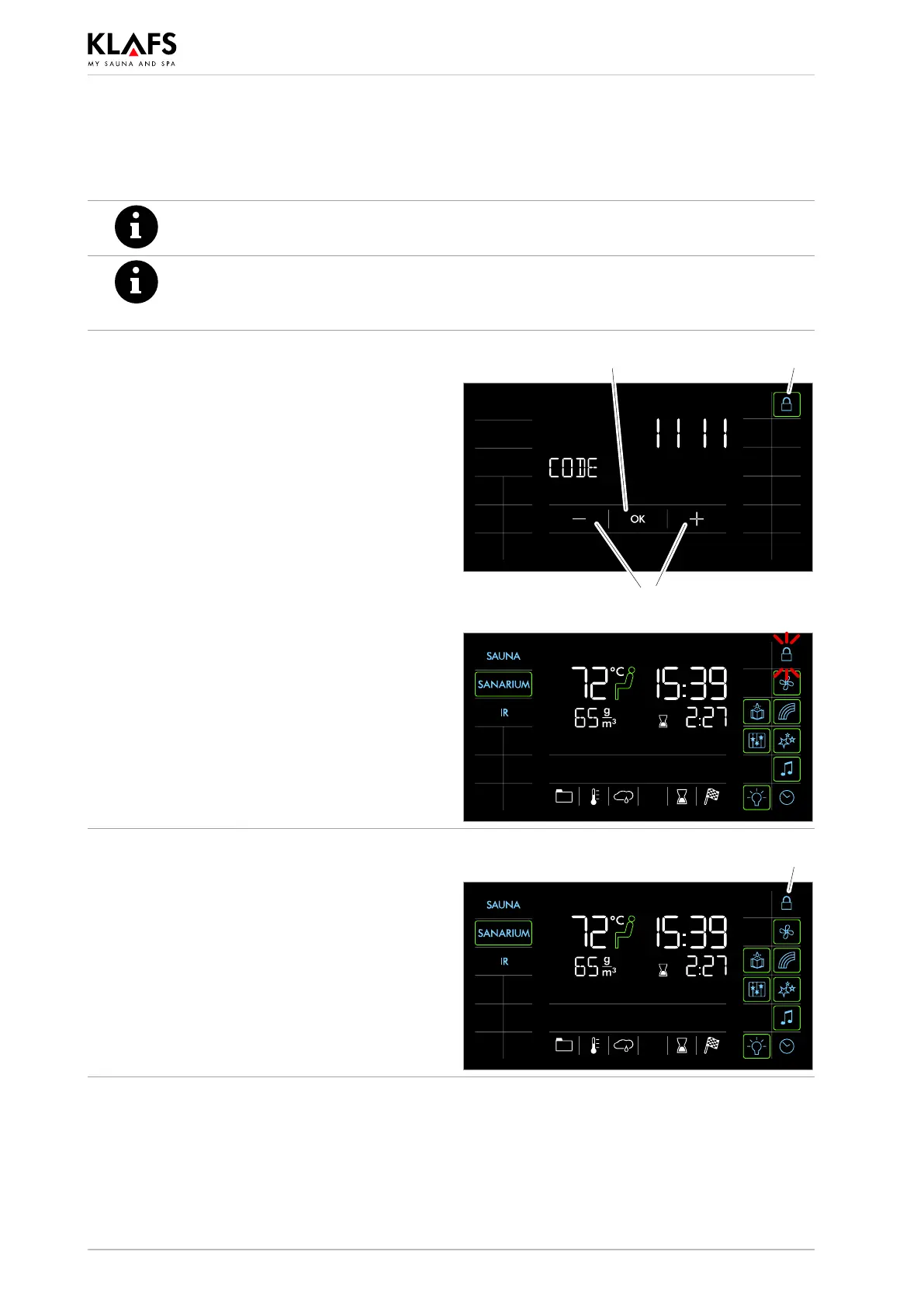
If the touchscreen lock is active (padlock symbol (1) displayed), the controller cannot
be operated via the touchscreen.
. Requirement:
The touchscreen lock must have been activated on service menu option 25 LOCK.
' See Servicing Instructions 18029, 18033, 18040.
Switching the touchscreen lock off
1. Press the symbol (1).
2. Enter the password one digit at a time by
pressing the +/- symbol (2) and pressing the
OK symbol (3) to confirm in each case.
2
3 1
. Symbol (1) starts flashing at 1 Hz if the
correct password is entered.
The touchscreen lock is switched off.
The controller can be operated via the
touchscreen.
Switching the touchscreen lock on
. Symbol (1) starts flashing at 1 Hz when the
lock is switched off.
1. Press the symbol (1).
Symbol (1) is permanently displayed. The
touchscreen lock is switched on.
The controller cannot be operated via the
touchscreen.
1



 To Next Page