SANARIUM B, S
PAGE 49
50701206/02.18
10. Custom settings
10.11. Special features
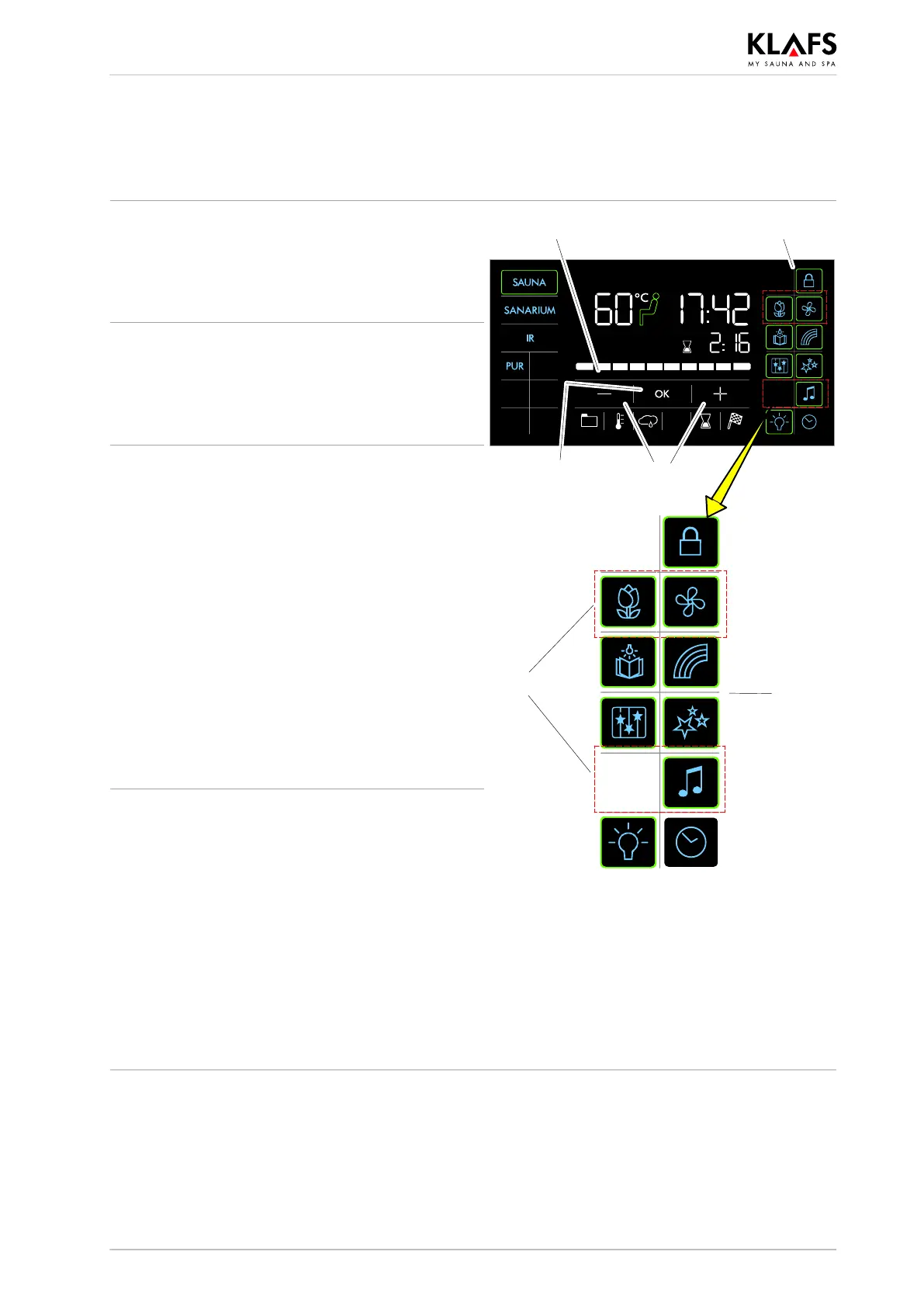
Switching special features on
1. Press the relevant symbol (1).
The special feature is switched on.
The bar appears.
2
3
4
1
5
1
Switching special features off
1. Press the relevant symbol (1).
The special feature is switched off.
The bar goes out.
Switching on and setting adjustable
special features
1. Change the settings for the adjustable special
features (5) by pressing the +/- symbols (2).
2. Or touch the bar scale (3) to change the
setting in the same way as for numerical
settings.
. Setting the adjustable special features (5) to 0
switches them off.
3. Apply the changed setting by pressing the
symbol (4).
The bar appears.
The adjustable special feature (5) then starts with
the setting entered.
Switching adjustable special features
off
1. Change the settings for the adjustable special
features (5) to 0 by pressing the
+/- symbols (2).
2. Or change the setting to 0 by touching the
bar scale (3).
3. Apply the changed setting by pressing the
symbol (4).
The adjustable special feature (5) is switched off.
The bar goes out.



 To Next Page