User manual - DATA RECORDER and cooperating software
•
[Export]
- saves the settings shown in the
Inputs settings
tab and writes
the configuration set to the FlashDrive;
•
[Close]
- exits the program.
Status information concerning currently performed operation is shown in the bottom of the
window.
3.1. “INPUTS SETTINGS” TAB
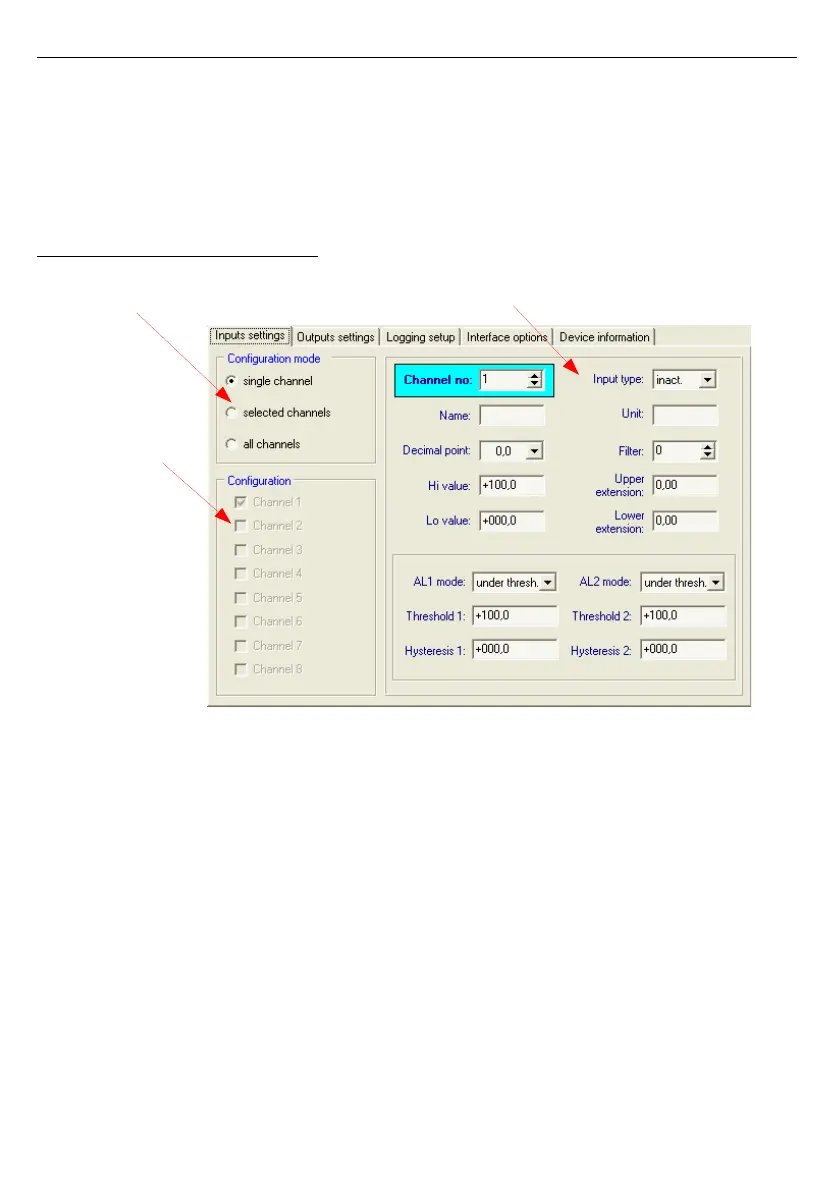
Fig. 3.2. Inputs settings tab options
There are two sections in this tab:
•
Configuration mode
- select the channel configuration method in this tab. If the “
single
channel
” option will be selected it will be possible to set
configuration parameters for only one from the channels available in
the device. “
all channels
” options enables setting configuration
parameters for all channels at the same time; "
selected channels
”
option enables setting configuration parameters for a number of
selected channels at the same time.
•
Configuration
- this section defines, which channels are currently configured.
If “
single channel
” or ”
all channels
” option was checked in the
”
configuration mode
” section, then selection of channels is made
automatically. If “
selected channels
” option was checked in the
”
configuration mode
” section, then the user can define which
channels of the device he intends to configure at the moment.



 To Next Page