User manual - DATA RECORDER and cooperating software
7.1. PARAMETERS EDITION
To start edition of any parameter user should select name of desired one using
[^] [v]
buttons and then
[ENTER].
7.1.1. Numeric and switching parameters ("LIST" - type)
Numeric parameters constitute a series of digits that form a number in decimal format.
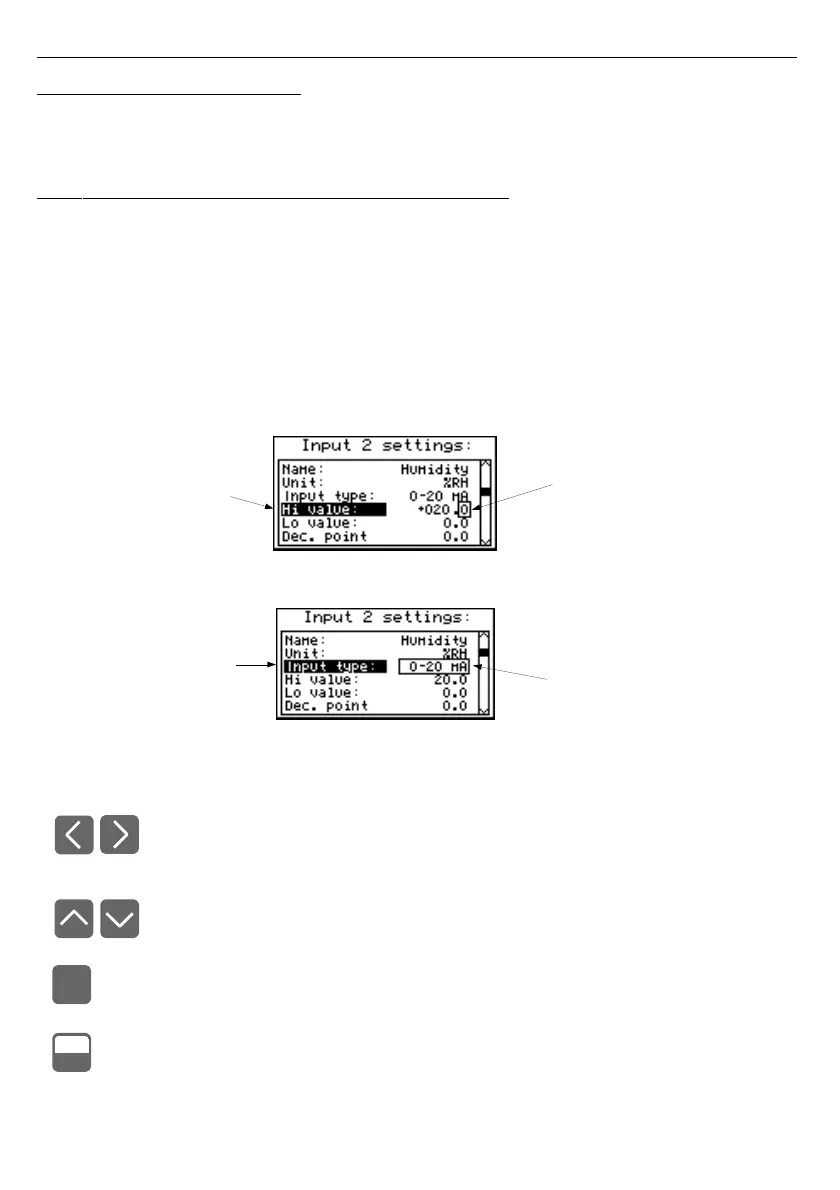
Entering a new parameter value (
Fig.
7.4
) consists of changing the values of selected digits
within the allowable range (using the
[^]
,
[v]
keys). Some numeric parameters can take
negative values (e.g. "
Hi value
" parameter). In such cases the "
-
" mark can be selected on the
first decimal position of the parameter.
Switching parameters (
Fig.
7.5
) can be presented in the form of a list, out of which only
one of the options available on the list can be selected for the given parameter. Options of
switching parameter are selected using
[^]
,
[v]
keys.
Fig. 7.4. Editing numerical parameter
Fig. 7.5. Editing "LIST" - type switching parameter
Functions of keys when editing numeric and switching parameters:
• Selecting the decimal position of the edited numeric parameter. Selected
item is distinguished with brackets and flashes. In the case of switching
parameters these keys are not used.
• Change of current value (i.e. flashing) of the digit (for numeric parameters)
or switching status (for switching parameters, e.g. "
Input type
").
• Confirm the changes and end parameter editing.
• Cancel changes.
4
3
ENTER
MENU
ESC
selected numerical
parameter
edited numerical parameter
position is outlined and blinking
selected LIST-type
parameter
edited switch parameter
is outlined and blinking



 To Next Page