User manual - DATA RECORDER and cooperating software
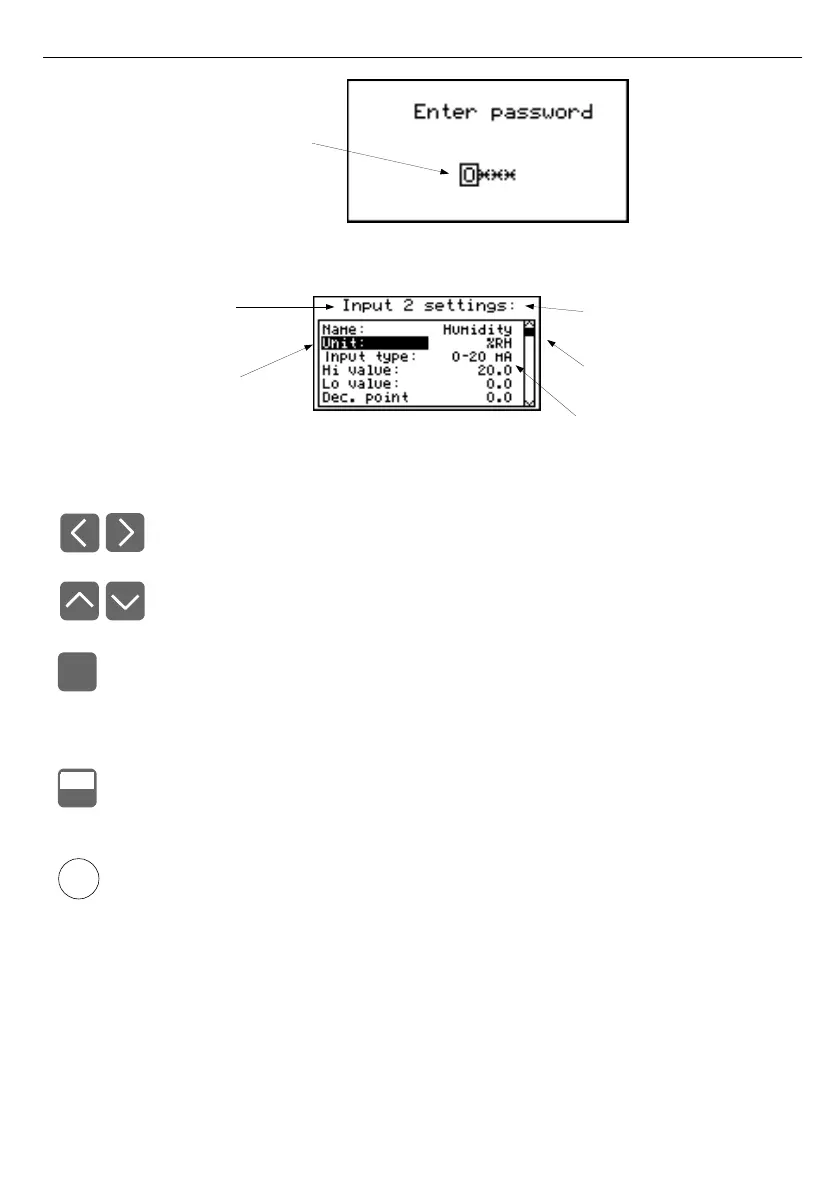
Fig. 7.2. Password requested when accessing unit's main menu.
Fig. 7.3. Example of submenu
Functions of the buttons while sub-menu and parameters choice:
• Change the number of the configured channel (only in "
Inputs settings
"
submenu.
• Change of current item in the menu (selecting a lower level menu or
parameter for editing). The selected option is distinguished by displaying
the option name in negative (bright lettering on dark background).
The function of the
[ENTER]
key depends on the type of current menu item:
• if the menu item corresponds to one of the unit's parameters, pressing
[ENTER]
starts parameter editing,
• if the menu item selects a lower level menu, pressing
[ENTER]
activates
the new menu.
• The
[ESC/MENU]
key exits the current menu level and returns to a higher
order menu (to one of the results presentation modes).
After approximately 1 minute since the last activation of the keys, the unit returns from
any level to one of the results presentation modes (only if no parameters are in
editing mode).
4
2
i
ENTER
MENU
ESC
edited password position
is outlined and blinking
current submenu name
presently selected
item (edited parameter)
presently configured
measurement channel
number
list position
indicator
current settings



 To Next Page