User manual - DATA RECORDER and cooperating software
After starting the unit the result presentation mode and channel selected prior to
switching off the unit are active (this information is stored in the EEPROM memory)
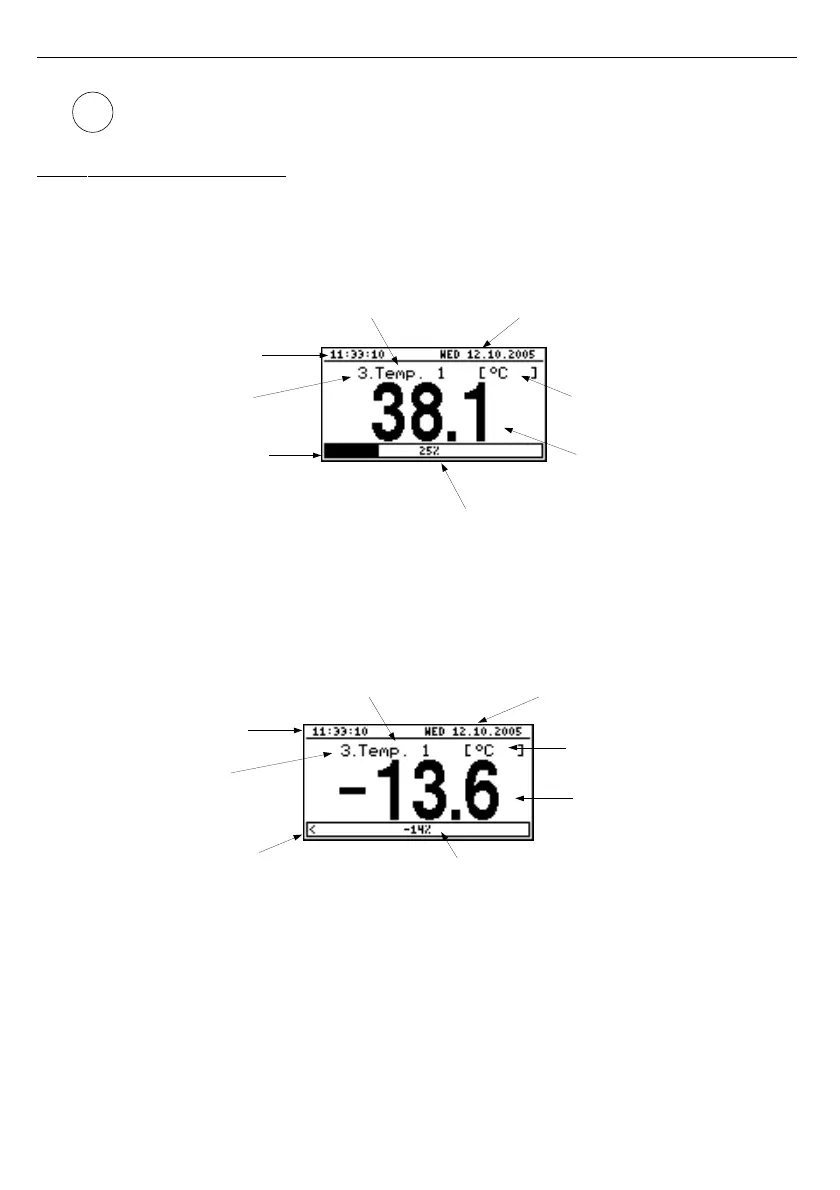
6.2.1. "Single channel" mode
This mode (
Fig.
6.12
) displays the result of the last measurement for one of the active
channels in numeric form (in the middle part of the display) and in the form of a bar
(percentage, at the bottom of the screen). The graphical indicator (bar) always shows the
relation of the measurement result to the
user defined range
(see description of "
Hi value
",
"
Lo value
" parameters in the "
Inputs settings
" menu).
Fig. 6.12. Unit in ”Single channel” result presentation mode
Exceeding the user defined range (
Fig.
6.13
) is signalled on the bar with an arrow indicating
the direction of exceeding the range. If the measurement result for one channel exceeds the
allowable measurement range (
Fig.
6.14
) instead of the result in numeric form the display
shows a
"-Hi-"
or
"-Lo-"
message (depending on the direction of exceeding).
Fig. 6.13. Exceeding user defined range in "Single channel" mode
29
i
channel name current date
unit name
measure result
in numerical mode
percentage rate of measure result to
user defined range
bargraph
channel number
current time
arrow indicates
exceeding
of user defined range
channel number
current time
percentage value of exceeding
unit name
measure result
in numerical mode
channel name current date



 To Next Page