User manual - DATA RECORDER and cooperating software
Explanation :
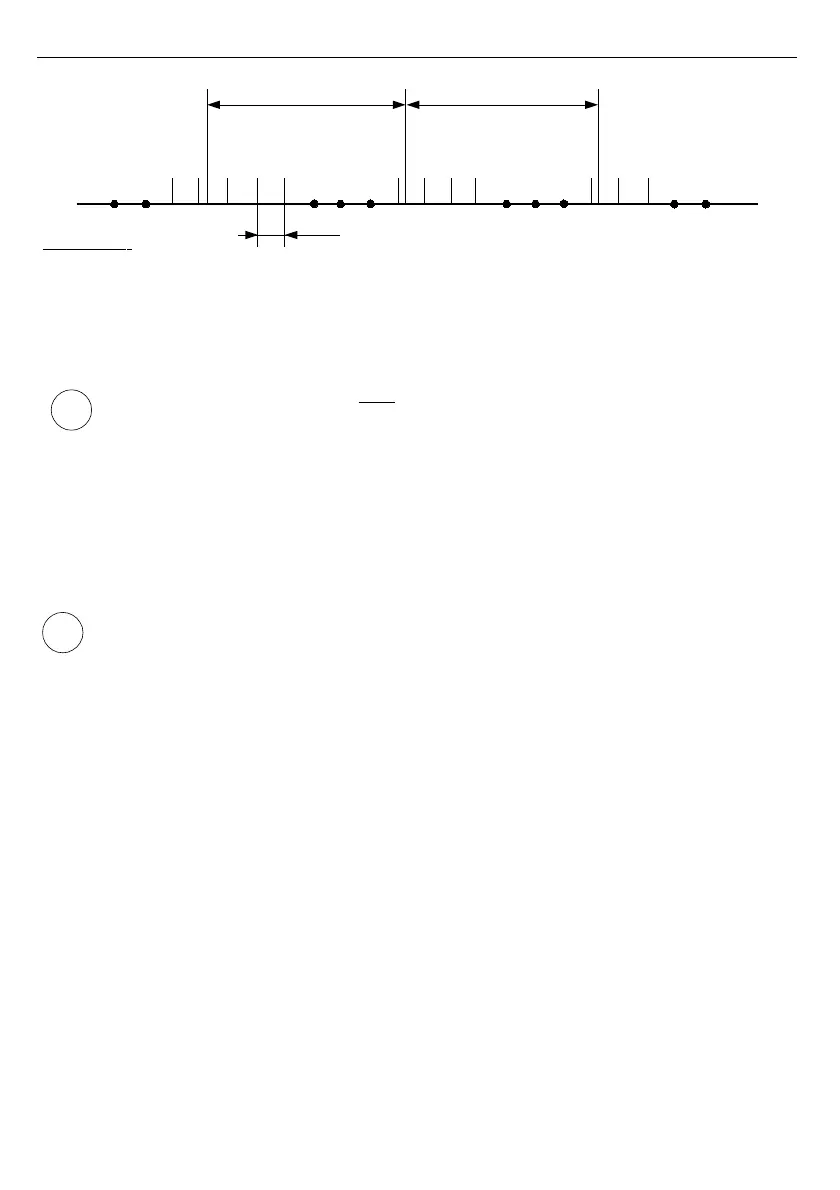
t(a), t(b), t(c) - recording points
a, b, c, d - measurement points
Δt - delay between measurements: 1 s (
U/I version
and
TC inputs
in
TC/RTD version
) or
2.5 s (
RTD inputs
in
TC/RTD version
)
Fig. 6.6. Principle of measurement recording
Averaging operation concerns
only
the type of recorded values; it does not concern
the method of presentation of current measurement. In all result presentation modes,
indications - described in the remaining part of the manual as results of
measurements not recorded in the unit's memory - correspond to the momentary
value of the measured signal.
Averaged values can be viewed in the data logger only in the "
Measurements list
" and
"
Graph
" results presentation mode, because these modes enable presentation of values
recorded in the unit's memory. Averaged values can also be viewed in the database
downloaded by the software working with the data logger.
In the case of multiple changes of type of recorded value (momentary values of
averaged values) there is no possibility to distinguish whether data recorded in the
memory concerns momentary measurement value or averaged measurement results.
Recording the measurement results in the non-volatile memory can be executed in two
modes: "
until full
" or "
cyclic
" ("
Write
" parameter). The first mode enables the recording of
such amounts of data as the unit's memory allows for, then the recording is stopped. In the
second mode, once the memory is full, the results are recorded from the starting address in
the memory, overwriting existing measurement results. The time remaining until the memory is
full is displayed once the unit is started and in the "
Device information
" menu, available in the
units main menu.
In the case of both modes, once the memory is full, a warning message is displayed (see
description of "
Write
" parameter in the "
Logging setup
" menu). The recorded data should be
periodically downloaded to a PC using appropriate software provided by the manufacturer
through one of the communication port: RS485/USB PC or alternatively through USB
FlashDrive device.
All parameters concerning the recording mode, the influence of digital input on the
recording method, the recording frequency and type of recorded value are available in the
"
Logging setup
" menu described in section
MAIN MENU DESCRIPTION
.
27
i
i
”Rec.period” parameter ”Rec.period” parameter
t(a)
t(c)
t(b)
a
n-1
a
n
b
1
b
2
b
3
b
n
c
1
c
2
c
3
c
n
d
1
d
2
. . .
. . .
Δt



 To Next Page