User manual - DATA RECORDER and cooperating software
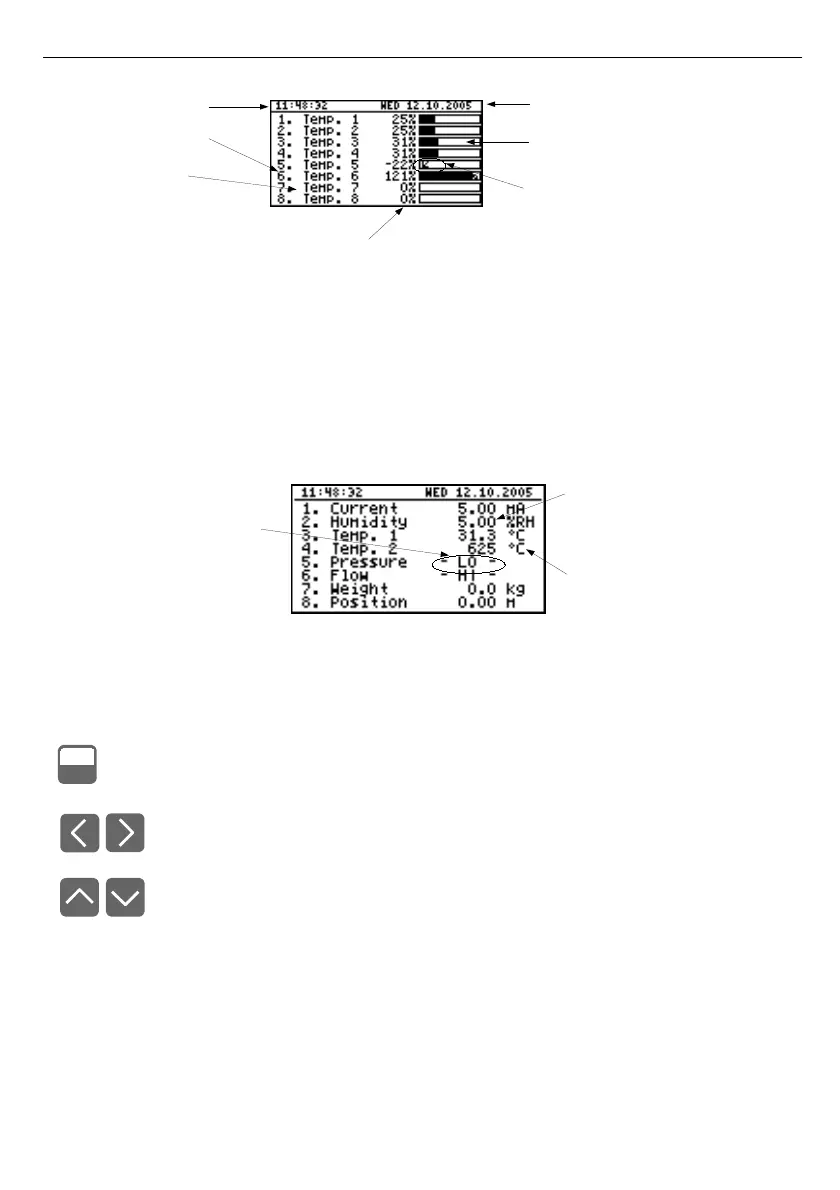
Fig. 6.24. Unit in "Channels list" results presentation mode.
"Channels list options" parameter set as "bar graphs".
Exceeding the
user defined range
is signalled on the bars in the form of an arrow
indicating the direction of exceeding the range. If the measurement result for a given channel
exceeds the
allowable measurement range
, instead of the current result in numeric form the
display shows a "
-Hi-
" or "
-Lo-
" message (depending on the direction of exceeding). Press the
[ESC/MENU]
key to go to "
Channels list options
" menu.
Fig. 6.25. Unit in "Channels list" results presentation mode.
"Channels list options" parameter set as "values".
Functions of keys in "Channels list" mode:
• go to main menu (press and hold for approx. 2 seconds),
• Go to "
Channels list options
" menu, description on page
46
.
• change channel number,
• change results presentation mode.
3
6
MENU
ESC
current time
channel number
channel name
percentage rate of measure result to
user defined range
current date
measure result in graphical
mode (bargraph)
arrow informs about direction of
user defined range exceeding
warning message
informing that input allowable
range is exceeded
measure result in
numerical mode
unit name



 To Next Page