34
392616/B
3MounttheWBTDrawerintothe19-inchcabinet.
4Connectthecables.
Note
Whenyouconnectthecables,makesurethattheyareallproperlysecured,andable
towithstandthevibrationandmovementsofthevessel.
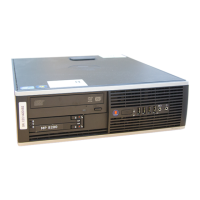
Installingacommercialcomputer
TheOperatorStationcanbeinstalledinsideaconsole,insideasuitablecabinet,ina19"
rackoronadesk.Makesurethatadequateventilationisavailabletoavoidoverheating.
Prerequisites
Youmustbeequippedwithastandardsetoftools.Thistoolsetmustcomprisethe
normaltoolsforelectronicandelectromechanicaltasks.Thisincludesdifferent
screwdrivertypes,pliers,spanners,acablestripper,asolderingiron,etc.Eachtool
mustbeprovidedinvarioussizes.Werecommendthatalltoolsaredemagnetizedto
protectyourequipment.
Asuitablelocationforthecomputermustbedenedpriortoinstallation.Observethe
compasssafedistance.
Context
Forinstallationofacommercialcomputer,refertothemanualsuppliedbythe
manufacturer.
Note
MakesurethatthechosencomputermeetstheEA440requirements.Thedesignand
constructionmustallowformarineuse,andthecomputermustbeabletowithstand
themovementsandvibrationsnormallyexperiencedonavessel.Verifythatyouhave
easyaccesstocablesandconnectors,andthatthecomputercanbeinstalledinasafe
andsecureway.
Standardofcecomputersmaynotbewellttedformaritimeuse.Themotionsand
vibrationsexperiencedonavesselmayreducethecomputerlifetimeconsiderably.While
installingacommercialcomputer,useyourcommonsensetoimprovetheinstallation
methodsuggestedbythemanufacturer.
Procedure
1Preparethelocationandthenecessarytools.
2Observetheinstallationrequirements.
EA440Installationmanual




 To Next Page