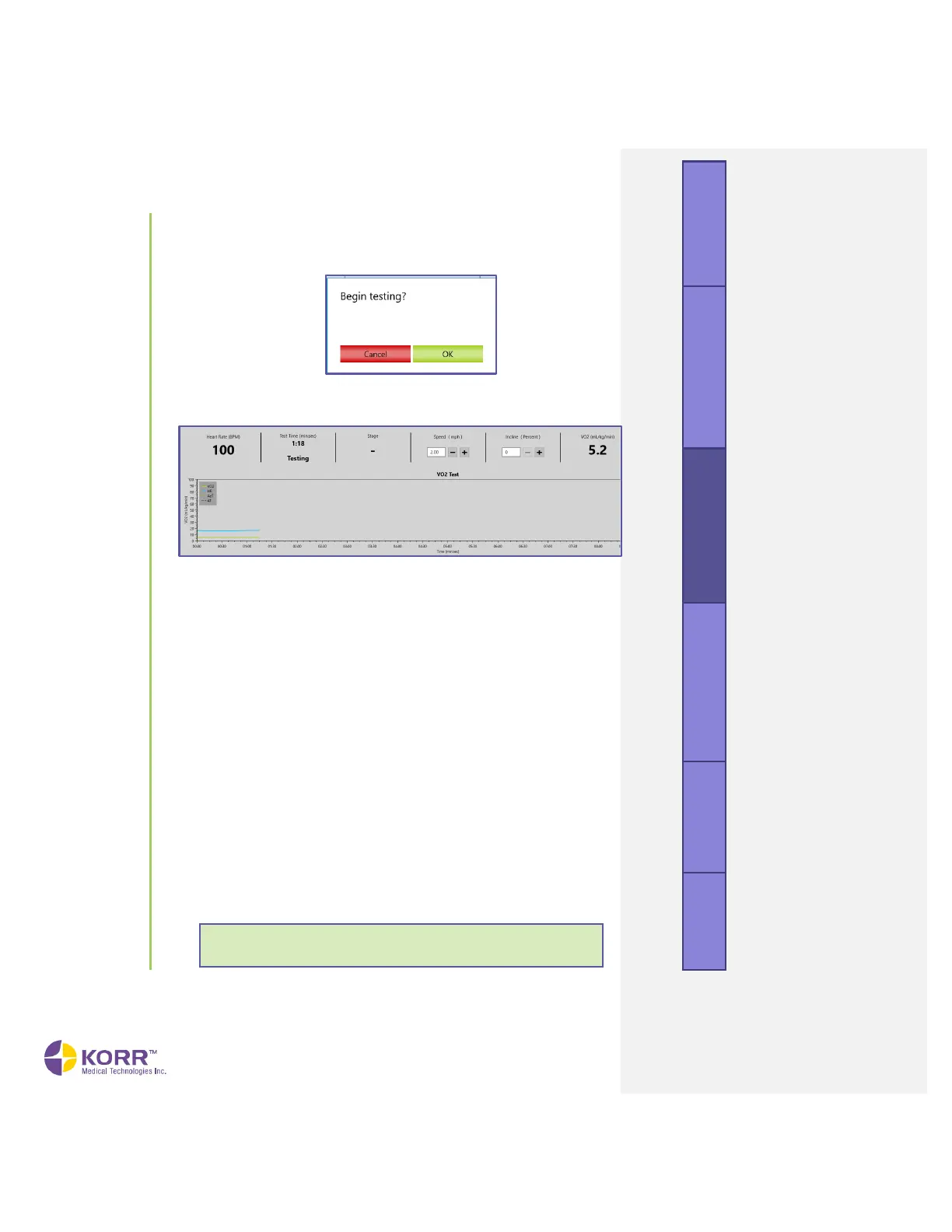
12. Begin Testing. When the CardioCoach PRO detects a stable heart rate
and VO
2
, it will prompt you to begin testing. Click the OK button to
begin the test.
13. Start Client Walking or Pedaling Slowly. Begin the graded exercise
test. A page similar to the following displays.
14. Increase Workload. The graded exercise test consists of a test phase
and a recovery phase.
● In the test phase, the intensity of the exercise is increased
gradually to increase workload over a period of 6 to 24 minutes.
This is typically done by increasing the speed/incline on a
treadmill or the RPM/watts on a stationary cycle or ergometer,
in one-minute intervals.
● For more information on performing a graded exercise test,
refer to the section on graded exercise tests in the Performing
Quality Test Procedures chapter of this manual.
15. Workload Stages. As you increase the workload, the CardioCoach PRO
will prompt you to enter the speed and incline or watts at each stage.
a) Use the + and - buttons to enter Speed, Incline, or Watts.
b) Click the Save Stage button to save those settings for the given
stage.
c) By recording stages of the VO
2
Max test, you can view both the
heart rate and the equipment settings for each change in
workload.
d) Manually recording the equipment settings is optional. The
heart rate will automatically be recorded.



 To Next Page