59
3
© 2018 KOSTAL Solar Electric GmbH
Installation
L1 L2 L3 N
LAN
X206
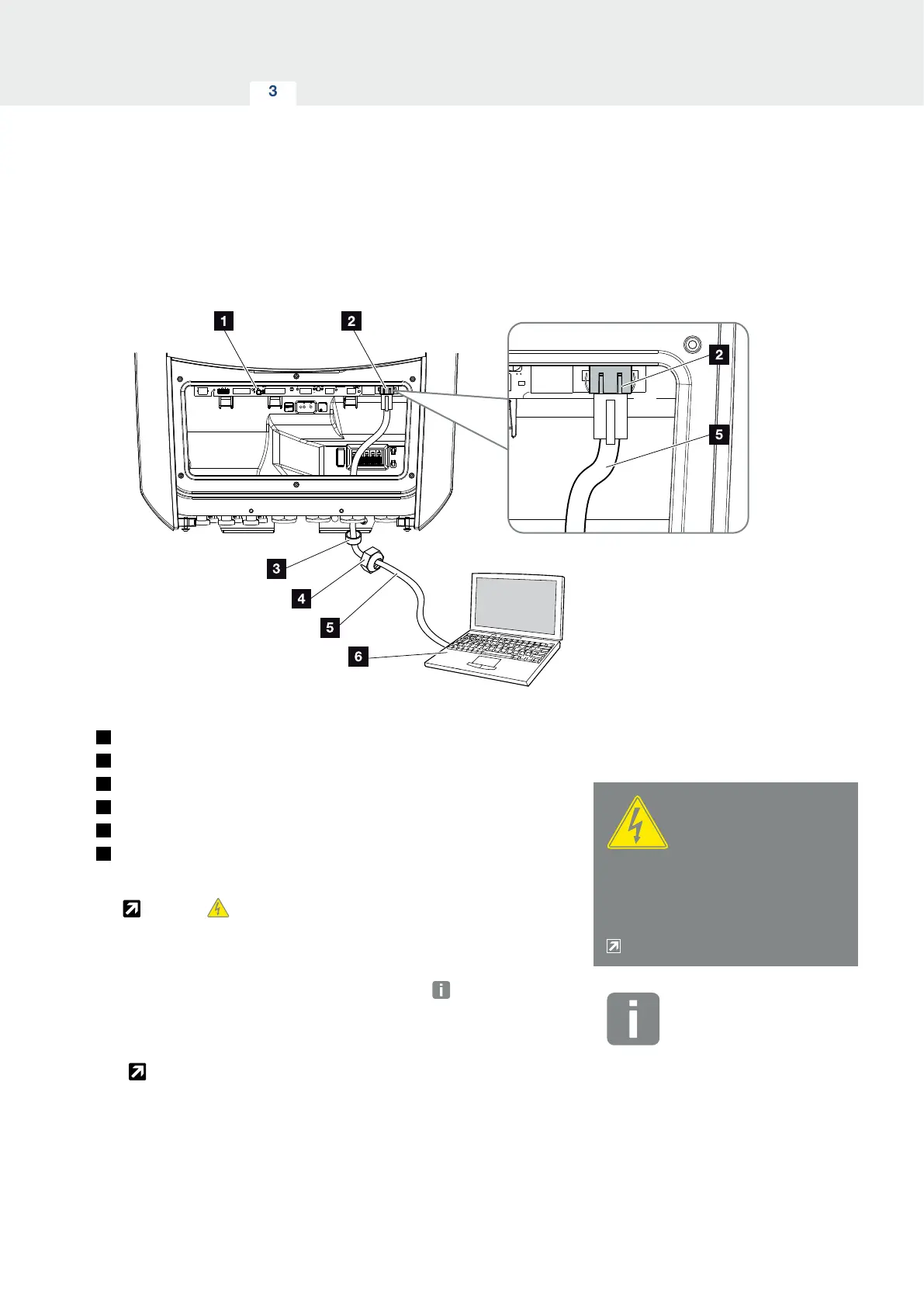
Fig. 33: Connecting inverter and computer with an Ethernet cable
1
Smart Communication Board
2
LAN connection (RJ45 Ethernet)
3
Sealing ring
4
Union nut
5
Ethernet cable (Cat 6)
6
Computer (for configuration or data retrieval)
1. De-energise the inverter’s terminal compartment.
Ch. 4.3
2. Insert Ethernet cable into the inverter and seal with
sealing ring and union nut. Tighten union nut to the
prescribed torque. Torques: 8 Nm (M25).
3. Connect Ethernet cable to LAN interface of Smart
Communication Board.
Fig. 33, It. 2
4. Connect the Ethernet cable to the computer or
router.
H
The inverter is connected with your own network.
DANGER
RISK OF DEATH DUE TO ELECTRI-
CAL SHOCK AND DISCHARGE!
De-energise device and secure
against being switched on again.
Ch. 4.3
INFO
For connection with a computer or
computer network (Ethernet 10BaseT,
10/100 Mbit/s), an Ethernet cable of
category 6 (Cat 6, FTP) with a max.
length of 100 m is to be used.



 To Next Page