SUPERSTRUCTURE OPERATION
Operating instructions • Semitrailer • 505369471-04 • 02/2019
105
Removing the lath socket
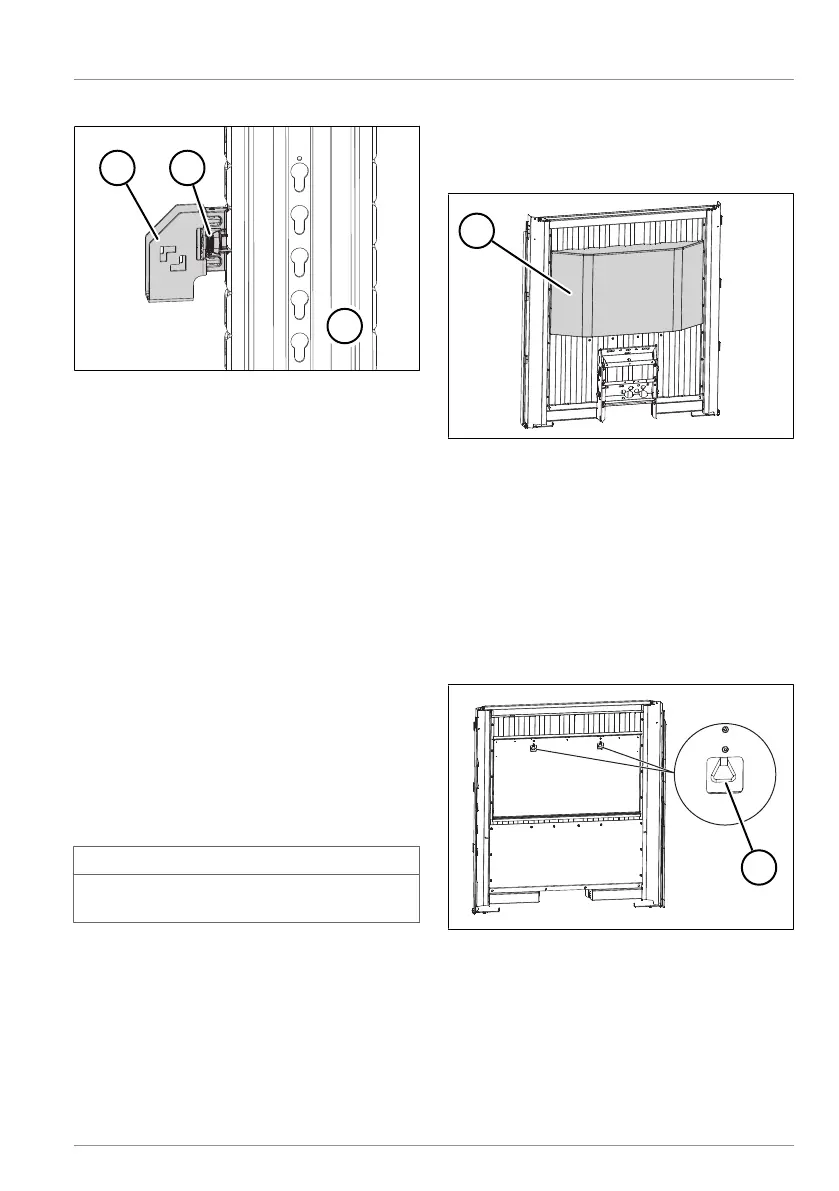
Fig.6-82: Adjustable lath socket
1 Lath socket
2 Locking mechanism
3 Double-deck post
► Removing the plug-in lath
► Press back the lock on the lath socket.
► Lift out the lath socket.
ü The lath socket has been removed
Inserting the lath socket
► Attach the lath socket at the desired
position from above into the grid on the
post.
► Allow the lock on the lath socket to en-
gage.
ü The lath socket has been inserted.
When all the lath sockets have been
moved, the plug-in laths can be at-
tached.
INFO
The plug-in laths must be aligned hori-
zontally.
6.2.12 Front wall depot
Depending on the version, KRONE trailers
with a steel front wall can be equipped with
a front wall depot.
Fig.6-83: Front wall depot
1 Front wall depot
The front wall depot contains fixed storage
shelves to store 24 paper wedges (see
"8.13.1 Using the paper wedge", pg.164), two
pallet rollers, (see "8.13.2 Using the pallet
roller", pg.164) and various other load se-
curing materials.
Opening the front wall depot
Fig.6-84: Locks on the front wall depot
1 Locks
► Actuate the locks.
► Fold down the flap.
ü The front wall depot is open.



 To Next Page