V - 21
Basic Settings and Operation
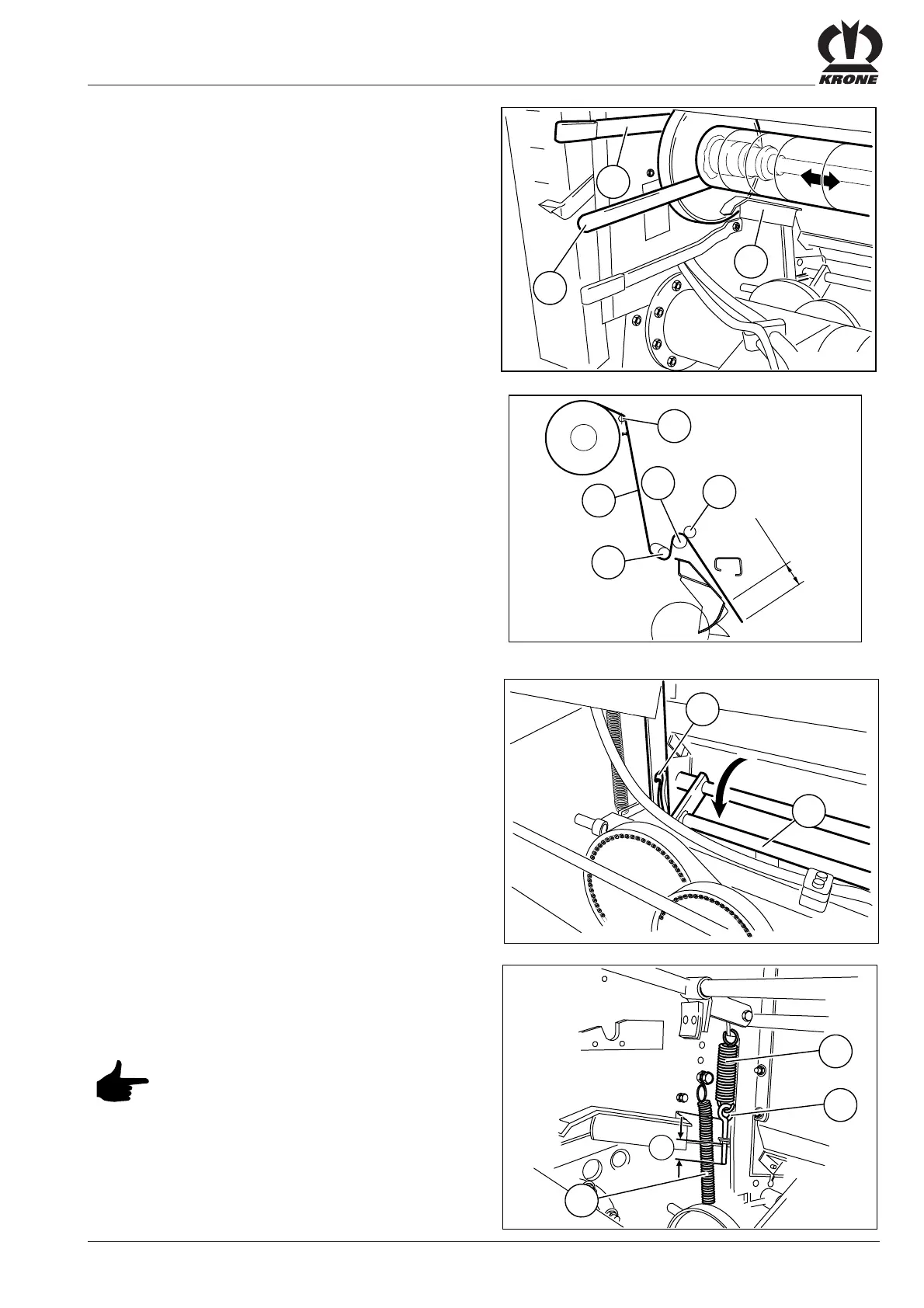
Insert the netting (3) over the guide shaft (1) below the
net stretcher bar (2) between the rubber-coated roller (4)
and the pressure roller (5). The netting should extend
0 - 50 mm above the scraper, the conveying roller or blade
rotor.
• Pull the flat iron (1) forward.
• Fold the net stretcher bar (2) downwards and engage.
Once installed, the netting roll can be aligned to the right
and left in the centre to the machine using the mounting
lever (2).
To pull the netting, release the brake. To do this press
lever (1) downwards.
Place the net brake callipers (3) below the netting roll.
5.7.5 Setting the Net Brake
In the basic setting, the tensioning bolt dimension should
be a = 35 mm.
If the netting gets caught up during baling,
then tension must be increased on the
spring (1) of the net brake.
The brake spring (1) can be tightened at the eye bolt (2).
If the netting does not feed correctly at the start,
pressure roller tension can be increased by adjusting
the spring (3).
RBV04041
2
1
RP-99-002
1
3
2
a









 To Next Page