V - 18
Basic Settings and Operation
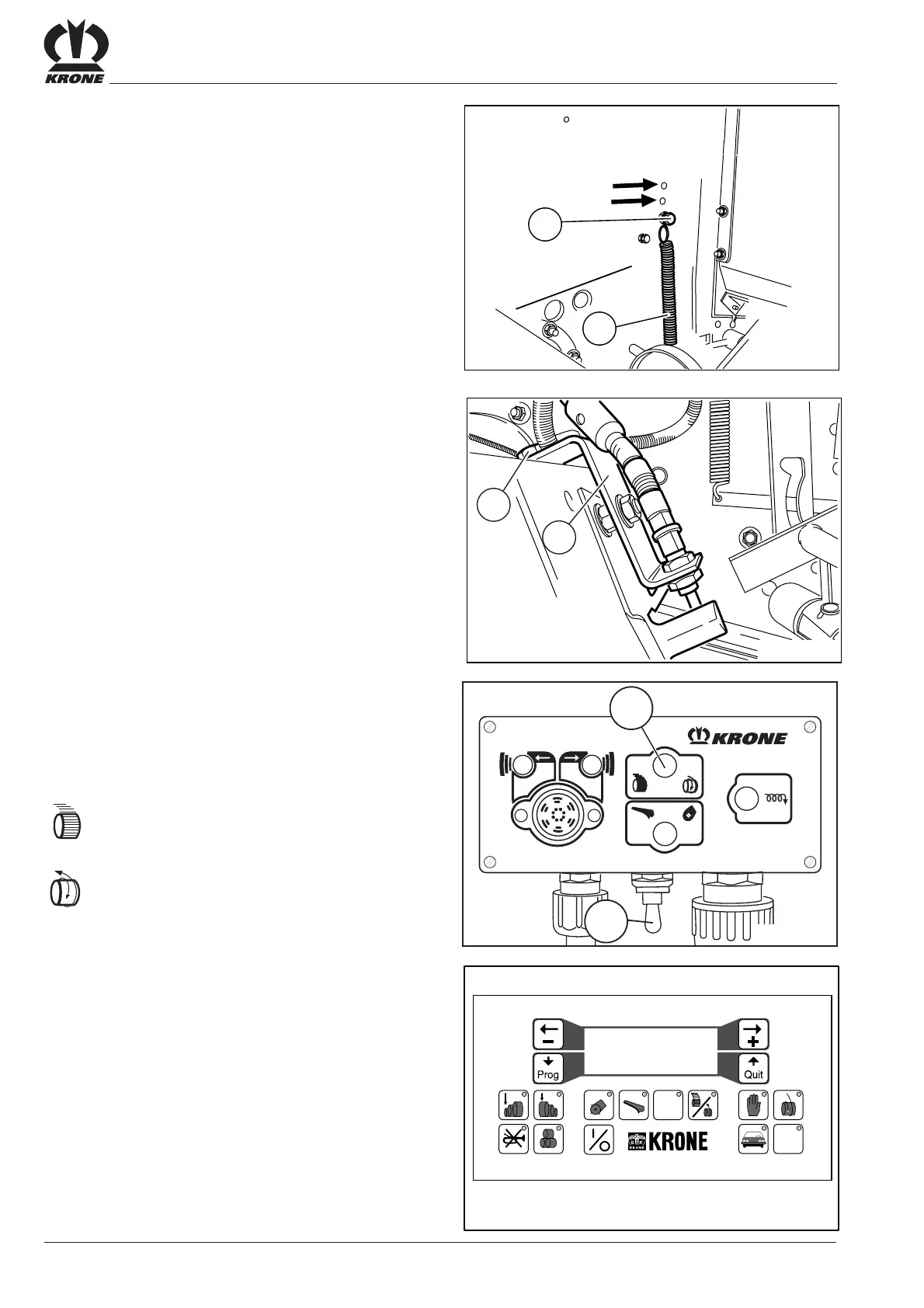
5.6.7 Adjusting the Pressure Roller
If the baler twine does not feed correctly at the start,
pressure roller tension can be increased by adjusting
the spring (2).
Right side:
• Detach spring (2).
• Detach bolt (3) and screw into one of the upper bore
holes.
• Reattach spring (2).
Left side:
• Pressure is increased by attaching the springs in the
bore holes.
5.6.8 Adjusting the Sensor
To ensure that the baler twine does not always start and
cut at the same position, the sensor bracket (1) can be
move to the left or the right.
• Undo bolt (4).
• Move sensor bracket (1).
• Tighten bolt.
5.6.9 Selecting Wrapping Mode
Control unit Medium
• Actuate the ON/OFF switch (1).
Use switch (6) to select the tying mode.
= Net wrapping
= Twine wrapping
Control unit Comfort
If twine wrapping is selected, the word "twine" must appear
in the second line on the display of the comfort control
(see Control unit Comfort)
RBV00021
4
1
VP-3-014
2
3
#
12 5 67 8 90
34
VP-3-051
STOP
Garn............Netz
------ Garn ! ------
weiter.......ja=quit
1
RP600008
6









 To Next Page