EasyManua.ls Logo

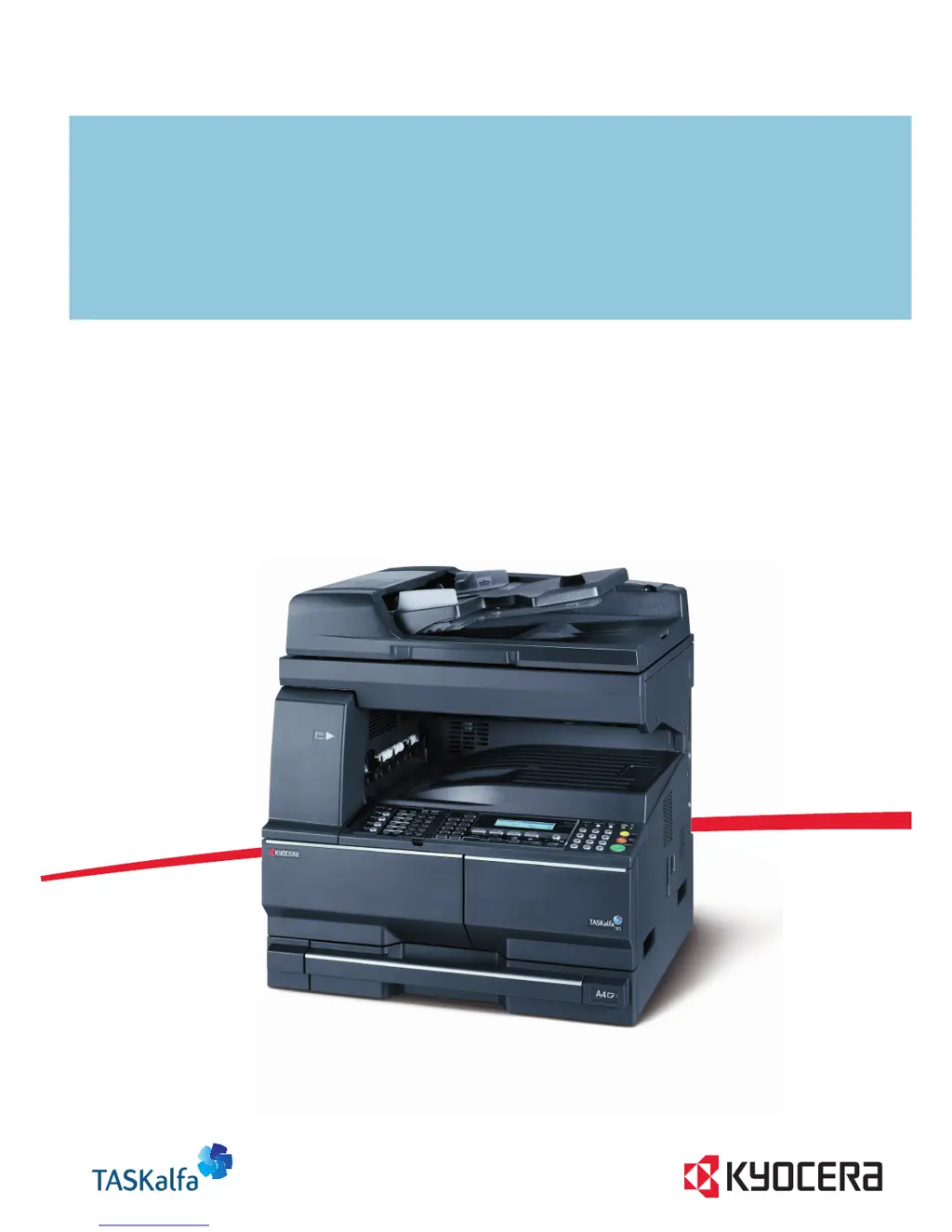
Kyocera TASKalfa 221 - User Manual

Kyocera TASKalfa 221
149 pages
Print Icon
To Next Page IconTo Next Page
Loading...
ADVANCED OPERATION GUIDE
TASKalfa 181/221

Table of Contents

Other manuals for Kyocera TASKalfa 221

Questions and Answers

  • A
    armstrongwendySep 2, 2025
    Why are there black lines on printouts from Kyocera All in One Printer document processor?
    • M
      Michael ShannonSep 2, 2025
      If printouts from the document processor of your Kyocera All in One Printer have black lines, the slit glass may be dirty. Clean the slit glass.
  • D
    Dorothy FergusonSep 3, 2025
    What to do if pressing start on Kyocera TASKalfa 221 All in One Printer doesn't make copies?
    • M
      Martha AndersonSep 3, 2025
      If pressing the Start key on your Kyocera All in One Printer does not produce copies: * Check the message display for any messages and respond accordingly. * If the machine is in Sleep mode, press the Power key to recover it. The machine will be ready to copy within 30 seconds.
  • A
    Alexander WilliamsSep 3, 2025
    What to do if Kyocera TASKalfa 221 says 'Paper capacity exceeded'?
    • D
      Dale WelchSep 3, 2025
      If your Kyocera All in One Printer displays 'Paper capacity exceeded. Remove paper from Job sep.', it means there are already 100 sheets of paper stored on the optional job separator. Remove the paper.
  • S
    Sandra HamptonSep 4, 2025
    How to remove moire pattern from copies on Kyocera TASKalfa 221?
    • M
      Michael BowersSep 4, 2025
      If your Kyocera All in One Printer copies have a moire pattern, and the original is a printed photograph, set the image quality to the Print Photo key.
  • J
    James PierceSep 4, 2025
    What to do if Kyocera TASKalfa 221 All in One Printer says 'Paper misfeed in Finisher'?
    • C
      Christie Williams DDSSep 5, 2025
      If your Kyocera All in One Printer displays 'Paper misfeed in Finisher, lower Process Tray and remove paper', paper has jammed in the optional finisher. Remove the paper.
  • E
    Erin CrawfordSep 5, 2025
    What to do if Kyocera All in One Printer says 'Remove paper from Finisher'?
    • R
      Rachel MillsSep 5, 2025
      If your Kyocera All in One Printer displays 'Remove paper from Finisher. Press GO', there are already 250 sheets of paper stored in the optional finisher during printing. Remove the paper. Press the Print key. Press U or V to select GO, and then press the Enter key. Printing will resume.
  • E
    Elizabeth ThomasSep 5, 2025
    What to do if Kyocera TASKalfa 221 All in One Printer says 'Remove paper from Finisher. Press START key.'?
    • R
      Robert Sandoval MDSep 5, 2025
      If your Kyocera All in One Printer displays 'Remove paper from Finisher. Press START key.', there are already 250 sheets of paper stored in the optional finisher during copying. Remove the paper.
  • L
    Lacey GloverSep 6, 2025
    What to do if Kyocera All in One Printer says 'Remove paper from Top tray. Press GO.'?
    • K
      Kenneth AdamsSep 6, 2025
      If your Kyocera All in One Printer displays 'Remove paper from Top tray. Press GO.', the output tray capacity is exceeded during printing. Remove the paper. Press the Print key. Press U or V to select GO, and then press the Enter key. Printing will resume.
  • D
    davisangelaSep 6, 2025
    What to do if Kyocera TASKalfa 221 All in One Printer says 'Remove paper from Top tray. Press START key.'?
    • M
      Melissa FoxSep 6, 2025
      If your Kyocera All in One Printer displays 'Remove paper from Top tray. Press START key.', the output tray capacity is exceeded during copying. Remove the paper.
  • D
    Dave JohnsonSep 7, 2025
    What does 'Receive Doc. in Mem.' mean on my Kyocera TASKalfa 221?
    • M
      Matthew YuSep 7, 2025
      The 'Receive Doc. in Mem.' message on your Kyocera All in One Printer means that received documents were stored in memory because there was no paper in the drawer. Once you load paper into the drawer, the documents stored in memory will be printed. If 'Add Paper (XX Cassette)' is also displayed, load paper of the indicated size.

Kyocera TASKalfa 221 Specifications

General IconGeneral
Print technologyLaser
Maximum resolution2400 x 600 DPI
Economical printingYes
Time to first page (black, normal)5.7 s
Print speed (black, normal quality, A3)10 ppm
Print speed (black, normal quality, A4/US Letter)22 ppm
Grayscale levels256
FaxingMono faxing
Fax memory4 MB
Modem speed33.6 Kbit/s
Fax coding methodsJBIG, MH, MMR (Fax coding method), MR
Fax speed dialing (max numbers)3s
Total input capacity300 sheets
Total output capacity250 sheets
Maximum input capacity1300 sheets
Multi-Purpose tray input capacity100 sheets
SafetyTÜV/GS, CE
Font stylesPCL, KPDL 3
Media thickness0.11 mm
Power supply typeAC
Custom media sizes98 x 148mm - 297 x 732 mm
Dimensions (WxDxH)568 x 594 x 607 mm
Power requirements220 - 240V, 50/60 Hz
Networking featuresFast Ethernet 10/100 Base-TX
All-in-one functionsCopy, Fax, Scan
Standard input trays2
Maximum internal memory1 GB
Supported media weight(s)64/105 g/m²
Compatible operating systemsWin 95, 98, Me, NT4.0, 2000, XP, Server 2003 Mac OS X 10.2 + UNIX LINUX
Internal memory128 MB
Processor familyPowerPC
Compatible memory cardsCF
Sound power level (standby)40 dB
Sound pressure level (printing)66.7 dB
Non-ISO print media sizesFolio
ISO A-series sizes (A0...A9)A3, A4, A5, A6
Maximum ISO A-series paper sizeA3
Standard interfacesUSB 2.0
USB 2.0 ports quantity1
Power consumption (standby)63 W
Power consumption (PowerSave)6.2 W
Power consumption (average operating)450 W
Market positioningBusiness

Related product manuals