2NL/2P8-1
1-2-11
Install the optional devices (Document finisher, Fax kit, etc.) as required.
Changing the default staple position of Manual Stapling
If the inch size paper is used, use the procedure below to change the default Staple Position after turning
the main power switch on.
1. Press the System Menu key.
2. Press [Common Settings] > [ ] > [Next] in Manual Staple > [Change] in Staple Position.
3. Select [Letter Long Edge].
4. Press [OK].
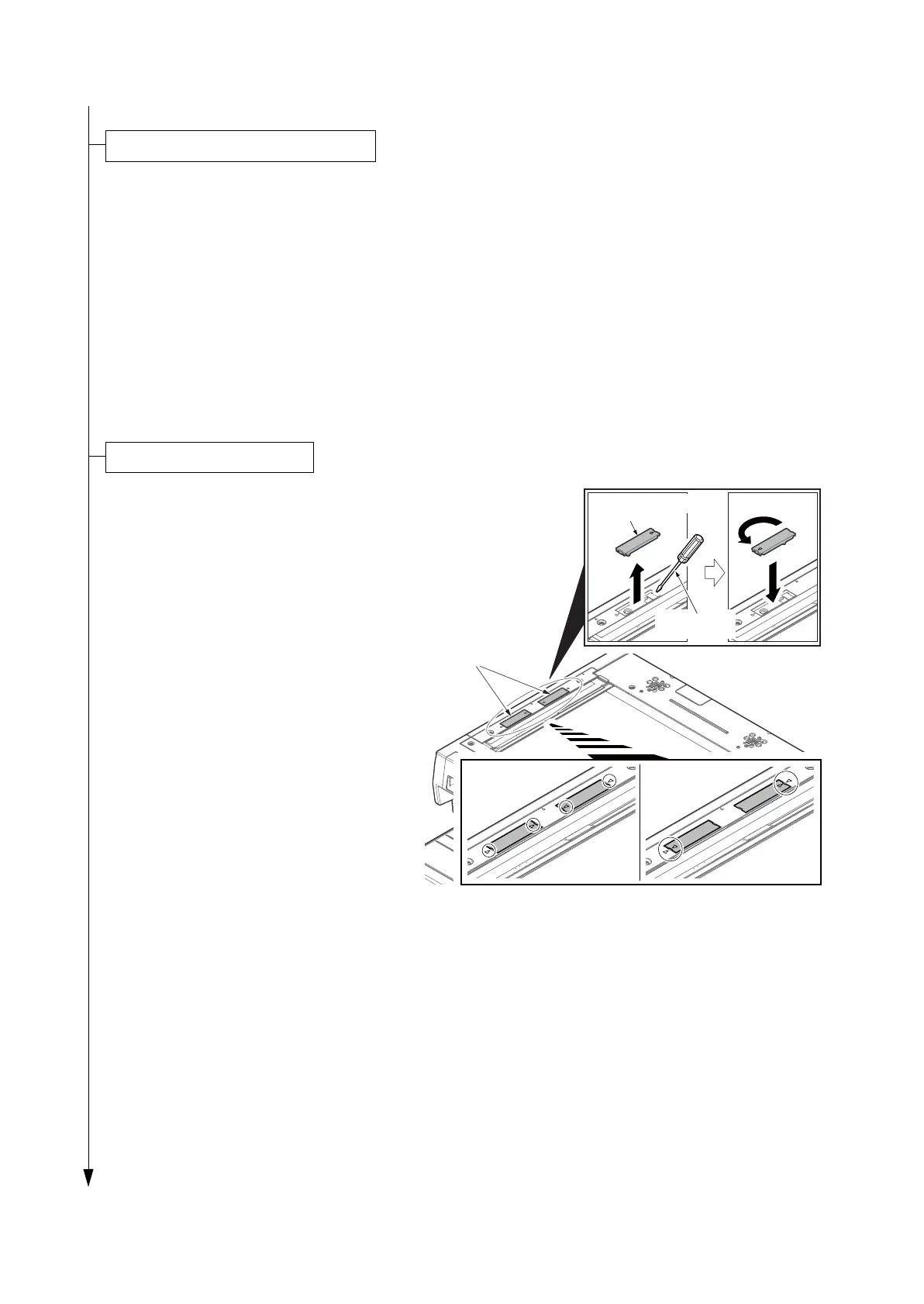
1. Remove two scanner lock cover using the
flatscrew driver.
2. Reverse the upper and lower sides of a
scanner lock cover and then refit it.
* : Releases the lock of the scanner unit.
* : If a lock is not released, when a power
supply is switched on, an error mes-
sage (C3100) will be displayed.
Figure 1-2-17
Install the other optional devices
Scanner lock
cover
Flat screw
driver
Scanner lock
cover
[Locked] [Released]










 To Next Page