2NL/2P8
1-4-69
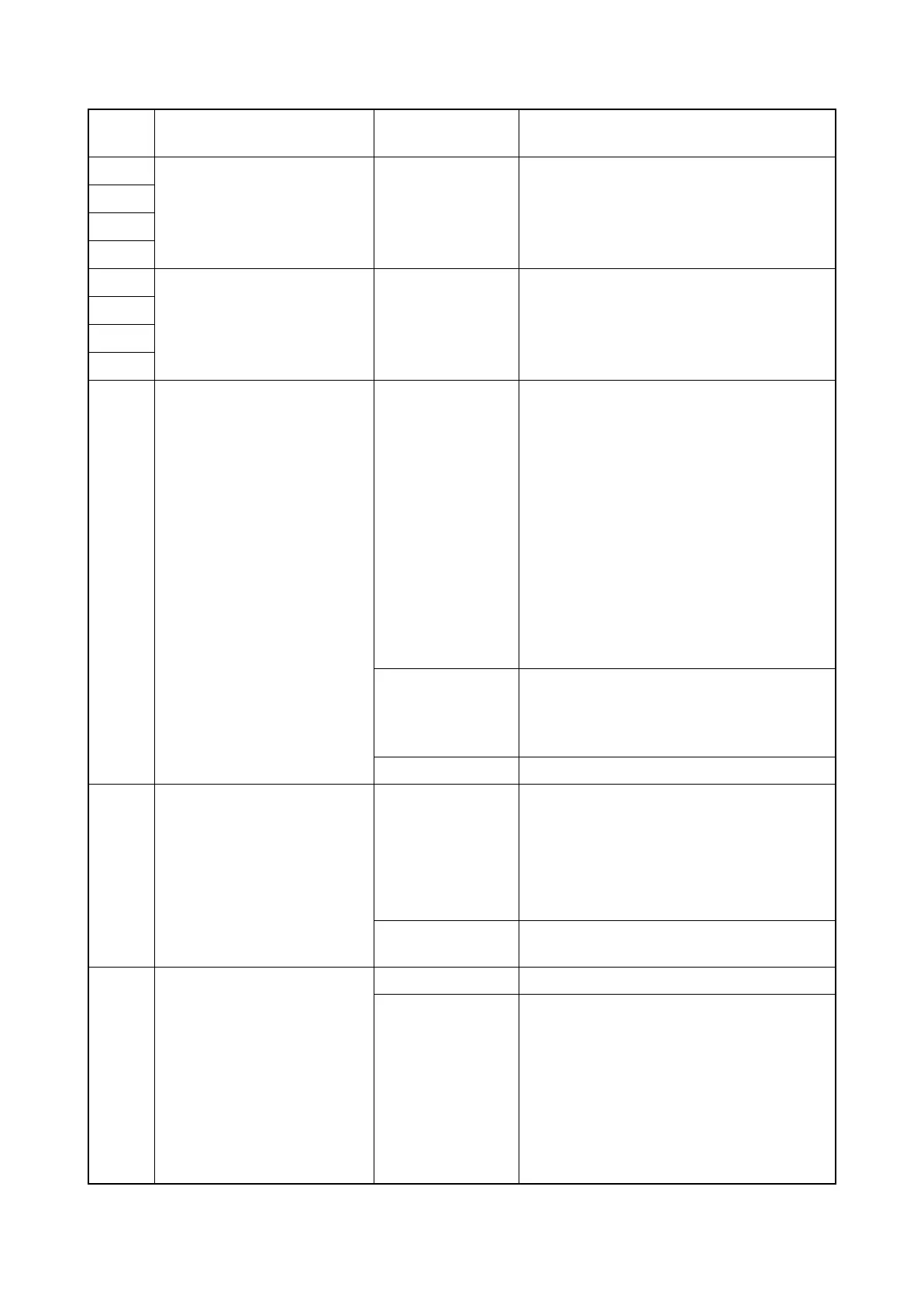
F010 Main PWB checksum error Defective main
PWB.
1. Turn the main power swtch off and after
5 seconds, then turn power on.
2. If not corrected, replace the main PWB
(see page 1-5-38).
F011
F012
F013
F020 System memory error
Controller detection error
Defective main
PWB.
1. Turn the main power swtch off and after
5 seconds, then turn power on.
2. If not corrected, replace the main PWB
(see page 1-5-38).
F021
F022
F023
F040 Communication error
between Main PWB and
Print engine
Main PWB
1. Turn the main power swtch off and after
5 seconds, then turn power on.
2. Repair or replace the wire from the
engine PWB, that may be grounded.
(Check short-circuit between 5V and
3.3V.)
3. Check that the FCC wire connecting
between the main PWB (YC3) and the
engine PWB (YC46) is normal and, if
necessary, re-insert.Or, replace the FCC
wire.
4. If not corrected, replace the main PWB
(see page 1-5-38).
Engine PWB
1. Check the engine software and upgrade
to the latest, if necessary.
2. Replace the engine PWB (see page 1-5-
44).
HDD Replace the HDD.
F041 Communication error
between Main PWB and
Scanner engine
Main PWB
1. Turn the main power swtch off and after
5 seconds, then turn power on.
2. Check that the wires between the main
PWB and the ISC PWB are normal.
3. If not corrected, replace the main PWB
(see page 1-5-38).
ISC PWB Replace the ISC PWB.
F050 Print engine ROM check-
sum error
Engine software Install the latest engine software.
Engine PWB
1. Turn the main power swtch off and after
5 seconds, then turn power on.
2. Confirm that the EEPROM has been
properly installed.
3. If not corrected, Replace the engine
PWB (see page 1-5-44).
Code Contents Related parts
Check procedures/
corrective measures










 To Next Page