2NL/2P8
1-2-48
1-2-7 Installing the keyboard holder (B) (option)
Keyboard holder (B) installation requires the following parts:
Supplied parts of keyboard holder (B) (1709AF0UN1):
Procedure
1. Press the power key on the operation
panel to off. Make sure that the power
indicator and the memory indicator are
off before turning off the main power
switch. And then unplug the power
cable from the wall outlet.
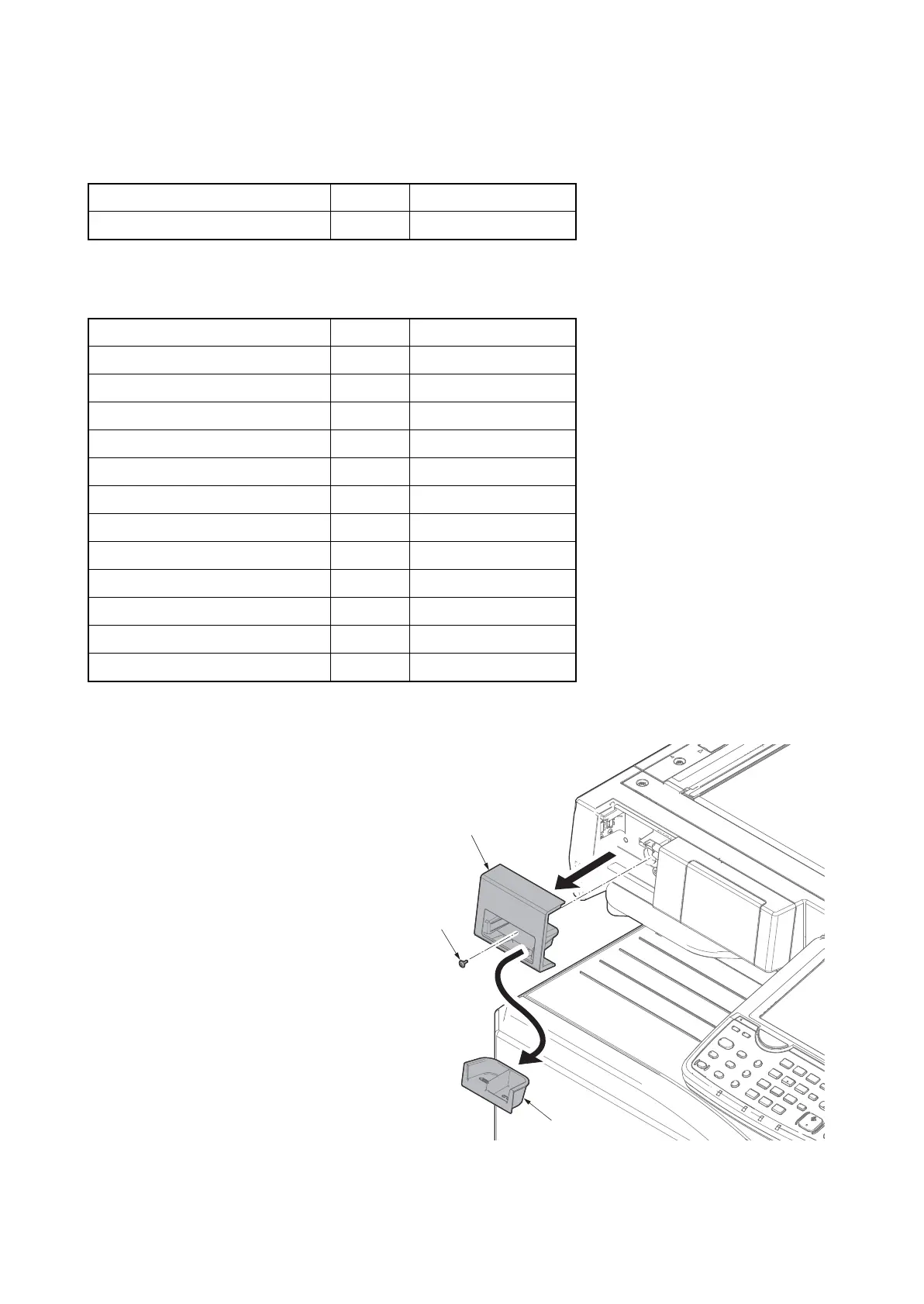
2. Remove the staple holder.
3. Remove a screw.
Figure 1-2-62
Parts Quantity Part.No.
Keyboard holder (B) 1 1709AF0UN1 (option)
Parts Quantity Part.No.
Upper keyboard holder 1 -
Lower keyboard holder 1 -
Upper keyboard cover 1 -
Lower keyboard cover 1 -
Cable cover 1 -
Upper lid 1 -
Lower lid 1 -
Hook and loop fastener 2 -
Bundling band 2 -
M4 x 14 tap-tight S screw 2 -
M3 x 8 tap-tight S screw 10 -
M3 x 8 tap-tight P screw 2 -
Screw
Staple holder
Staple cover










 To Next Page