2NL/2P8
1-5-19
1-5-8 Drive section
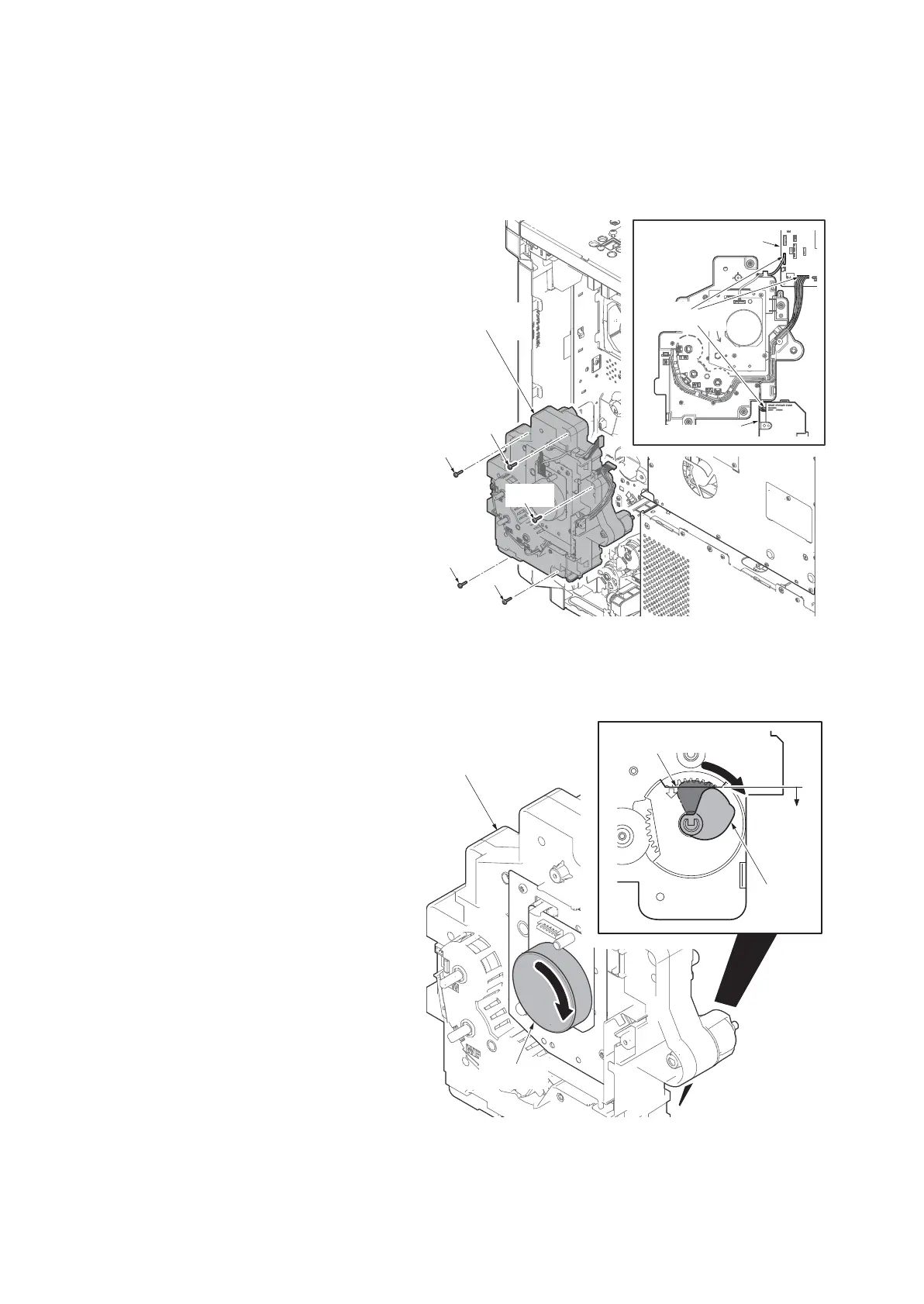
(1) Detaching and refitting the drive unit 1
Procedures
1. Remove the rear cover.
(See page 1-5-5)
2. Remove the connector from the engine
PWB.
3. Remove five screws and then remove
the drive unit.
4. Check or replace the drive unit 1 and
refit all the removed parts.
Figure 1-5-30
NOTE: When refitting the drive unit 1, checks
that the position of a cam is in the A side from
the upper limit line.
NOTE: When cam isn't in the A side from the
upper limit line, turn the motor by hand and
bring the cam into the A side.
Figure 1-5-31
Screw
Screw
Screw
Screw
Screw
Drive unit 1
Engine PWB
Connectors
Lift motor 1
A
Cam
Motor
Upper limit line
Drive unit 1











 To Next Page