Reception Features
90
5
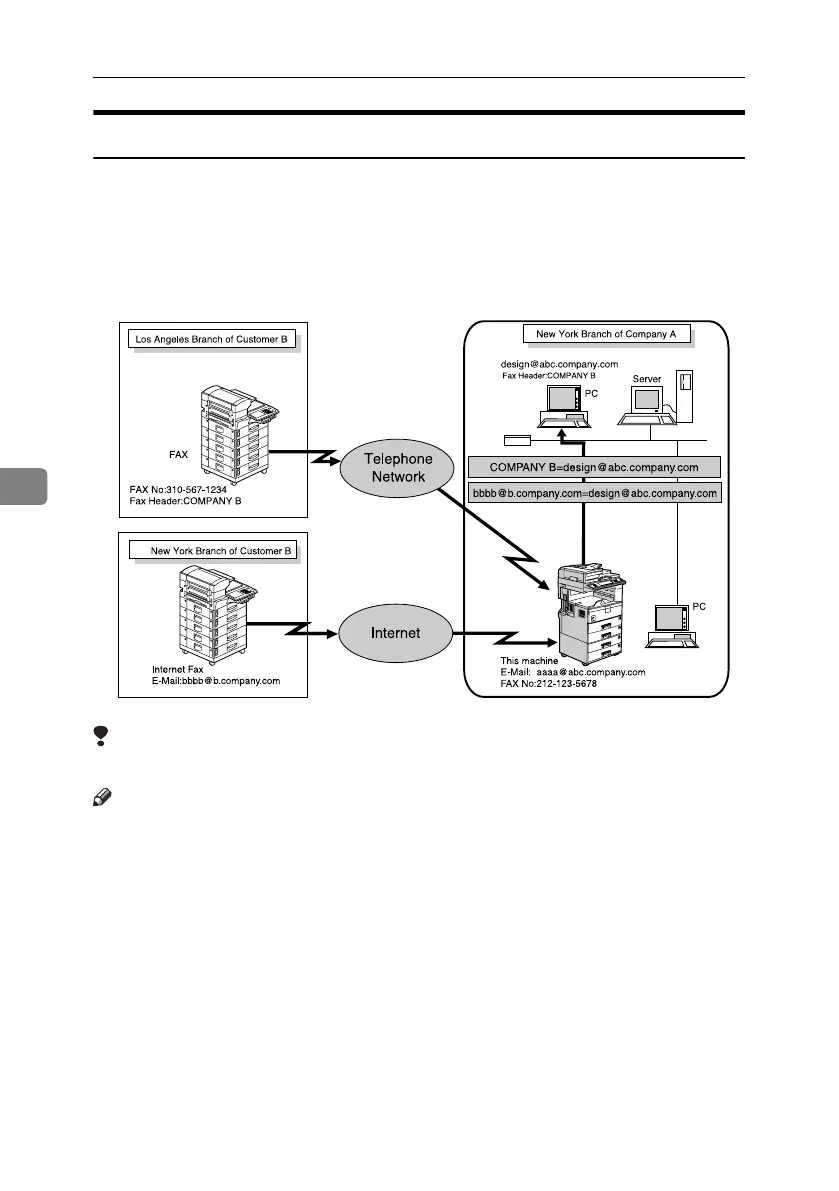
Forwarding Received Documents
This machine can forward received documents to other destinations pro-
grammed in memory based on Own Name, Own Fax Number or sender's e-mail
address. A fax number, Internet Fax address, IP-Fax address, or folder address
can be set as a Transfer Box. If an e-mail address is programmed as the destina-
tion, documents received are forwarded as e-mail.
Limitation
❒ A maximum of 500 parties can be specified in a group.
Note
❒ You need to specify the Forwarding destination in advance. See p.162 “For-
warding”.
❒ If you want to forward documents to a different destination depending on the
sender, see p.172 “Special Senders to Treat Differently”.
❒ You can select whether the machine prints out the documents it forwards
with User Parameters (switch 11, bit 6). For details, see p.167 “User Parame-
ters”.
❒ You can set whether or not the Folder Transfer Result Report is transmitted
to the specified e-mail address if folders are programmed as the forwarding
destinations to which documents are sent from all senders or Special Senders.
For details, see p.198 “Folder Transfer Result Report”.
AJC007S
RussianC4-EN_Combine-F_FM.book Page 90 Tuesday, April 5, 2005 8:22 PM



 To Next Page