Fax via Computer
122
6
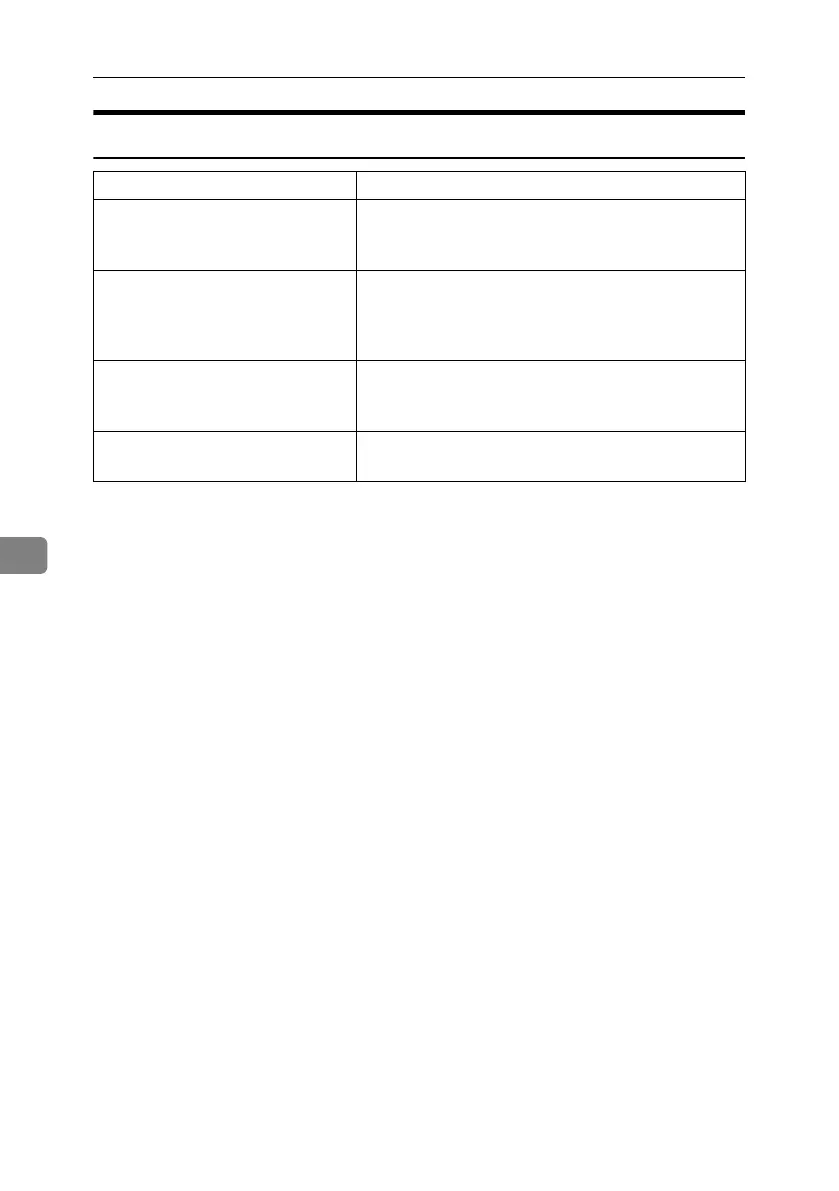
LAN-Fax Operation Messages
Message Causes and Solutions
Cannot access the print-
er. Click [retry] to send
the data again.
Check the network connection.
Check that the power is turned on.
The number of entries in
Destinations exceed the
limits. Up to 500 entries
can be entered.
The number of destinations specified exceeds the maxi-
mum possible. The maximum number of destinations
that can be specified at one time is 500.
“LAN-Fax” has already
been launched. Cannot
launch it again.
The [LAN-Fax] dialog box is already open. Quit LAN-Fax
once, and then start it up again.
Failed to allocate memo-
ry.
Available memory on the computer is insufficient. Quit
applications currently not in use.
RussianC4-EN_Combine-F_FM.book Page 122 Tuesday, April 5, 2005 8:22 PM



 To Next Page