Adding a Destination
21
2
Adding a Destination
Note
❒ A destination cannot be added us-
ing a destination list.
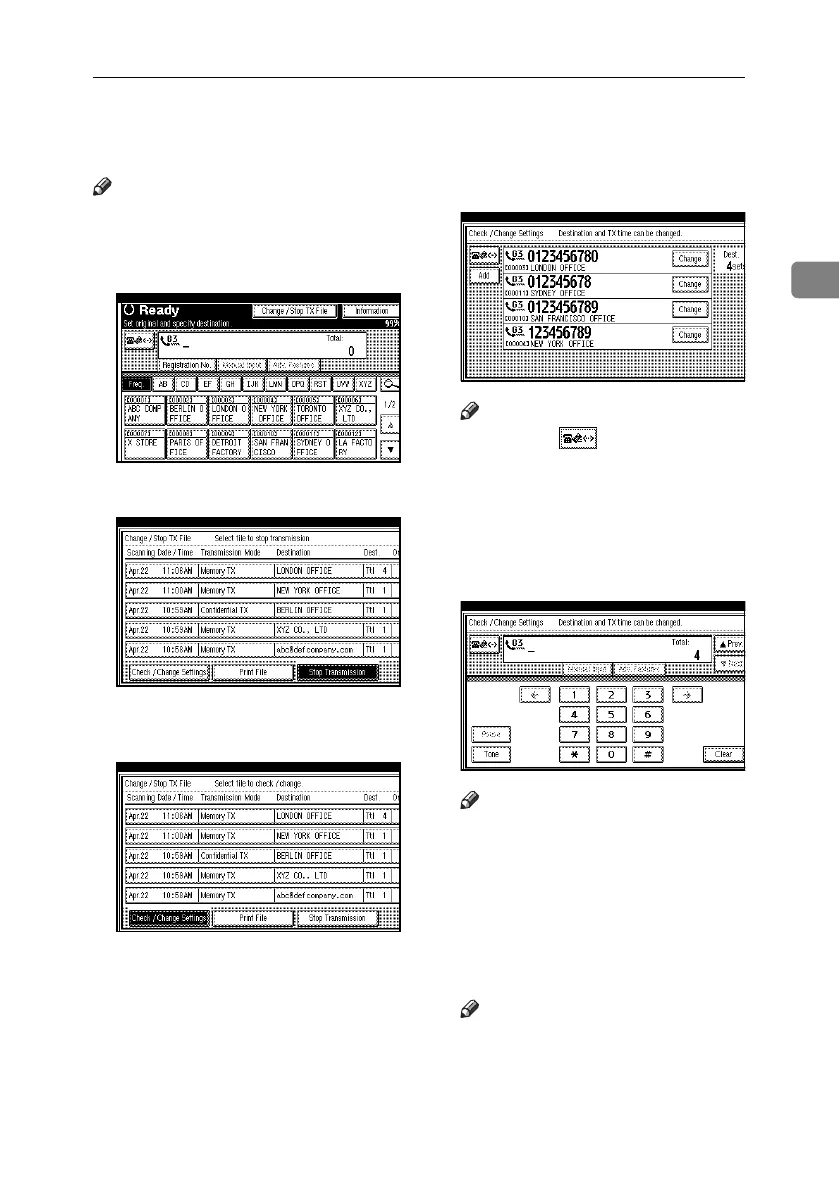
A Press [Change / Stop TX File].
B Press [Check / Change Settings].
C Select the file to which you want
to add a destination.
D Press [Add].
Note
❒ Pressing switches the des-
tination between fax number,
Internet Fax address and IP-Fax
address.
E Specify the destination using the
number keys or soft (on-screen)
keys.
Note
❒ To add an e-mail address, press
[Manual Input], and then specify
the destination.
❒ You can also program a SUB Code
or SEP Code by pressing [Adv.
Features].
F Press [Exit].
Note
❒ Repeat steps
C
through
E
, if you
want to add another destina-
tion.
G Press [Exit].
The standby display appears.
RussianC4-EN_Combine-F_FM.book Page 21 Tuesday, April 5, 2005 8:22 PM



 To Next Page