107
6. Fax via Computer
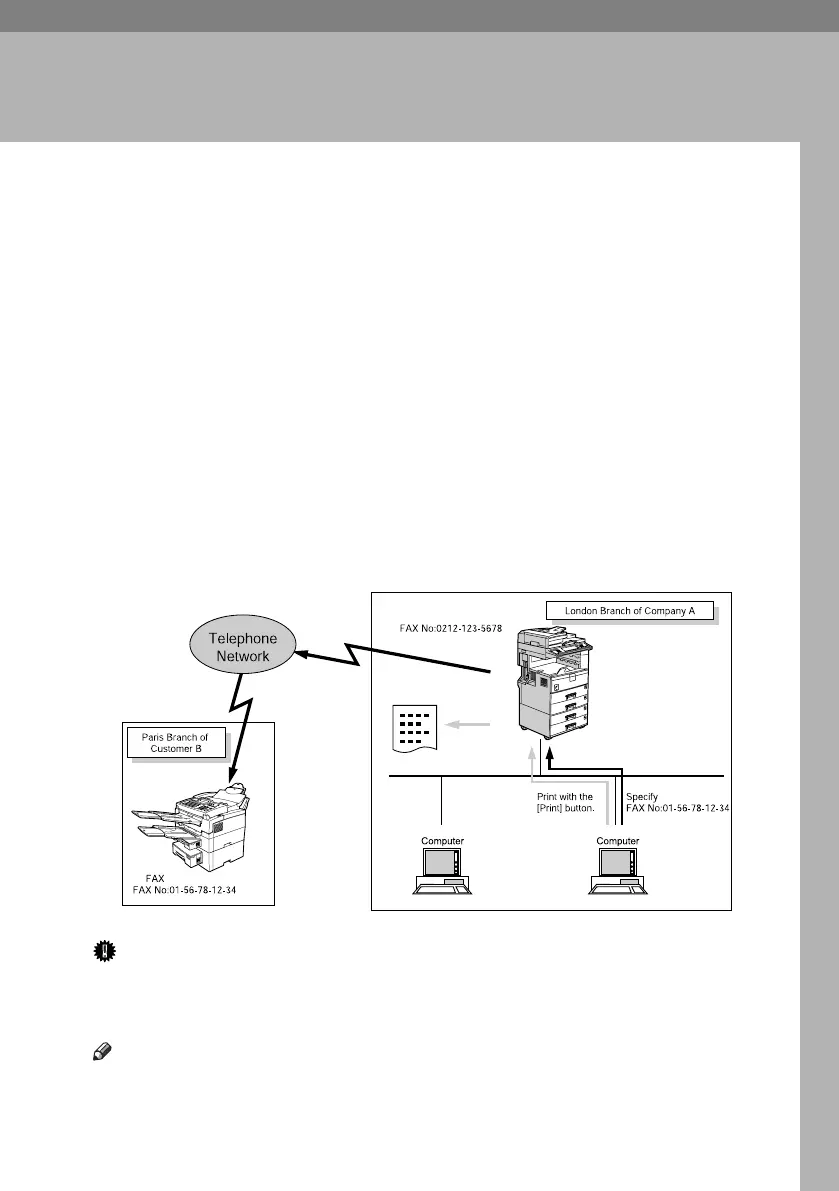
Sending Fax Documents from Computers
The optional HDD and printer/scanner unit are required.
Using computers connected to the machine through parallel ports (optional),
IEEE 1394 (IP Over 1394) ports (optional), LANs, wireless LANs (optional), or
USB 2.0 you can fax documents, created using Windows applications, to other
fax machines over a telephone line.
• To send a fax, simply select [Print] from the Windows application, then select
LAN-Fax as the printer, and then specify a destination. LAN-Fax enables pa-
perless faxing from your computer to the other destinations.
• In addition to sending faxes, the LAN-Fax Driver allows this machine to be
used for printing out documents prepared on a computer for proof checking.
• To use the LAN-Fax Driver, connect this machine to a LAN and make the nec-
essary network settings, and then install the LAN-Fax Driver and the related
utilities on your computer.
Important
❒ Errors occurring when the machine is used as a LAN-Fax will not be dis-
played on the computer. Check for errors by using a Web Image Monitor. See
Web Image Monitor help.
Note
❒ It is recommended that you use a Web Image Monitor running under the
same network environment as this machine. Otherwise, the Web browser
may not open and an error may occur.
AJC011S
RussianC4-EN_Combine-F_FM.book Page 107 Tuesday, April 5, 2005 8:22 PM



 To Next Page