Other Transmission Features
76
4
Selecting transmission options for a
single transmission
A Place the original, and then select
the scan settings you require.
Reference
p.15 “Placing Originals”, Fac-
simile Reference <Basic Features>
p.34 “Scan Settings”, Facsimile
Reference <Basic Features>
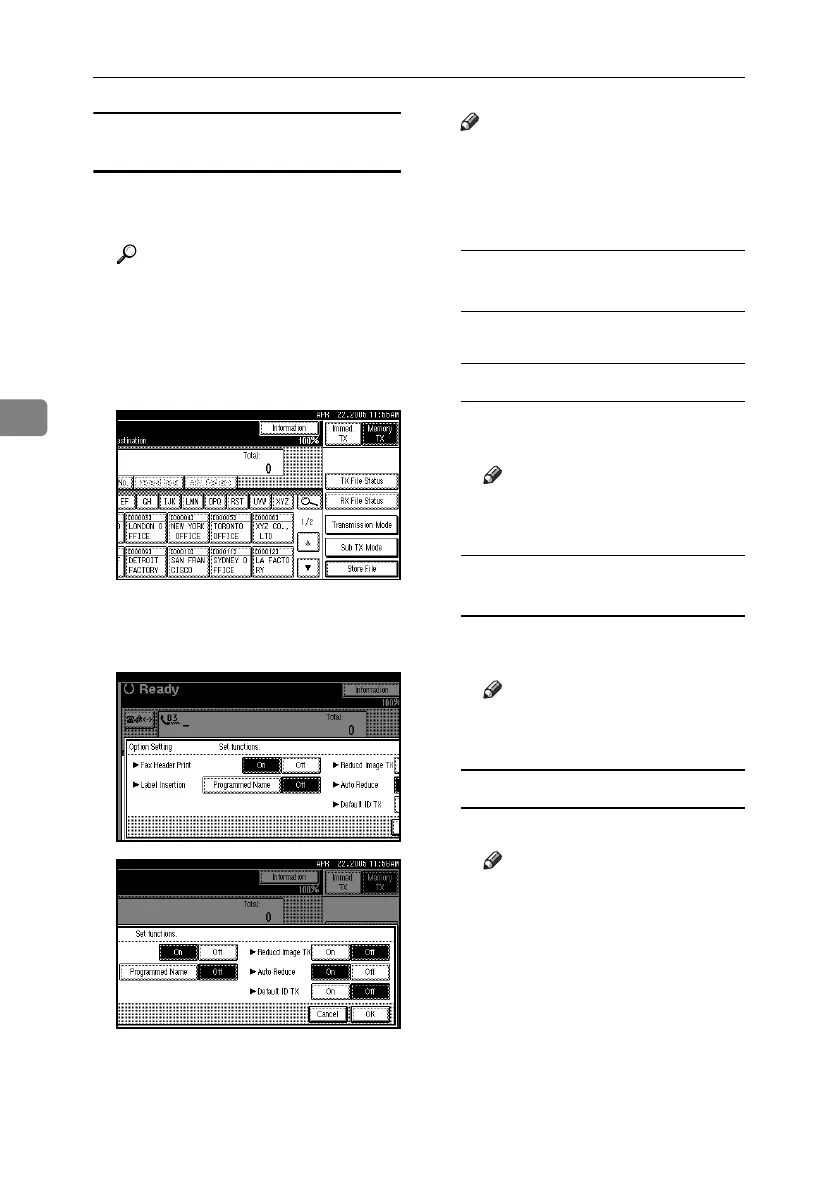
B Press [Sub TX Mode].
C Select [Options].
D Select options to be set up.
Note
❒ To close the option settings, pro-
ceed to step
E
.
❒ To cancel the option settings, press
[Cancel].
Programming the Fax Header
Print
A Press [On] for Fax Header Print.
Programming the Label Insertion
A Press [Programmed Name] for La-
bel Insertion.
Note
❒ Press [Off] if you do not want
to insert a destination.
Programming the Reduced
Image Transmission
A Press [On] in for Reduced Image
TX.
Note
❒ Press [Off] if you do not want
to do a reduced transmission.
Programming the Auto Reduce
A Press [On] for Auto Reduce.
Note
❒ Press [Off] if you do not want
to use the Auto Reduce func-
tion.
RussianC4-EN_Combine-F_FM.book Page 76 Tuesday, April 5, 2005 8:22 PM



 To Next Page