Checking and Canceling Transmission Files
20
2
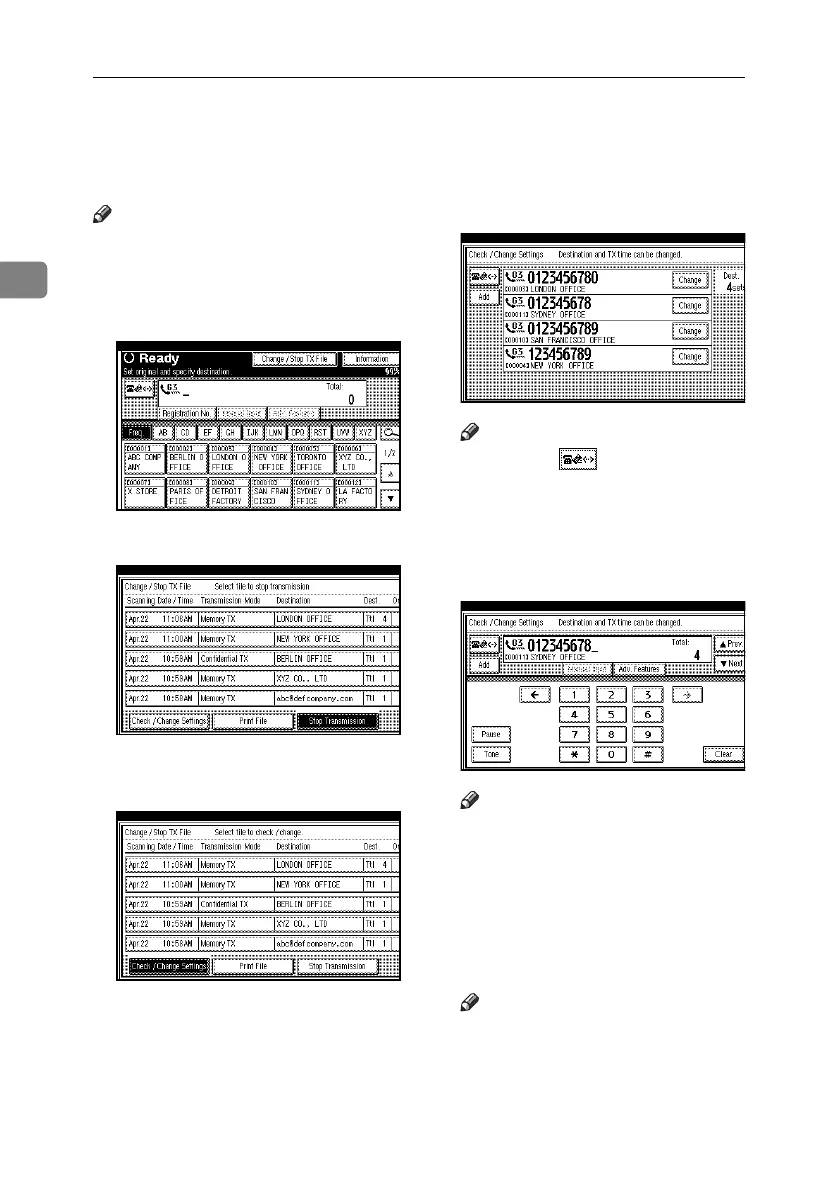
Deleting a Destination
You can delete destinations.
Note
❒ If you delete a destination that is
the only destination for a transmis-
sion, the transmission is canceled.
A Press [Change / Stop TX File].
B Press [Check / Change Settings].
C Select the file from which you want
to delete a destination.
D Press [Change] for the destination
you want to delete.
Note
❒ Pressing switches the des-
tination between fax number,
Internet Fax address and IP-Fax
address.
E Press [Clear] to delete the destina-
tion.
Note
❒ Pressing [Clear] deletes by single
digits the fax number or IP-Fax
address entered using the number
keys. The Internet Fax address
can be entirely deleted at once
by pressing [Clear].
F Press [Exit].
Note
❒ To delete another destination, re-
peat from step
C
.
G Press [Exit].
The standby display appears.
RussianC4-EN_Combine-F_FM.book Page 20 Tuesday, April 5, 2005 8:22 PM



 To Next Page