Using the Document Server
135
7
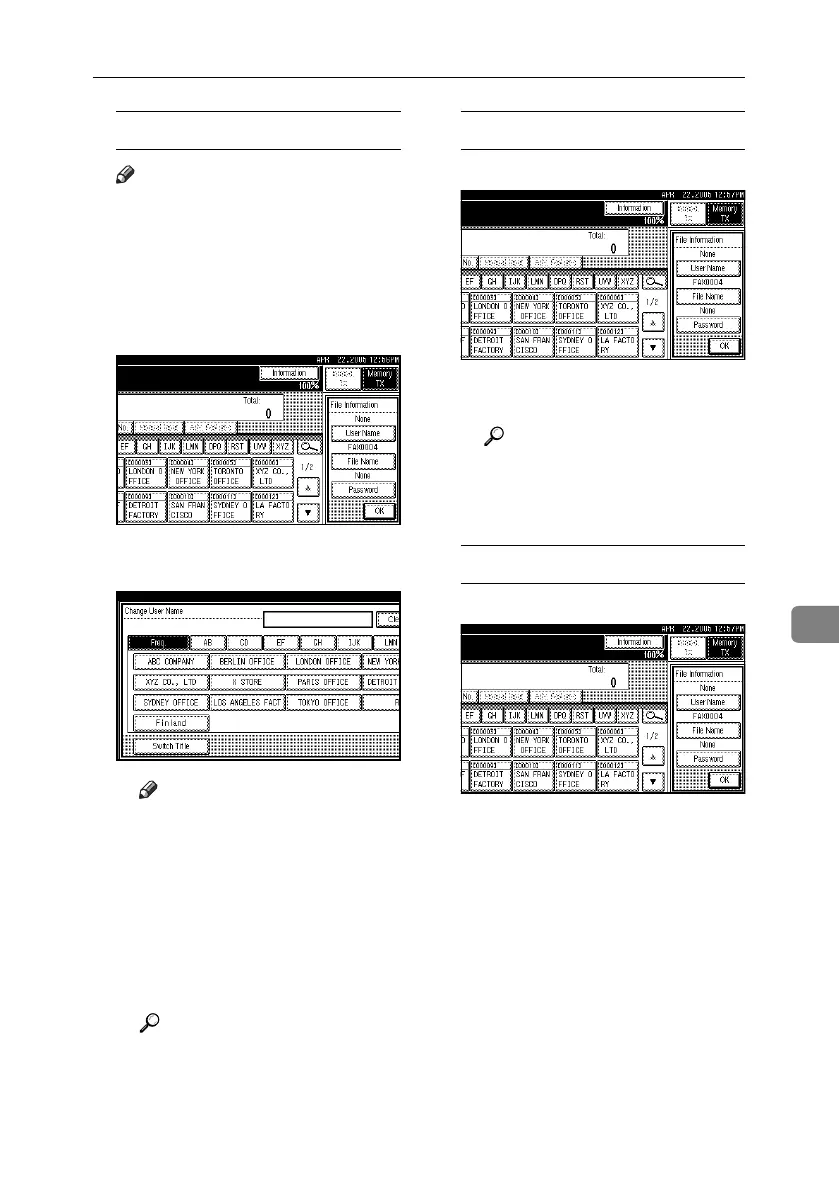
Programming a user name
Note
❒ Set a user name from those pro-
grammed in the user code. User
code is programmed in System
Settings. See “Registering a
New User Code”, General Set-
tings Guide.
A Press [User Name].
B Press the user name to be pro-
grammed, and then press [OK].
Note
❒ Press the title key to switch
between titles.
❒ To set a non-programmed user
name, press [Non-programmed
Name], and then enter the
name. User names entered
by pressing [Non-programmed
Name] are not programmed
into the user code.
Reference
“Entering Text”, General Set-
tings Guide
C Press [OK].
Setting a file name
A Press [File Name].
B Enter the file name, and then
press [OK].
Reference
“Entering Text”, General Set-
tings Guide
C Press [OK].
Setting a password
A Press [Password].
RussianC4-EN_Combine-F_FM.book Page 135 Tuesday, April 5, 2005 8:22 PM



 To Next Page