Administrator Setting
176
9
G Enter a destination name, and then
press [OK].
Enter a destination name using
Own Name or Own Fax Number.
Reference
“Entering Text”, General Set-
tings Guide
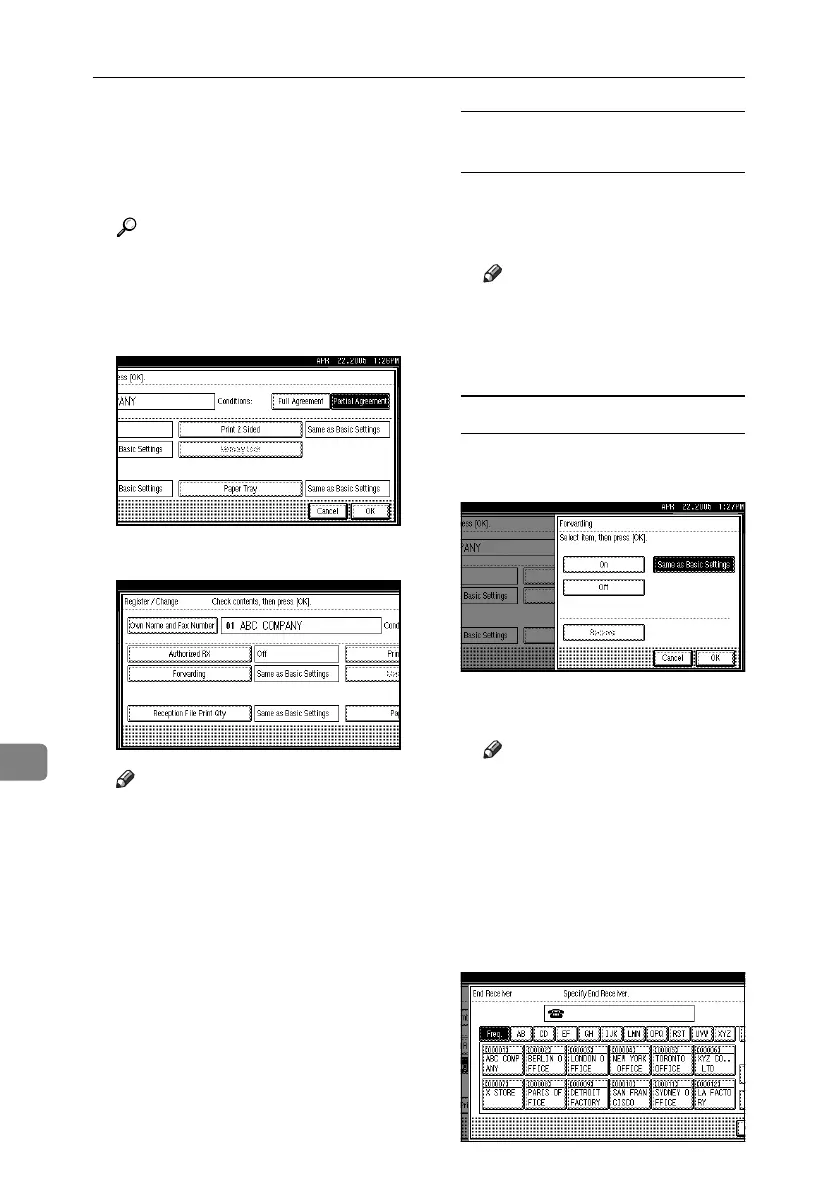
H Press [Full Agreement] or [Partial Agree-
ment].
I Select the item you want to program.
Note
❒ You must select only the item
you want to program.
❒ To cancel these settings, press
[Cancel]. The display returns to
that of step
E
.
Authorized RX (Authorized
Reception)
A Select [Authorized RX].
B Press [On] or [Off], and then press
[OK].
Note
❒ After you perform step
K
, set
“Authorized RX” of “Recep-
tion Settings” to “On”. See
p.147 “Reception Settings”.
Forwarding
A Select [Forwarding].
B Select [On] or [Off].
If you select [Off], proceed to
step D.
Note
❒ Selecting [Same as Basic Set-
tings] will result in the same
setting made for “Forward-
ing” under “Administrator
Tools”. See p.162 “Forward-
ing”.
C Press the Destination key of a
forward destination, and then
press [OK].
RussianC4-EN_Combine-F_FM.book Page 176 Tuesday, April 5, 2005 8:22 PM



 To Next Page