PLMNL0232 REV. H Effective Date: 01/14/19 10 FiberCUT
®
2D Operation Manual
2.2.2 Fiber Orientation Adjustment
If the water cooling fittings on the
fiber interfere with the fiber clamp
body, it is necessary to rotate the
fiber interface adapter.
The fiber interface adapter has
(2) red alignment dots.
The dots may or may not be at
the front of the head.
To reorient the fiber connection:
1. If necessary, remove the upper
fiber clamp according to Section
2.2.1.
2. If it is not already, position the
head so it is horizontal. See
Figure 3.
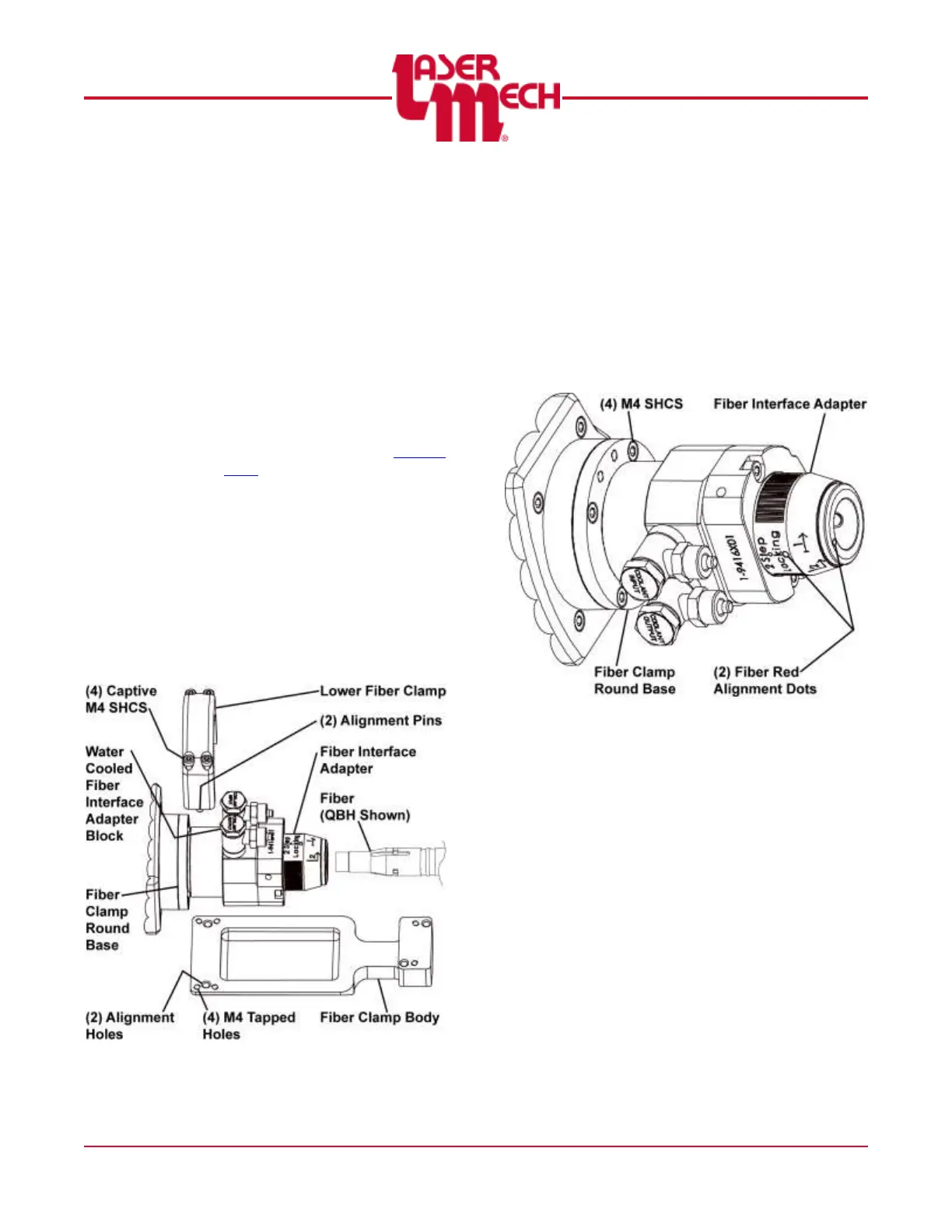
For steps 3 and 4, see Figure 5.
3. Loosen the (4) captive M4
SHCS securing the lower fiber
clamp.
4. Remove the lower fiber clamp
and fiber clamp body.
Figure 5
For steps 5 to 7, see Figure 6.
5. Loosen, but do not remove, the
(4) M4 SHCS in the round base.
6. Rotate the fiber interface
adapter so the fiber connection
(red dots) are in the desired
position.
7. Tighten the (4) M4 SHCS in the
round base.
Figure 6



 To Next Page