PLMNL0232 REV. H Effective Date: 01/14/19 16 FiberCUT
®
2D Operation Manual
2.4.2 Manual Beam Centering
The beam must be aligned parallel
and centered through the head.
Check the beam alignment
during initial installation or
whenever the fiber or collimator
optics are replaced.
Do not look directly into the red
beam.
Visually locating the beam inside
the tip orifice can be difficult.
Adequate lighting and a
magnifying glass are highly
recommended.
If necessary, Laser Mechanisms
offers an alternative solution. See
Section 2.4.1, Beam Centering
Camera.
To manually center the beam in the
gas jet tip:
1. Verify that the high power beam
is disabled.
2. Put a piece of translucent tape
on the end of the gas jet tip.
3. Turn on the laser’s internal red
pointing beam and observe the
position of the beam on the
tape. If the beam is not centered
in the gas jet tip orifice, proceed
to step 4.
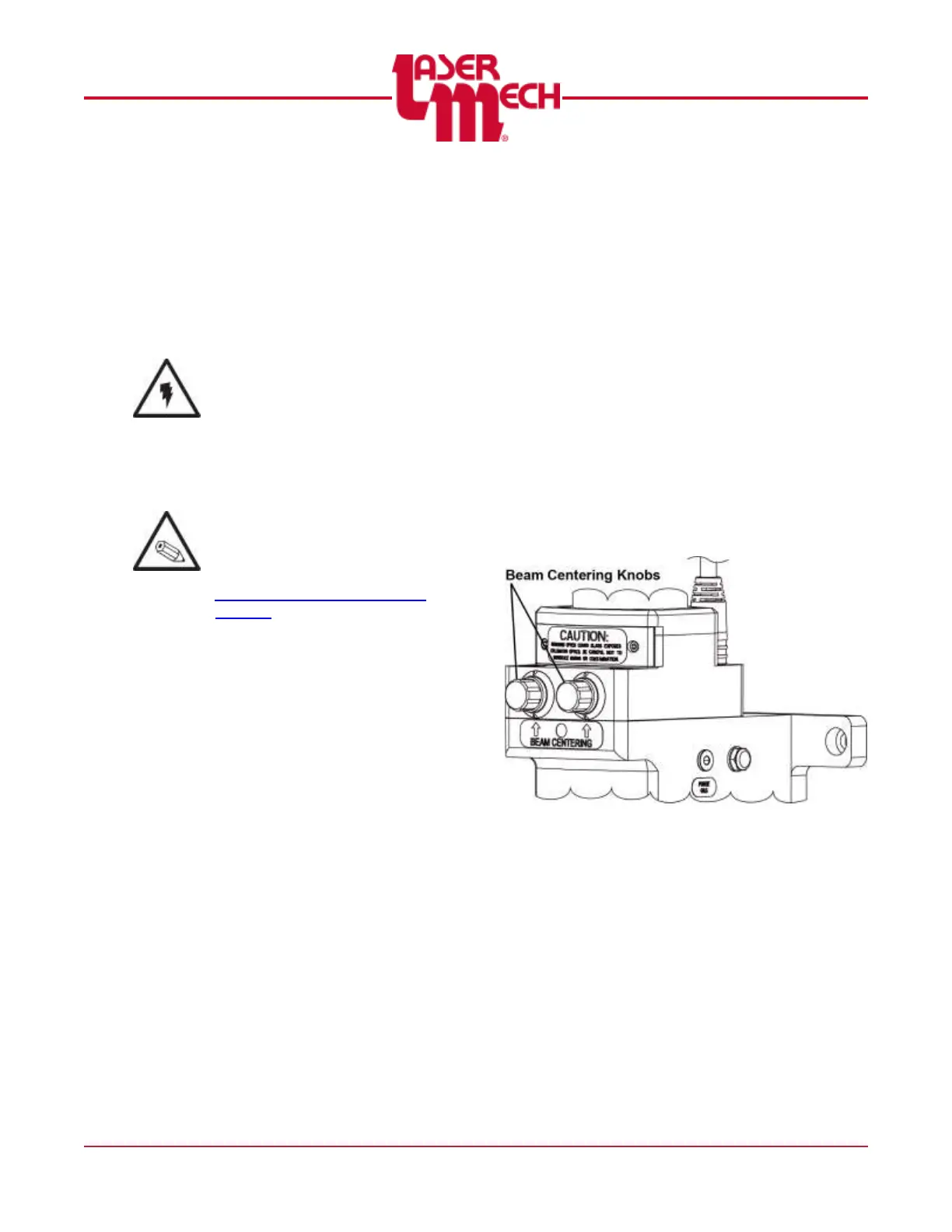
4. Center the beam inside the gas
jet tip orifice using the beam
centering knobs. See Figure 16.
Some trial and error may be
necessary.
Figure 16



 To Next Page