PLMNL0232 REV. H Effective Date: 01/14/19 33 FiberCUT
®
2D Operation Manual
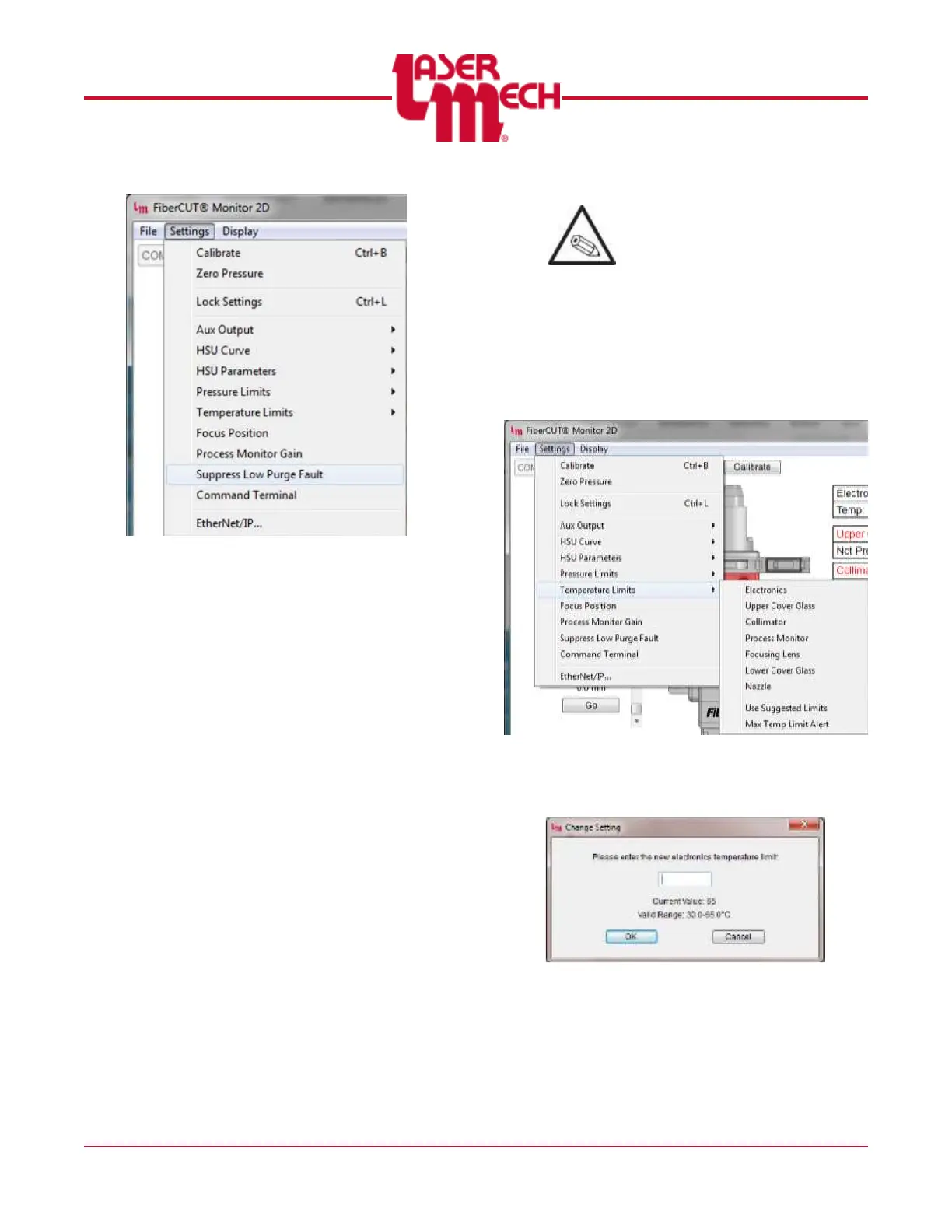
Figure 38
A checkmark appears if a fault
is currently suppressed.
Clicking the checkmark will
restore the fault.
The fault is automatically
restored following a power cycle
of the controller.
4.4.5 Temperature Limits
The acceptable upper temperature
limit can be set as desired within the
stated range for the following
components:
Electronics
Upper Cover Glass
Collimator
Process Monitor
Focusing Lens
Lower Cover Glass
Nozzle
Temperature readings outside the
acceptable range will result in a
fault condition.
To modify the desired upper
temperature limit:
1. Click the Settings menu in the
upper left corner of the Main
screen and hover over
Temperature Limits. Click on the
desired temperature range to
set. See Figure 39.
Figure 39
A screen similar to Figure 40 will
appear.
Figure 40
2. Enter a desired upper limit that
is within stated range using the
provided value field.
3. Click OK to apply the settings.



 To Next Page