PLMNL0232 REV. H Effective Date: 01/14/19 36 FiberCUT
®
2D Operation Manual
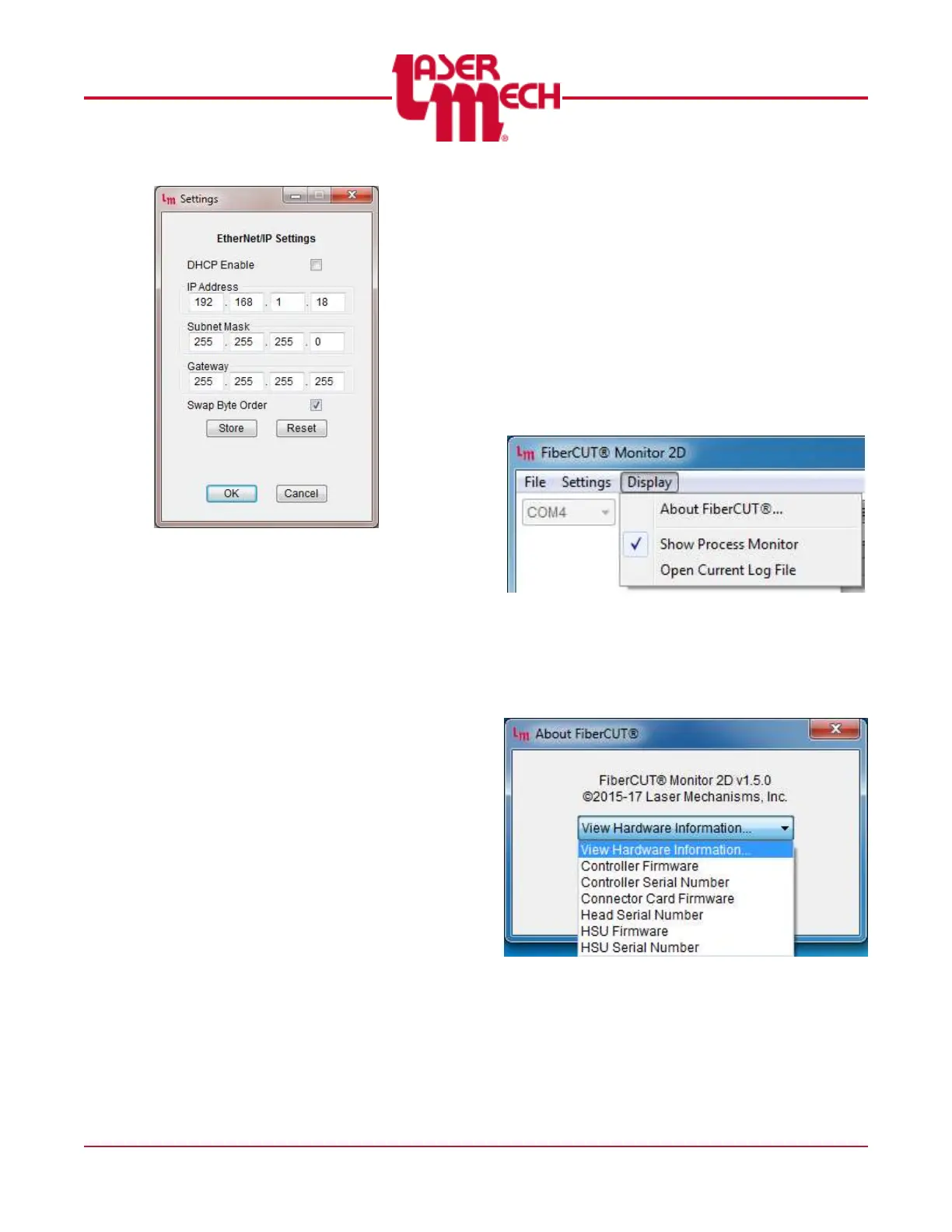
Figure 46
3. Configure the DHCP, IP
Address, Subnet Mask, and
Gateway settings as desired.
When using EtherNet/IP,
Swap Byte Order should be
checked.
4. Click OK to apply the settings.
5. If desired, click the Store button
to save the changes to the
control box.
6. If desired, click the Reset button
to reset the control box and
implement the new
configuration.
Otherwise, power must be
cycled in order for new
settings to take effect.
4.5 FiberCUT
®
Monitor System
Identification Information
The hardware, controller, interface, and
HSU are all specific to your system. So,
version and serial numbers are critical in
order for Laser Mechanisms to provide
support.
To display system information:
1. Click the Display menu in the upper left
corner of the Main screen and select
About FiberCUT
®
… See Figure 47.
Figure 47
2. Click on the View Hardware
Information drop down menu in the pop
up box that appears and the image
shown in Figure 48 will appear.
Figure 48
3. Click on the appropriate line to view the
identifying information for the desired
item.
4. Repeat steps 2 and 3 as needed.
5. Click OK to exit the About FiberCUT
®
screen.



 To Next Page