ELD2-RS70** User Manual
Note: For parameters which No. have a suffix of “*”,changed contents will be validated when you
turn on the control power.
Torque command direction selection
Select the direction positive/negative direction of torque command
Specify the direction with the sign of torque command
Torque command input[+] positive direction, [-] negative direction
Specify the direction with torque command sign(TC-SIGN).
OFF: positive direction ON: negative direction
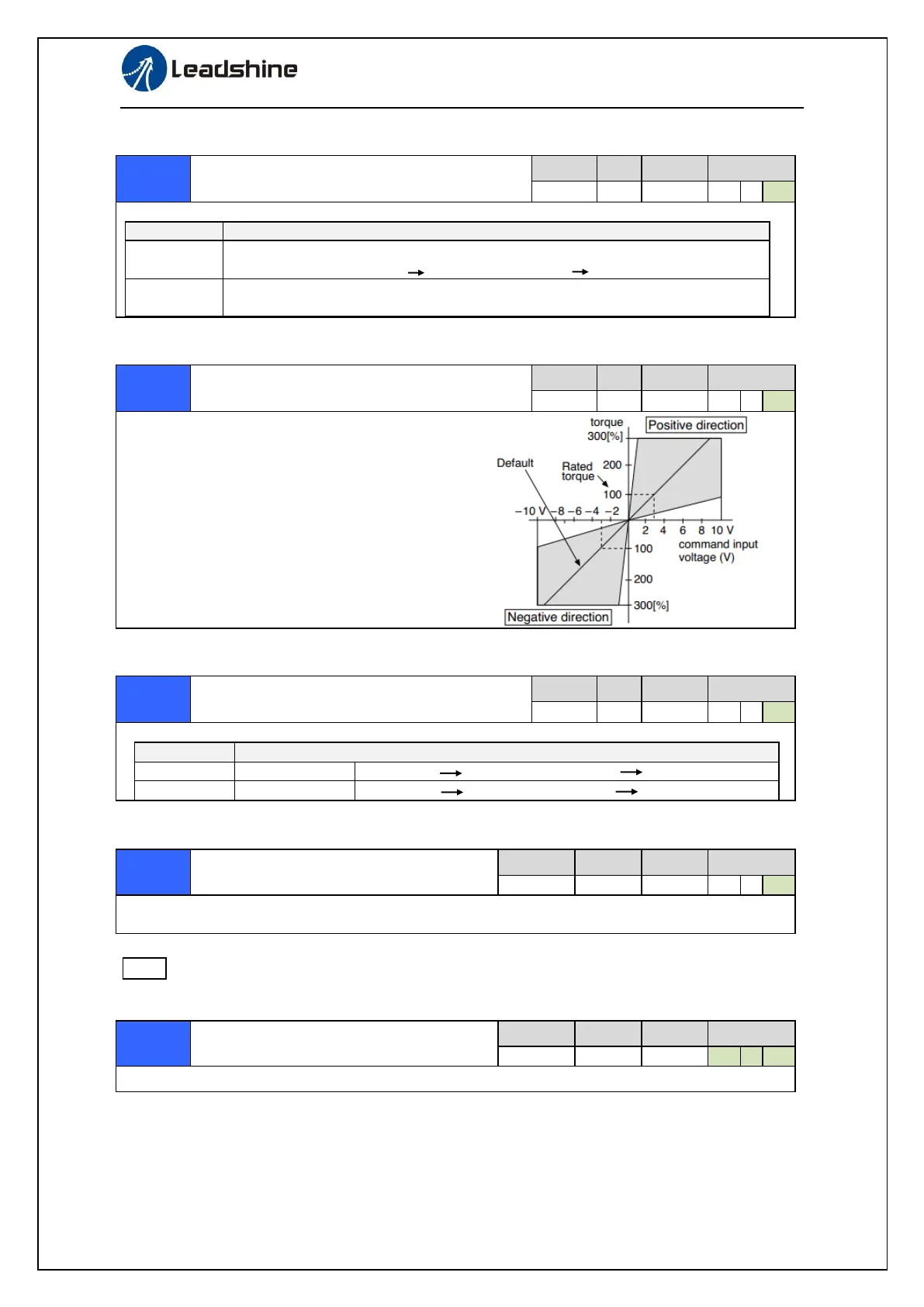
Torque command input gain
Based on the voltage (V) applied to the analog torque
command (TRQR),set up the conversion gain to
torque command(%) .
⚫ Unit of the setup value is [0.1V/100%] and
set up input voltage necessary to produce
the rated torque.
⚫ Default setup of 30 represents 3V/100%
Torque command input reversal
Set up the polarity of the voltage applied to the analog torque command(TRQR).
Direction of motor output torque
[+ voltage] [+ direction] [- voltage] [-direction]
[+ voltage] [- direction] [- voltage] [+direction]
Set up the speed limit used for torque controlling.
During the torque controlling, the speed set by the speed limit value cannot be exceeded.
Motor rotate maximum speed limit
Set up motor running max rotate speed, but can’t be exceeded motor allowed max rotate speed.


 To Next Page