EasyManua.ls Logo

Leadshine ELD2-RS70 Series - Page 42

Leadshine ELD2-RS70 Series
92 pages
Print Icon
To Next Page IconTo Next Page
To Previous Page IconTo Previous Page
Loading...
42
ELD2-RS70** User Manual
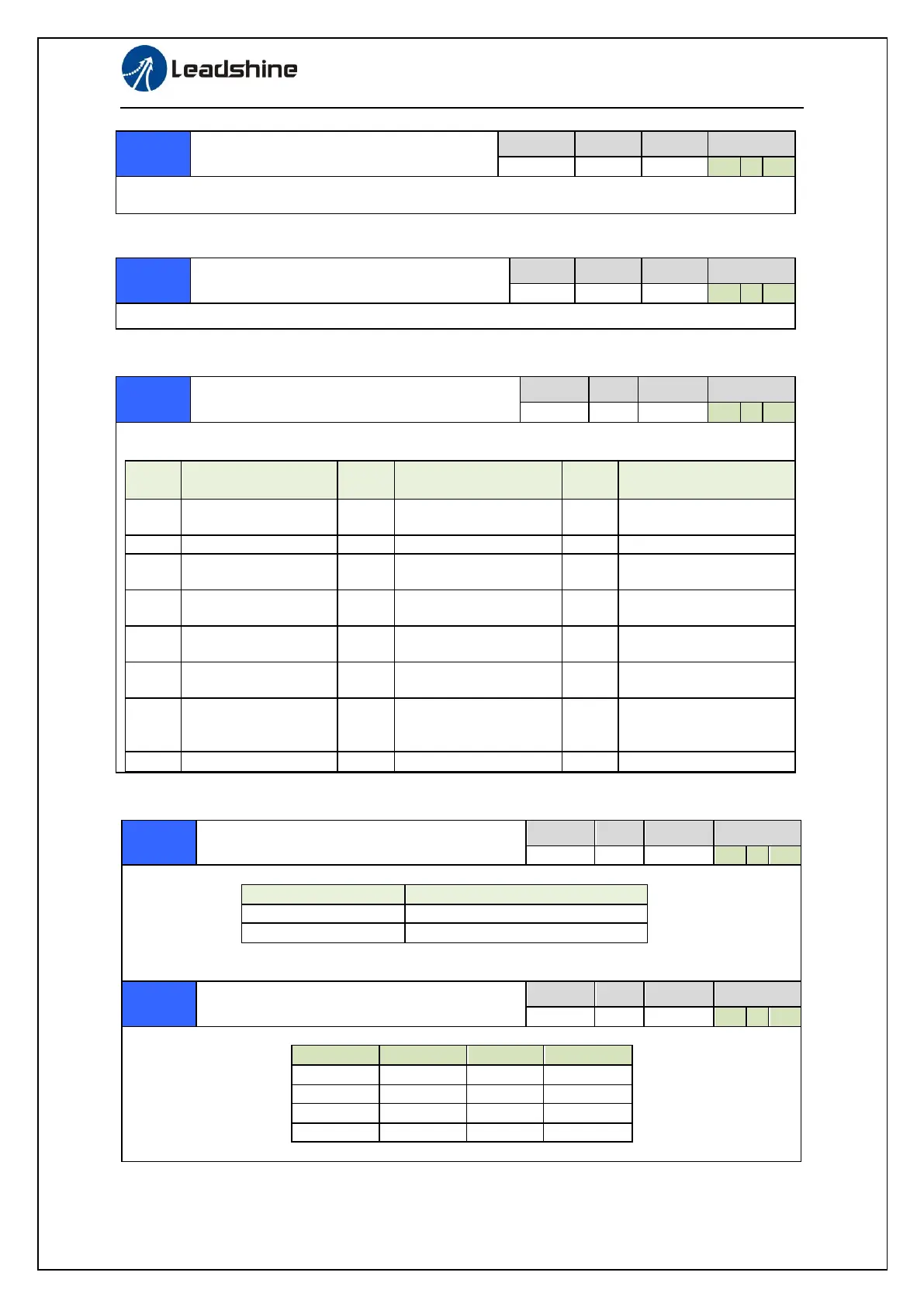
Over-speed level setup
Range
unit
default
Related
control mode
0-20000
r/min
0
P
S
T
If the motor speed exceeds this setup value, Err1A.0 [over-speed protect] occurs.
The over-speed level becomes 1.2 times of the motor max, speed by setting up this to 0.
I/F reading filter
Range
unit
default
Related
control mode
0-255
0.1ms
0
P
S
T
I/O input digital filtering; higher setup will arise control delay.
LED initial status
Range
unit
default
Related
control mode
0-35
-
1
P
S
T
You can select the type of data to be displayed on the front panel LED (7-segment) at the initial
status after power-on.
Setup
value
content
Setup
value
content
Setup
value
content
0
Positional command
deviation
10
I/O signal status
27
Voltage across PN [V]
1
Motor speed
11
Analog input value
28
Software version
2
Positional command
speed
12
Error factor and
reference of history
29
Driver serial number
3
Velocity control
command
16
Inertia ratio
30
Motor serial number
4
Torque command
17
Factor of no-motor
running
31
Accumulated operation
time
5
Feedback pulse sum
23
Communication axis
address
33
Temperature
information
6
Command pulse sum
24
Encoder positional
deviation[encoder
unit]
36
Safety condition
monitor
9
Control mode
Pr5.29*
RS485 communication mode setting
Range
unit
default
Related
control mode
0-6
-
5
P
S
T
RS485 communication mode setting
Setup value
RS485 communication mode
5
Latest Version
21
The previous Version
Pr5.30*
Baud rate setup of RS485
communication
Range
unit
default
Related
control mode
0-6
-
2
P
S
T
You can set up the communication speed of RS485.
Set value
Baud rate
Set value
Baud rate
0
2400bps
4
38400bps
1
4800bps
5
57600bps
2
9600bps
6
115200bps
3
19200bps
Baud rate error is 2400-38400bps±5% ,57600-115200bp2%

Table of Contents