1.Removeallmediafromthedrivesandturnoffallattacheddevicesandthecomputer.Then,disconnect
allpowercordsfromelectricaloutletsanddisconnectallcablesthatareconnectedtothecomputer.
2.Removethecomputercover.See“Removingthecomputercover”onpage90.
3.Removethefrontbezel.See“Removingandreinstallingthefrontbezel”onpage90.
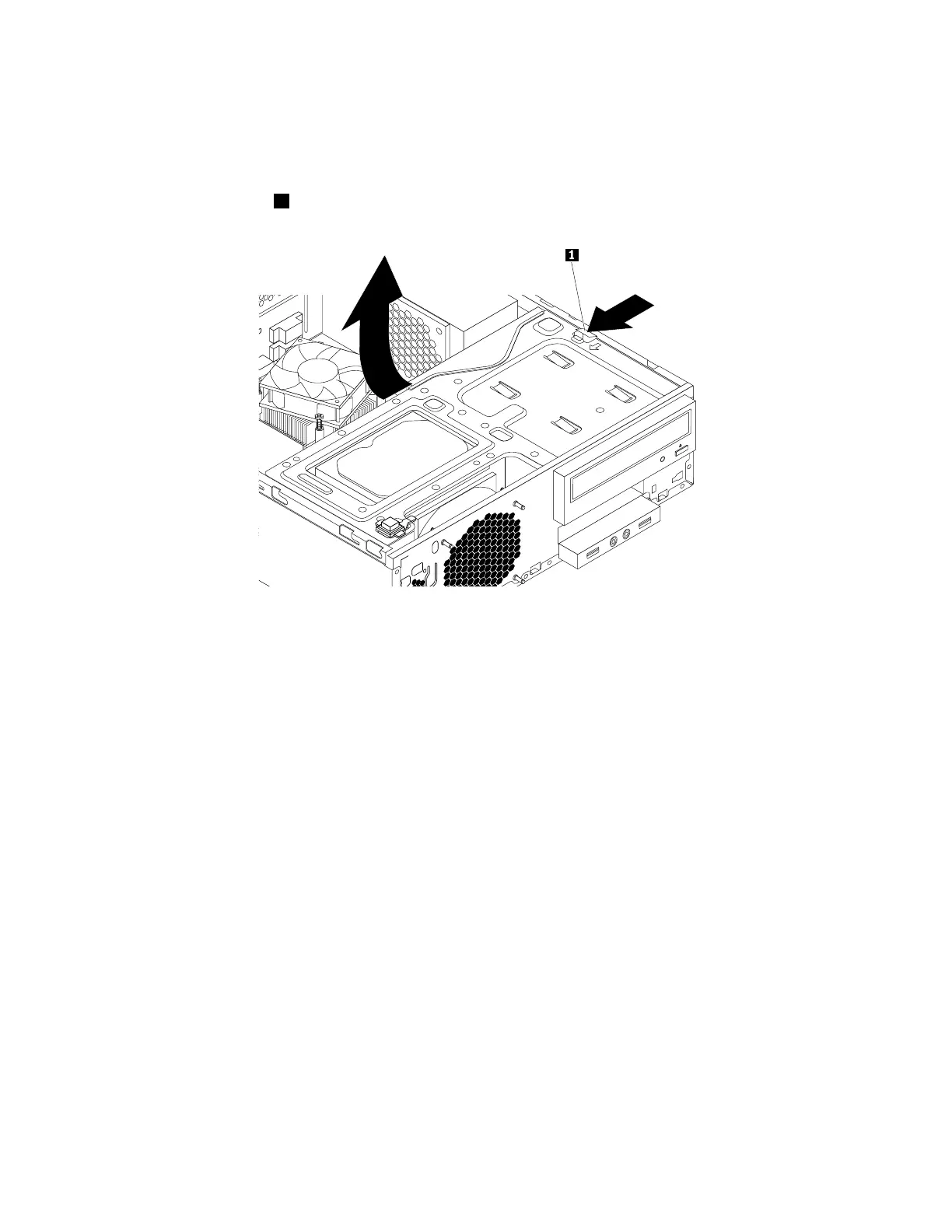
4.Pressthereleasetab1asshownandpivotthedrivebayassemblyupward.
Figure40.Pivotingthedrivebayassemblyupward
5.Ifyouareinstallinganewopticaldrive,dothefollowing:
a.Removethemetalstaticshieldfromthebay.
b.Locatetheoptical-driveretainerfromtheleftsideofthecomputer.Pushtheoptical-driveretainer
downwardstounlocktheretainer.Thenlifttheoptical-driveretaineroutofthechassis.
Ifyouarereplacinganopticaldrive,dothefollowing:
a.Disconnectallcablesfromtherearoftheopticaldrive.
110ThinkStationP310HardwareMaintenanceManual













 To Next Page