100
RC300RC300hNavi(EE)
3-4. Favourite destinations
nations.
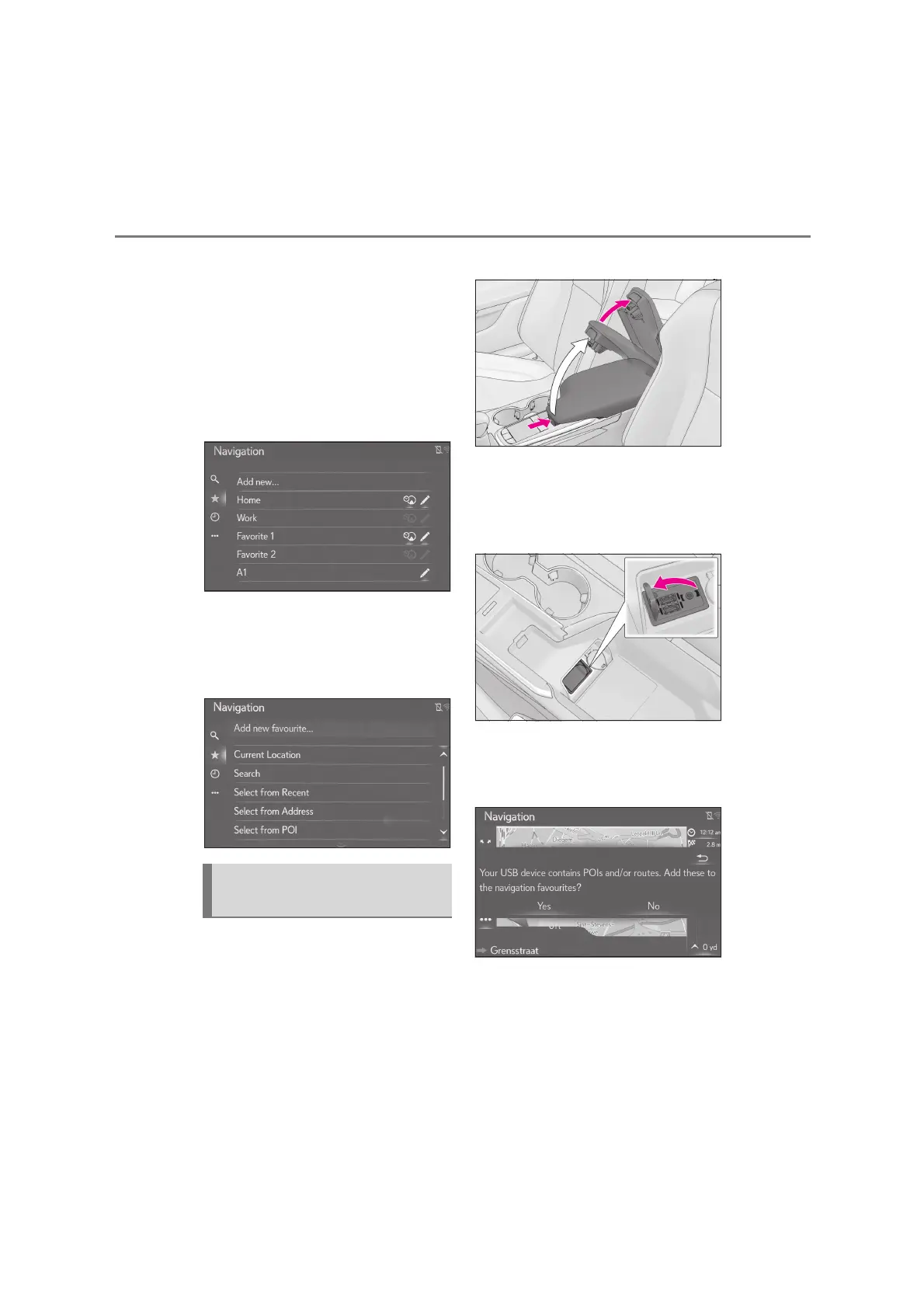
1 Press the “MENU” button on the
Remote Touch and then select
“Destination” on the menu screen.
2 Select “Favourites”.
3 Select “Home”, “Work”, “Favourite
1” and “Favourite 2” if not registered
yet.
4 Select “Yes” if the confirmation
screen appears.
5 Select the desired method to enter
the location.
The POIs and routes that are regis-
tered on your Lexus portal site can be
transferred via a USB memory. They
will be stored in the favourites list.
1 Push the knob.
Lift by hand to fully open the console
box.
2 Open the cover of the USB/AUX
port.
3 Connect a USB memory.
4 Select “Yes” when the confirmation
screen appears.
5 Check that a progress bar is being
displayed while the data loading is
in progress.
To cancel this function, select “Can-
cel”.
Transferring POIs and routes via
a USB memory





 To Next Page