68
RC300RC300hNavi(EE)
3-1. Basic operation
2 Press the button on the Remote
Touch.
Press the touch pad to return to the
current position.
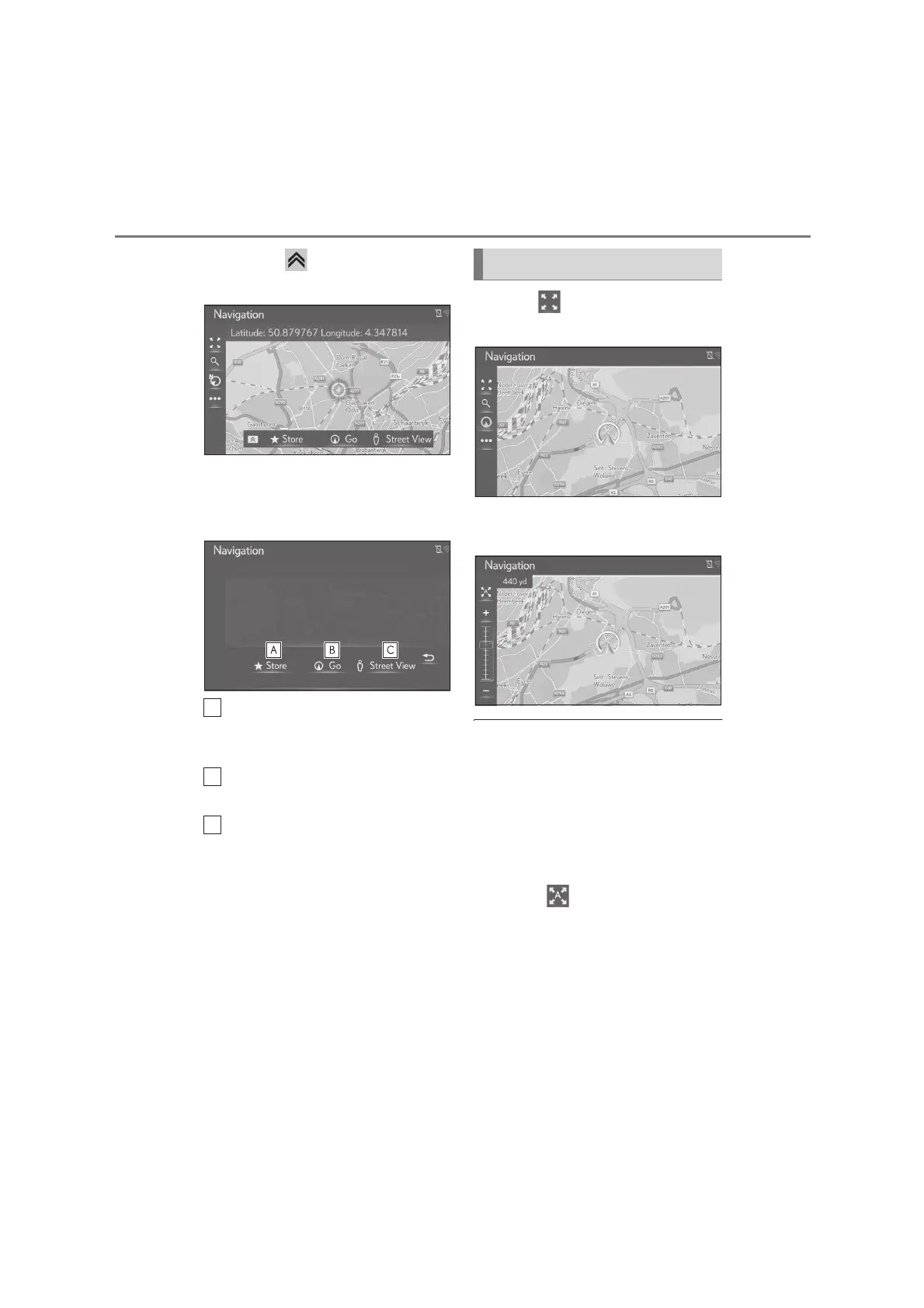
3 Select the desired entry.
Select to register in favourites list.
To change the icon, name, etc.:
(P.101)
Select to set as a destination.
(P.87)
Select to display the Street View.
(P.222)
1 Select on the map screen.
(P.62)
2 Select “+” or “-” to change the scale
of the map screen.
The scale of the map screen can also be
changed on the touchpad of the Remote
Touch with your finger.
Pinch out on the touchpad to zoom in and
pinch in to zoom out. (P.28)
●
The scale of the map screen can also be
changed the following ways:
• Dragging the scale bar marking to the
desired point.
●
Each time is selected, the automatic
map zoom is turned on/off.
The default automatic zoom level can be
selected. (P.106)
●
The scale range is from 10 m to 1000 km
(10 yd. to 600 miles).
●
After the scale has been changed, the
new scale indicator will be displayed for a
while.
Map scale






 To Next Page