26
RC300RC300hNavi(EE)
2-1. Basic information before operation
2-1.Basic information before operation
After a few seconds, the caution
screen will be displayed.
Waiting about 5 seconds or selecting
“Continue” switches to the last dis-
played screen.
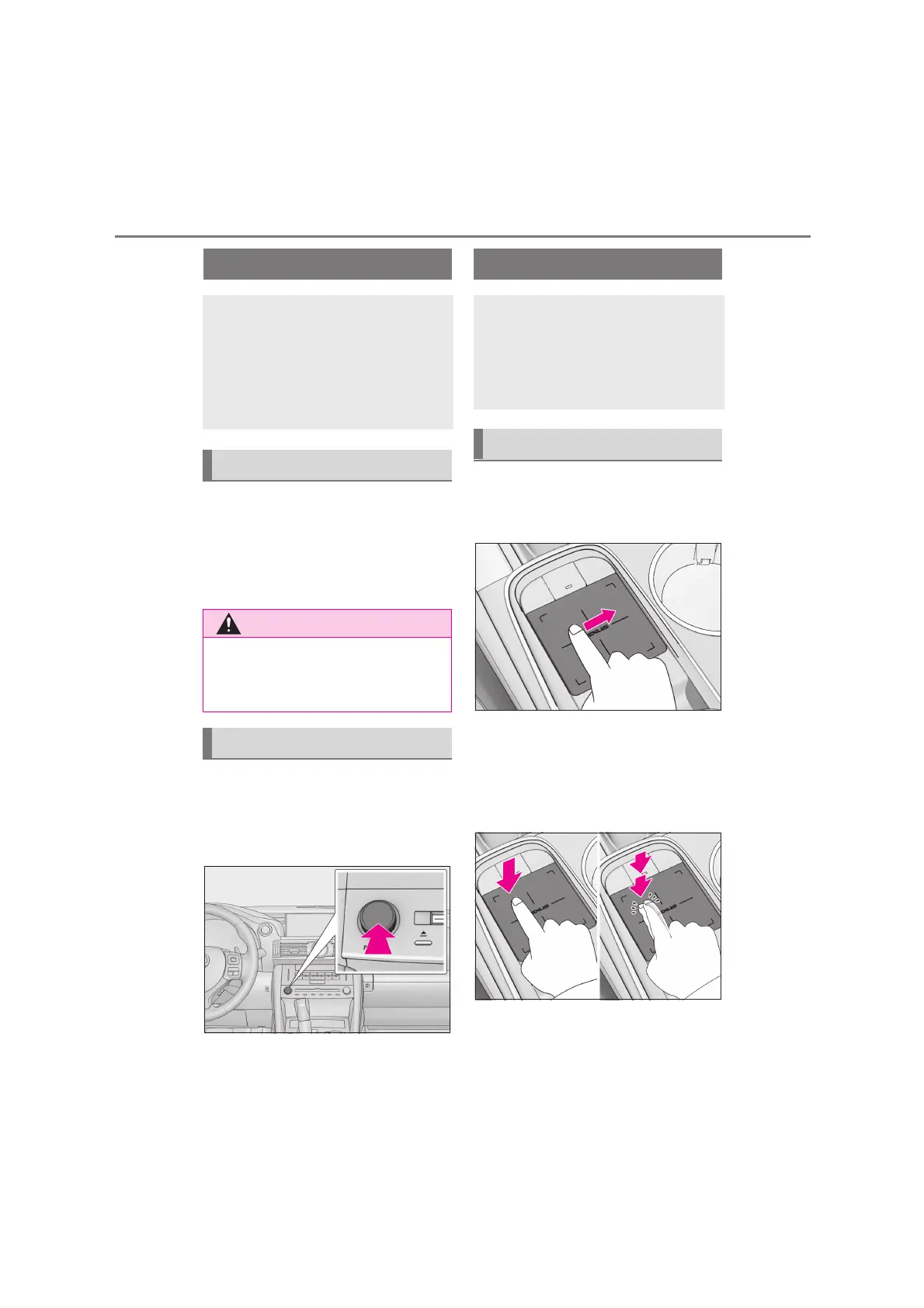
When system response is extremely
slow, the system can be restarted.
1 Press and hold the “PWR•VOL”
knob for 3 seconds or more.
1 Use the touchpad of the Remote
Touch to select the desired button
on the screen.
2 The buttons on the screen can be
selected by either depressing or
double tapping on the touchpad.
Once a button has been selected,
the screen will change.
When the pointer moves close to a
button, it will automatically snap to
that button and the Remote Touch
Initial screen
When the engine switch <power
switch> is turned to ACCESSORY
or IGNITION ON mode <ON
mode>, the initial screen will be dis-
played and the system will begin
operating.
Caution screen
●
When the vehicle is stopped with the
engine running <the hybrid system
operating>, always apply the parking
brake for safety.
Restarting the system
How to use the touchpad
This system can be operated by the
touchpad when the engine switch
<power switch> is in ACCESSORY
or IGNITION ON mode <ON
mode>.
Touchpad operation






 To Next Page