33
2
RC300RC300hNavi(EE)
2-1. Basic information before operation
Basic function
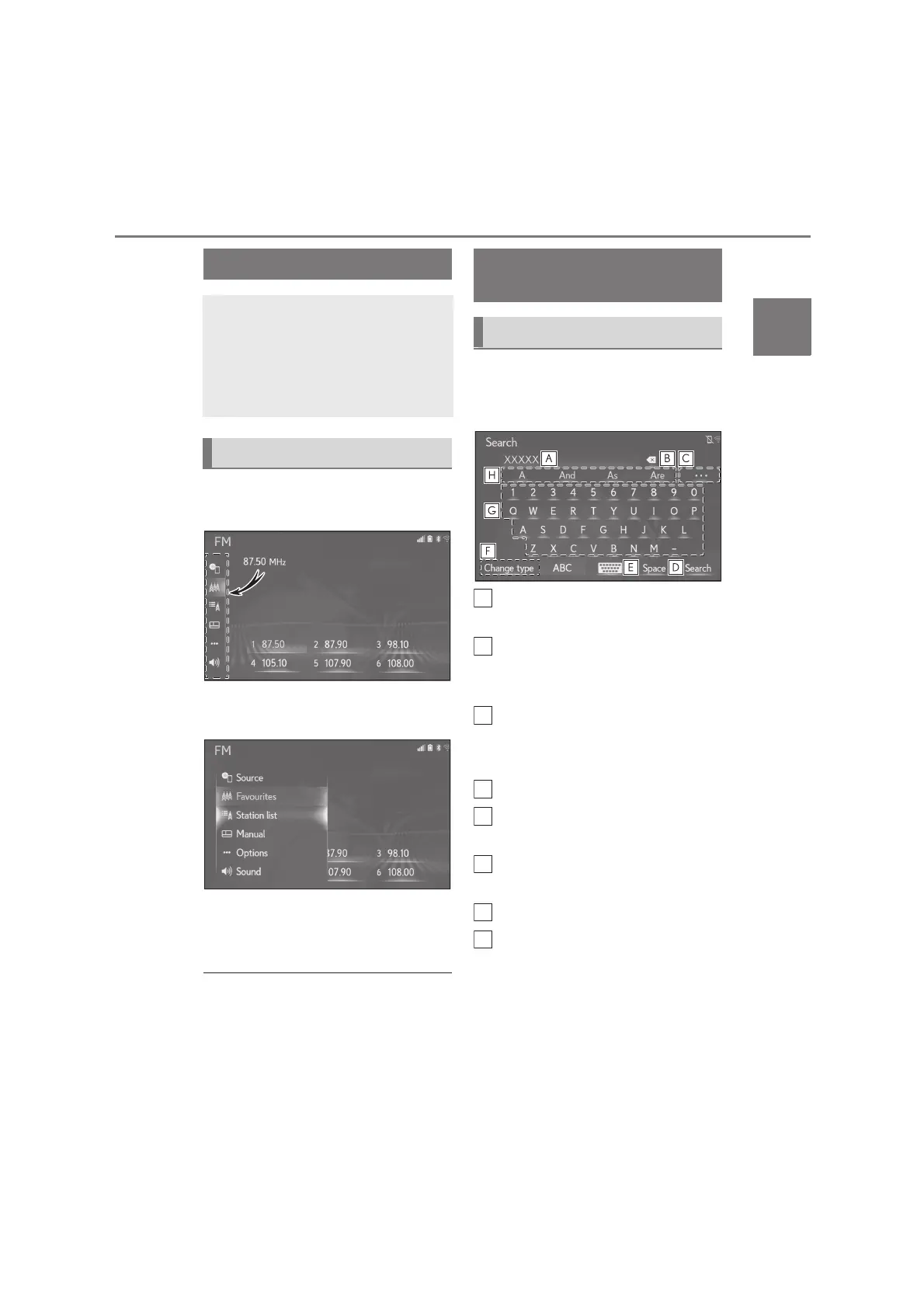
1 Move the cursor over the sub menu
icon.
2 Select the desired option on the
sub menu.
The sub menu closes when the cur-
sor is moved away from the sub
menu.
●
The sub menu items differ according to
the function.
●
In the full screen display on the 10.3-inch
display model, the sub menu is opened all
the time.
When searching by an address, name,
etc., or entering data, letters and num-
bers can be entered via the screen.
Text field. Entered character(s) will
be displayed.
Select to erase one character.
Select and hold to continue erasing
characters.
Select to display a list of predictive
text candidates when there is more
than one.
*
(P.34)
Select to make a space on cursor.
Select to change character and
keyboard layout.
Select to change character and
keyboard types. (P.34)
Select to enter desired characters.
Select to display predictive text
candidates for entered text.
*
(P.34)
*
: These functions are not available in
some languages.
Sub menu
Various options can be selected
using the sub menu displayed on the
left side of the main screen.
Move the cursor over the sub menu
icon to display the sub menu.
Displaying the sub menu
Entering letters and num-
bers/list screen operation
Entering letters and numbers






 To Next Page