17
1
RC300RC300hNavi(EE)
1-1. Basic function
Quick guide
7-inch display model
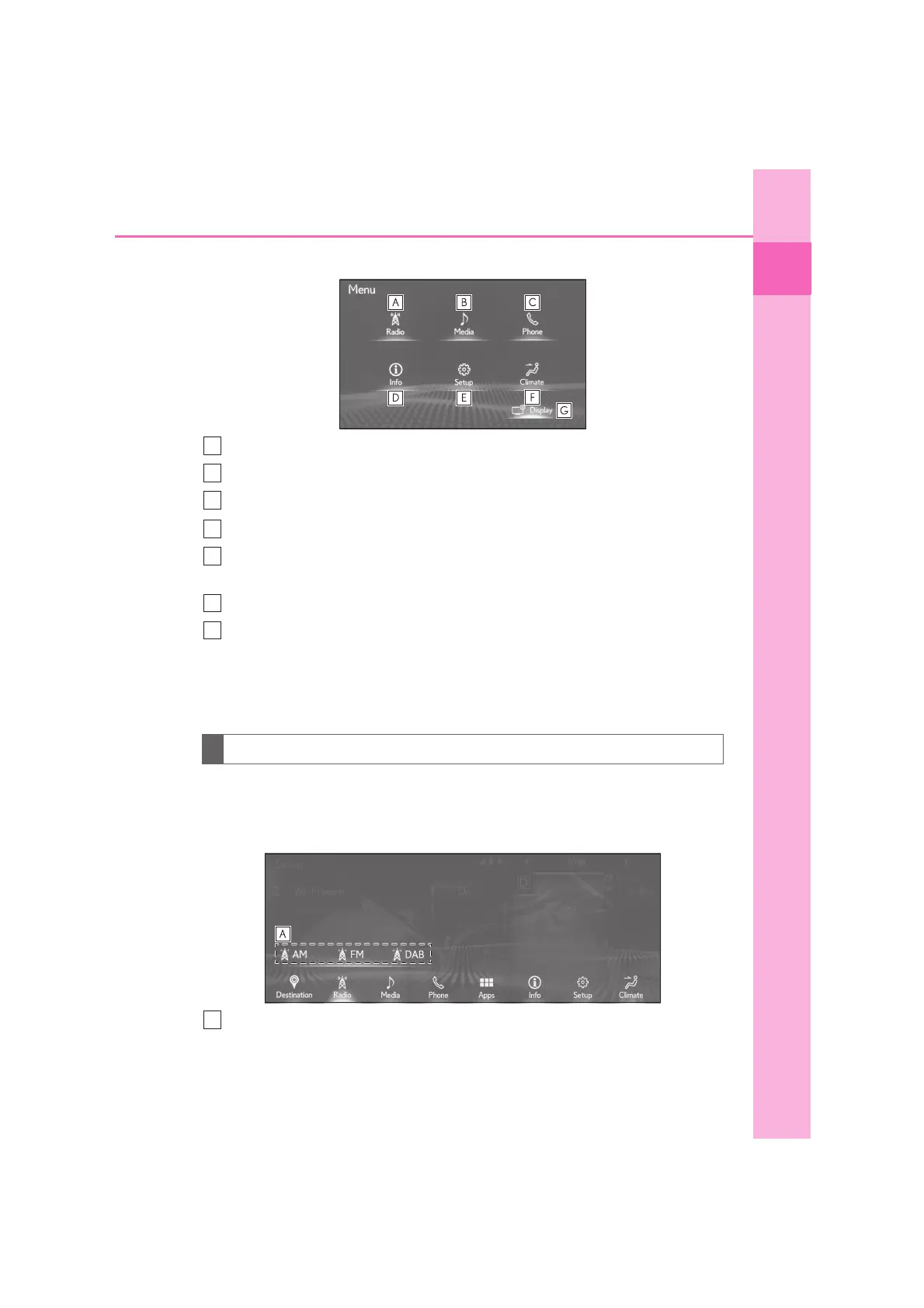
Select to display the radio control screen. (P.116)
Select to display the media control screen. (P.116)
Select to display the hands-free control screen. (P.186)
Select to display the energy monitor
*1
or fuel consumption screen.
*2
Select to display the general settings screen. (P.53)
• Move the cursor over the sub menu icon to display the “Setup” screen. (
P.20
)
Select to display the air conditioning control screen.
*2
Select to adjust the contrast and brightness of the screens, turn the screen off,
etc. (P.55)
*1
: Vehicles with hybrid system
*2
: Refer to the “OWNER’S MANUAL”
Moving the cursor over a switch on the menu screen causes shortcut switches to
display for that switch.
The shortcut switches can be used to perform operation procedures more quickly.
On cursor shortcut
How to use “On cursor shortcut” (10.3-inch display model)





 To Next Page