95
3
RC300RC300hNavi(EE)
3-3. Route guidance
Navigation system
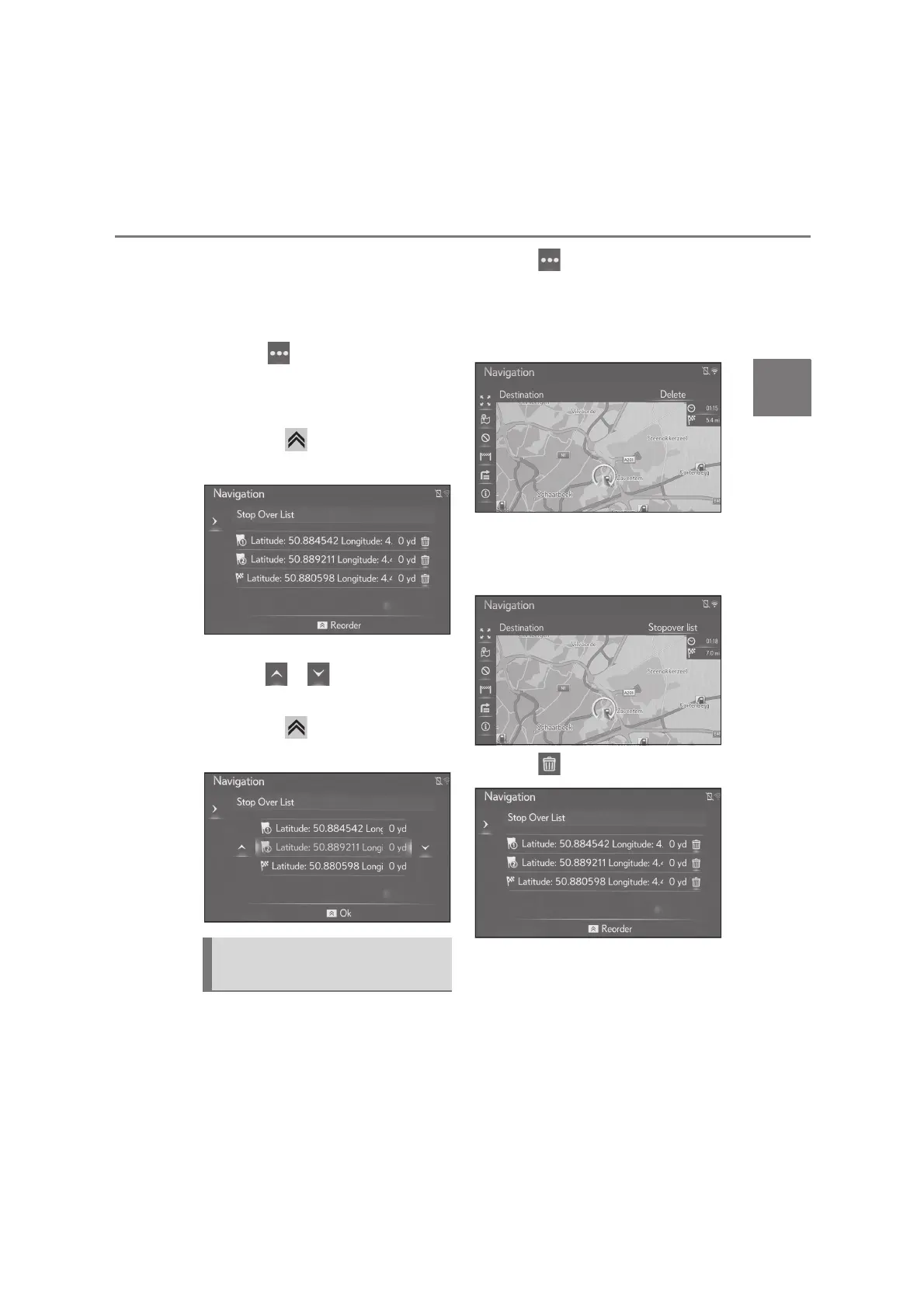
been set, the arrival order of the desti-
nations can be changed.
1 Press the “MAP” button on the
Remote Touch.
2 Select on the map screen.
3 Select “Route”
4 Select “Stopover list”.
5 Press the button on the Remote
Touch.
6 Select the desired destination and
select or to change the
arrival order.
7 Press the button on the Remote
Touch.
1 Press the “MAP” button on the
Remote Touch.
2 Select on the map screen.
3 Select “Route”
When a destination is set
4 Select “Delete”.
When a destination and stopovers
are set
4 Select “Stopover list”.
5 Select .
When desired stopover is selected, the
stopover information can be displayed.
(P.78)
6 Select “Yes”.
Deleting stopovers and destina-
tion






 To Next Page