EXTERNAL EQUIPMENT SETUP
20
EXTERNAL EQUIPMENT SETUP
GG
Do not connect to both Video
and S-Video at the same time. In
the event that you connect both
Video and the S-Video cables,
only the S-Video will work.
CAUTION
GG
The picture quality is improved: ; compared to normal
composite (RCA cable) input.
NOTE
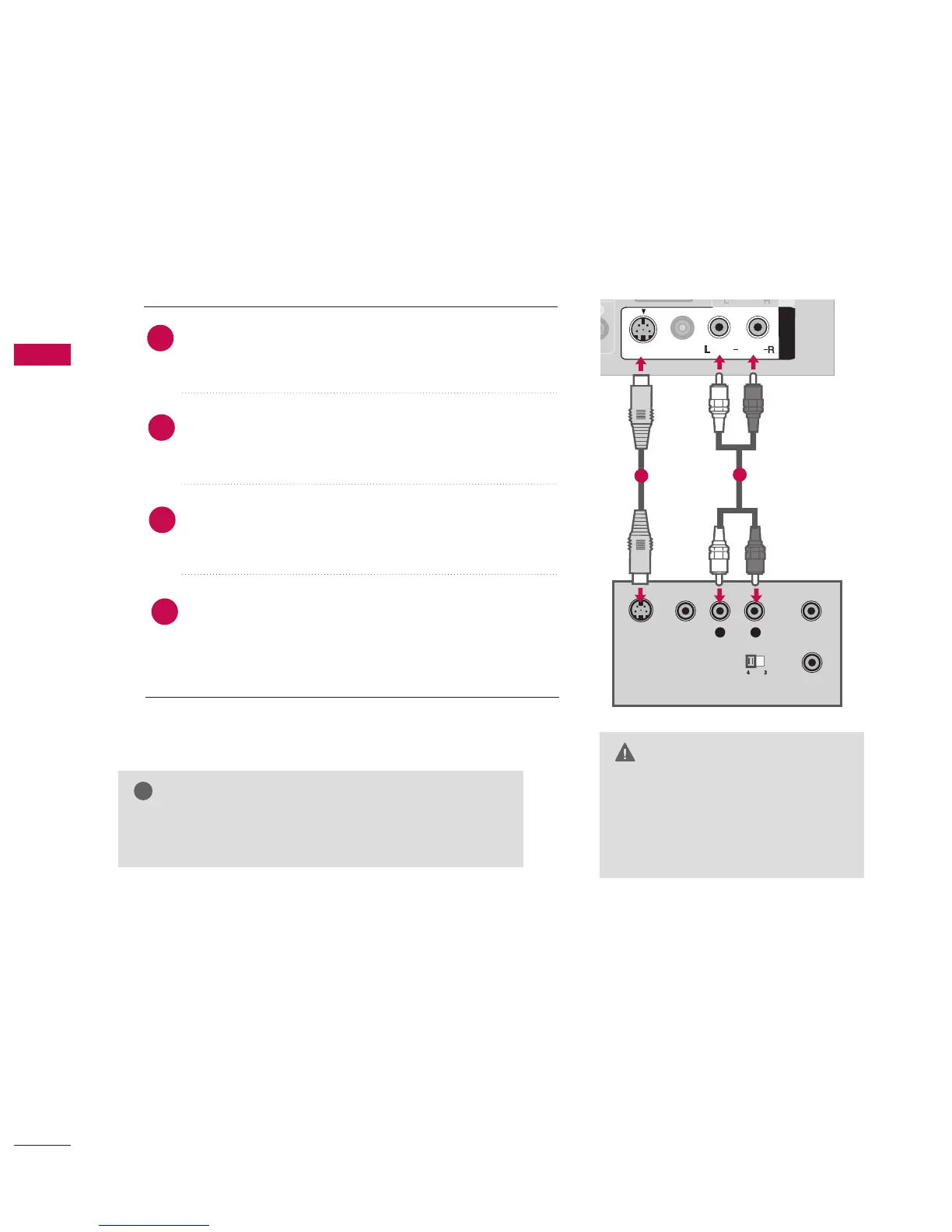
When connecting with an S-Video cable
Connect the S-VIDEO output of the VCR to the SS--VVIIDDEEOO
input on the set.
Connect the audio outputs of the VCR to the AAUUDDIIOO
input jacks on the set.
Insert a video tape into the VCR and press PLAY on the
VCR.
(
Refer to the VCR owner’s manual.
)
Select AAVV11 input source using the IINNPPUUTT button on
the remote control.
If connected to AAVV IINN 22 input, select AAVV22 input
source.
2
1
1
2
3
4



 To Next Page