EasyManua.ls Logo

LG 32LCD7D-AB - Picture Control

LG 32LCD7D-AB
98 pages
Print Icon
To Next Page IconTo Next Page
To Previous Page IconTo Previous Page
Loading...
60
PICTURE CONTROL
PICTURE CONTROL
XD DEMO
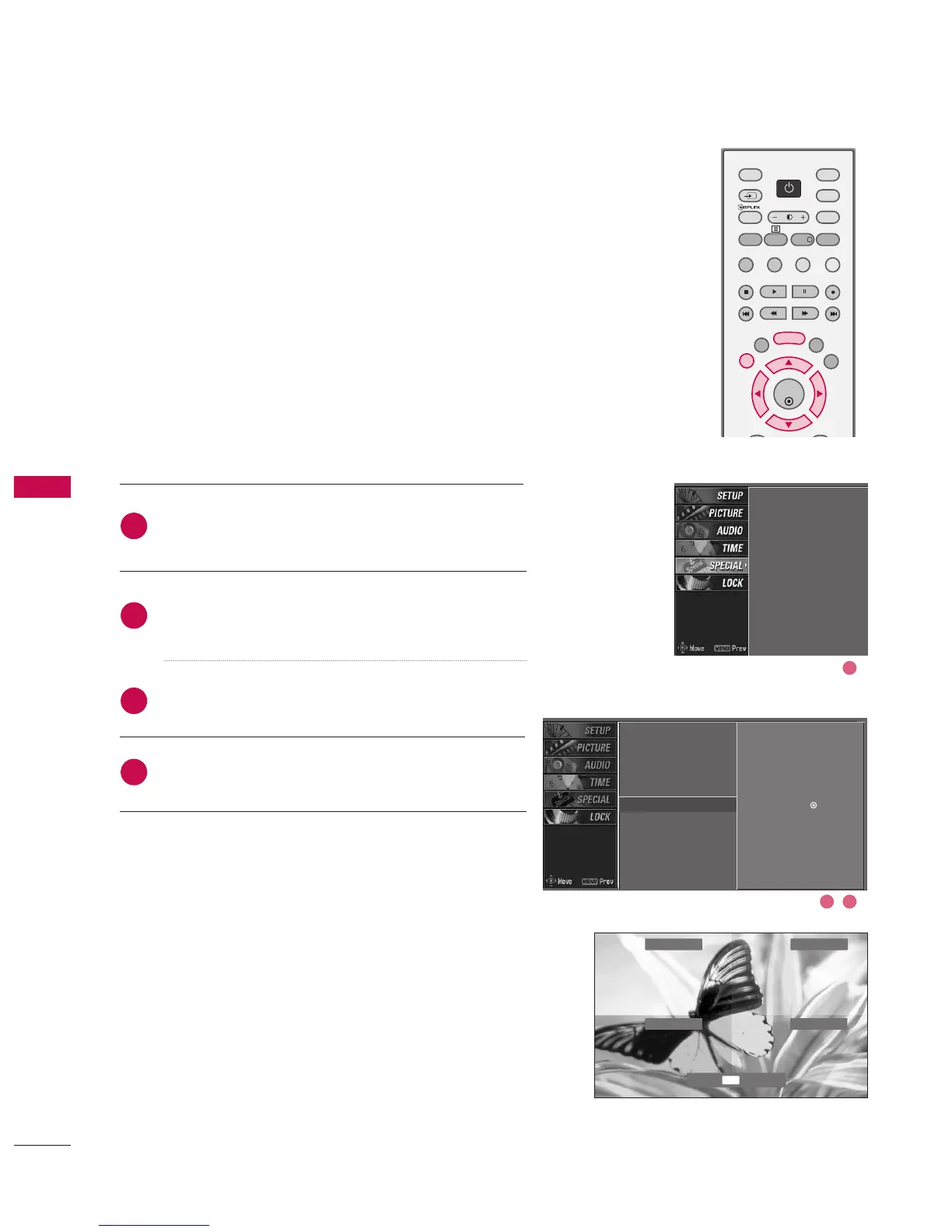
Press the
MMEENNUU
button and then use
DD
or
EE
button
to select the
SSPPEECCIIAALL
menu.
Press the
GG
button and then use
DD
or
EE
button to
select
XXDD ddeemmoo
.
Press the
GG
button to start
XXDD ddeemmoo
.
Press
EEXXIITT
button to stop XD demo.
Allows you to select your preferred picture mode after
compare the four different picture (Dynamic, Standard,
Mild, and User1 (or User2)) settings.
Input
Subtitle
Child lock
ARC
XD demo
SIMPLINK
2
3
4
1
Input
Subtitle
Child lock
ARC
XD demo
G
SIMPLINK
Selection (
G
or )
leads you
to the XD demo.
2 3
1
Dynamic
Standard
User1
Mild
Press to end.
EXIT
OK
TVD/A
INPUT
DVD
EXIT
LIST
MENU
TEXT
GUIDE
VCR
POWER
POWER
RATIO
FAV
SUBTITLE
BRIGHT
INFO
!
INPUT
MODE
SIMPLINK
POWER

Table of Contents