EasyManua.ls Logo

LG 32LCD7D-AB - Vcr Setup

LG 32LCD7D-AB
98 pages
Print Icon
To Next Page IconTo Next Page
To Previous Page IconTo Previous Page
Loading...
EXTERNAL EQUIPMENT SETUP
18
EXTERNAL EQUIPMENT SETUP
VCR SETUP
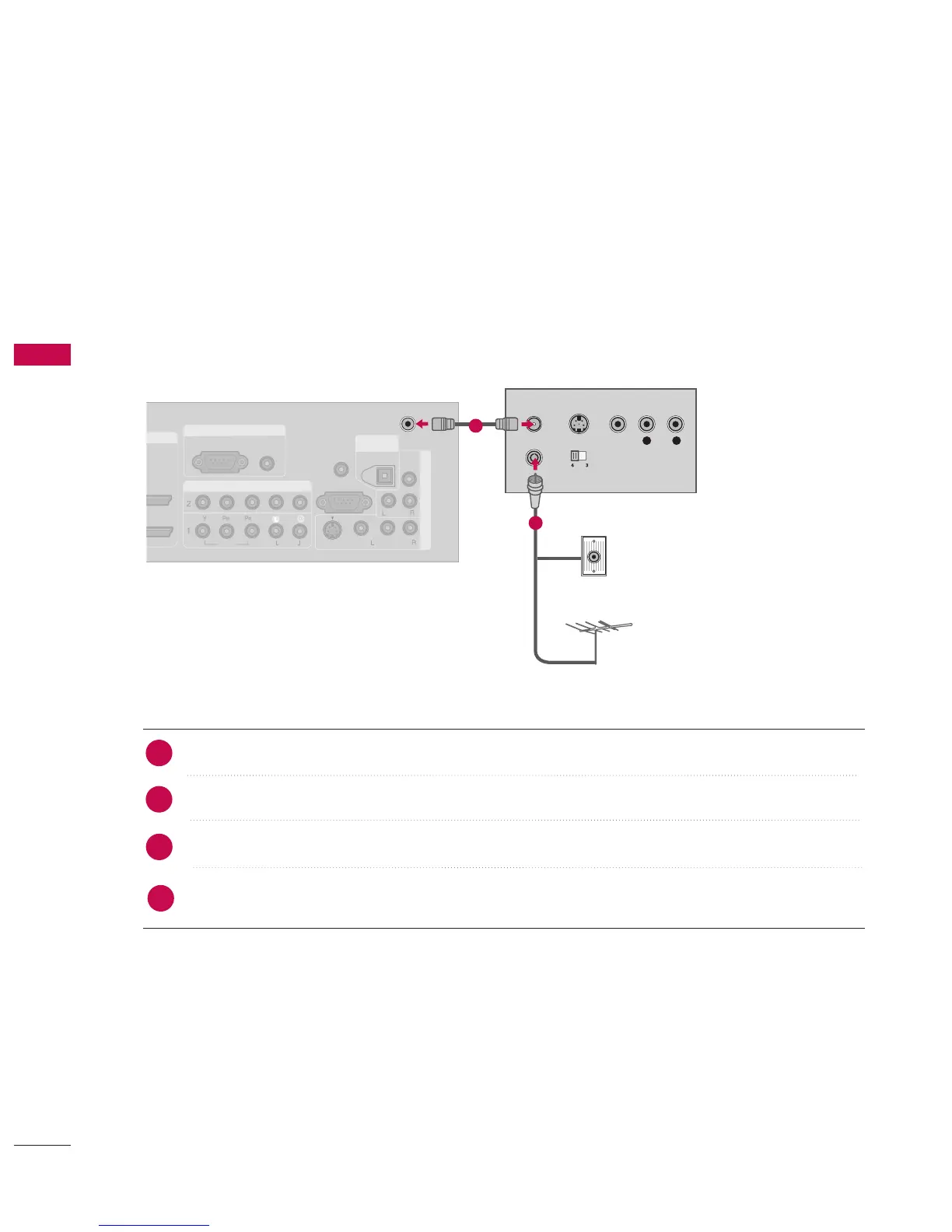
When connecting with an antenna
To avoid picture noise (interference), leave an adequate distance between the VCR and TV.
If the 4:3 picture format is used; the fixed images on the sides of the screen may remain visible on the
screen. This phenomenon is common to all manufacturers and in consequence the manufacturer’s warranty
does not cover the product bearing this phenomenon.
ANTENNA
OUT
ANTENNA
IN
AV IN 1
ANTENNA
OUT
ANTENNA
IN
AV IN 1
ANTENNA
OUT
ANTENNA
IN
VIDEO
AUDIO
( )
AUDIO
( )
S-VIDEO
DVI INHDMI/DVI IN
2
1
COMPONENT INCOMPONENT IN
VIDEOVIDEO
AUDIOAUDIO
RGB INRGB IN
RGB (PC) RGB (PC)
AUDIO
(RGB/DVI)
AV IN 1
VIDEO
AUDIO
MONO
( )
RS-232C IN
(CONTROL & SERVICE)
AV OUT
REMOTE
CONTROL IN
DIGITALDIGITAL
AUDIO AUDIO
OUTOUT
OPTICAL
S-VIDEO
ANTENNAANTENNA
ININ
HDMI/DVI IN
2
1
COMPONENT IN
VIDEO
AUDIO
RGB IN
RGB (PC)
DIGITAL
AUDIO
OUT
A
V IN 1
VIDEO
AUDIO
( )
HDMI/DVI IN
2
1
COMPONENT IN
VIDEO
AUDIO
RGB IN
RGB (PC)
DIGITAL
AUDIO
OUT
A
V IN 1
VIDEO
AUDIO
( )
S-VIDEO
VIDEO
(DVI)
(DVI)
(DVI)
AUDIO
L R
S-VIDEO VIDEO
OUTPUT
SWITCH
ANT IN
ANT OUT
Wall Jack
Antenna
1
2
Connect the RF antenna out socket of the VCR to the AANNTTEENNNNAA IINN socket on the set.
Connect the antenna cable to the RF antenna in socket of the VCR.
Set VCR output switch to 3 or 4 and then tune TV to the same programme number.
Insert a video tape into the VCR and press PLAY on the VCR.
(
Refer to the VCR owner’s manual.
)
2
1
3
4


Table of Contents

Related product manuals